EasyManua.ls Logo

Roland F-110 - User Manual

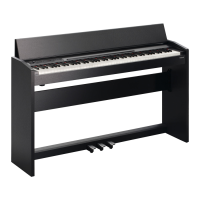
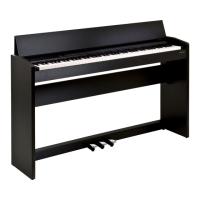
Roland F-110
84 pages
Print Icon
To Next Page IconTo Next Page
Loading...
PANTONE 444 BLACK
Owners Manual
* 5 1 0 0 0 0 8 5 9 3 - 0 1 *

Table of Contents

Other manuals for Roland F-110

Questions and Answers

  • J
    Jon KellyJul 26, 2025
    Why do the notes on my Roland Musical Instrument not sound right?
    • M
      Megan TaylorJul 26, 2025
      If the notes on your Roland Musical Instrument don't sound right, consider these possibilities: * Check if you've made any Transpose settings. * Verify that the Master Tune setting is appropriate. * Ensure the setting for the Temperament is correct. * Check if the F-110 is in Dual performance mode.
  • J
    Jose CalderonAug 3, 2025
    How to fix a Roland Musical Instrument pedal that is not working or is stuck?
    • F
      fhessAug 3, 2025
      If your Roland Musical Instrument's pedal isn't working correctly or seems stuck, try these solutions: * Ensure the pedal is correctly connected by firmly plugging the cable into the pedal connector. * If the pedal cable was disconnected while the power was on, the pedal effect might remain "stuck" in the On condition. Turn off the F-110's power before connecting or disconnecting the pedal cable. * If you've reconfigured the function of the soft or sostenuto pedal, they won't operate as originally intended.
  • L
    Laura CoffeyAug 7, 2025
    What to do if I hear a buzz from external devices connected to my Roland F-110?
    • D
      drodriguezAug 7, 2025
      If you're hearing a buzz from external devices connected to your Roland Musical Instrument, try these steps: * Ensure all external devices are connected to the same AC power outlet. * Check that you're not using a connection cable that contains a resistor. Use a cable without a resistor.
  • D
    Deanna YoderAug 12, 2025
    What to do if a song won’t play on my Roland F-110?
    • J
      Joshua WagnerAug 12, 2025
      If a song won’t play on your Roland Musical Instrument, check if the indication "dEL" appears on the screen. Internal songs can't be played if you've recorded a performance and haven't saved it yet. Delete this performance data, and then try playing the song again.
  • B
    brianna28Aug 16, 2025
    Why did my recorded performance disappear on my Roland F-110 Musical Instrument?
    • J
      jennifer25Aug 16, 2025
      Your recorded performance on the Roland Musical Instrument will disappear if you switch off the F-110’s power or select a song.
  • C
    Craig WelchAug 20, 2025
    What to do if reverberation remains even if I defeat the Reverb effect on my Roland Musical Instrument?
    • A
      Amy MannAug 20, 2025
      Lowering the Key Off Resonance may improve matters if reverberation remains even after you disable the Reverb effect on your Roland Musical Instrument.
  • S
    spencergambleOct 29, 2025
    What to do if there is no sound when playing back a song on my Roland Musical Instrument?
    • J
      Jennifer WalshOct 29, 2025
      If you're not hearing any sound when playing back a song on your Roland Musical Instrument, here are a few things to check: * Ensure that the volume on the F-110 or any connected equipment isn't turned down. * Make sure headphones aren't connected, as the speakers will be disabled. * Verify that Local Control is set to "On." When it's off, no sound is produced during playback. * Check if V-LINK is switched on; it uses the lowest twelve notes to control the image and will not produce sound. * Confirm that the MIDI channels of the F-110 and the connected device match. * Note that the maximum simultaneous polyphony is 128 notes. If you're using the Dual performance, or if you're making extensive use of the damper pedal, the performance data may exceed the available polyphony, po...

Summary

Introduction and Overview

About the Manual

Explains manual structure, conventions, and purpose.

Main Features

Highlights key functionalities like piano sounds, keyboard feel, and design.

Safety and Setup Procedures

Using the Unit Safely

Provides essential safety instructions to prevent hazards like fire, shock, and injury.

Important Notes

Covers crucial information on power, placement, maintenance, repairs, and general precautions.

Names of Components

Identifies and explains the function of front, rear, and bottom panel controls.

Before You Play

Guides through initial setup, connections, and basic operations like power and volume.

Performing and Playback

Performing Piano Functions

Details selecting sounds, adjusting touch, reverb, transpose, and split functions.

Playing Back Songs

Explains how to select, play, and control internal songs and playback features.

Recording, Saving, and Settings

Recording Performances

Covers methods for recording keyboard performances and saving them.

Various Settings

Explains how to adjust sound, keyboard, pedal, tuning, metronome, and MIDI settings.

Connectivity and Troubleshooting

Connecting to Other Devices

Details connections for audio equipment, MIDI devices, and computers.

Troubleshooting

Provides solutions for common problems, error messages, and performance issues.

Reference Information

Tone List

Lists all available instrument sounds with their MIDI numbers.

Drum Set List

Details the available drum kits and their corresponding instrument assignments.

Internal Song List

Provides a list of all built-in preset songs.

Main Specifications

Outlines the technical specifications of the Roland F-110 digital piano.

Roland F-110 Specifications

General IconGeneral
Maximum Polyphony128 voices
Rated Power Output12 W x 2
Speakers12 cm x 2
Keyboard88 keys
Sound SourceSuperNATURAL Piano Sound
EffectsReverb
Recorder1 song, approx. 30, 000 notes memory
Internal MemoryApprox. 30, 000 notes
ConnectorsUSB COMPUTER port
PedalsDamper pedal, Soft pedal, Sostenuto pedal
Included AccessoriesOwner's Manual, Power cord
Touch Sensitivity5 types, fixed touch

Related product manuals