EasyManua.ls Logo

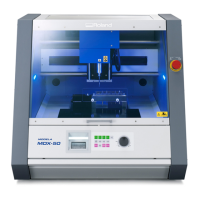
Roland MODELA MDX-50 - User Manual

Roland MODELA MDX-50
50 pages
Print Icon
To Next Page IconTo Next Page
Loading...
Thank you very much for purchasing this product.
To ensure correct and safe usage with a full understanding of this product's performance, be sure to read through
this document completely and store it in a safe location.
Unauthorized copying or transferal, in whole or in part, of this document is prohibited.
The contents of this document and the specications of this product are subject to change without notice.
This product and this document have been prepared and tested as much as possible. If you nd any misprints or
errors, please inform us.
Roland DG Corporation assumes no responsibility for any direct or indirect loss or damage that may occur through
use of this product, regardless of any failure to perform on the part of this product.
Roland DG Corporation assumes no responsibility for any direct or indirect loss or damage that may occur with
respect to any article made using this product.
R2-170213
Setup Guide
Question and Answer IconNeed help?

Do you have a question about the Roland MODELA MDX-50 and is the answer not in the manual?

Summary

To Ensure Safe Use

Understanding Warning and Caution Notices

Explains the meaning of WARNING and CAUTION notices used in the manual.

Understanding Safety Symbols

Explains the meaning of various warning and instruction symbols.

Power Cord, Plug, and Outlet Safety

Provides important safety notes regarding the power cord, plug, and outlet.

Interpreting Warning Labels

Explains the meaning of warning labels affixed to the machine.

Important Notes on Handling and Use

Suitable Installation Location Guidelines

Guidelines for installing the machine in an appropriate environment.

Tool Burr Handling Advice

Advice on using and handling tool burs correctly.

Installing the Machine

Installation Site Selection

Guidance on selecting a proper location for machine installation.

Required Installation Space

Specifies the necessary clearance around the machine for operation.

Installation Height Requirements

Information on the required installation height for accessibility.

Removing Shipping Retainers

Instructions for removing shipping retainers before operation.

Machine Highlights

Key Machine Features

Overview of the machine's key capabilities and features.

Operating the Machine Overview

How to operate the machine using built-in panel and VPanel.

Included Documentation List

Lists the manuals and software provided with the machine.

Part Names and Functions

Front Panel Components

Identifies and describes parts located on the front of the machine.

Internal Machine Components

Identifies and describes parts located inside the machine.

Spindle Head Details

Details the spindle head assembly and its components.

ATC Magazine Details

Describes the Automatic Tool Changer magazine and related parts.

Side Panel Components

Identifies and describes parts located on the sides of the machine.

Performing an Emergency Stop on This Machine

Performing an Emergency Stop

Instructions on how to perform an emergency stop.

Canceling an Emergency Stop

Procedure to cancel an active emergency stop.

Emergency Stop or Pause Due to Opening or Closing the Cover

Cover Opening Emergency Stop

Explains emergency stop triggered by opening covers during operation.

Cover Opening Pause

How the machine pauses when covers are opened during standby/paused states.

Canceling a Pause

Procedure to cancel a paused state.

Preparing the Machine for Use

Checking Included Items

Lists and describes all items included with the machine.

Installing Roland DG Software

Guide to installing the necessary software from the CD.

Software Installation Requirements

Specifies the minimum system requirements for software installation.

Connecting the Power and Data Cables

Instructions for connecting the power cord and other cables.

Powering On and Setting Language

How to turn on the machine and set the display language.

Connecting Machine to Computer via USB

Guide to connecting the machine to a computer via USB.

Starting VPanel Software

Instructions on how to launch and use the VPanel software.

Performing Spindle Run-in

Procedure to stabilize the spindle rotation through run-in.

Automatic Machine Correction

How to perform automatic correction for ATC and rotary axis.

Exiting VPanel Software

How to properly exit the VPanel application.

Switching Off Machine Power

Instructions for safely turning off the machine's power.

Machine Specifications

Power Rating and Serial Number

Details power requirements and location of the serial number.

Expansion Port Overview

Information on the specifications of expansion ports.

Expansion Port 1 Details

Technical details for Expansion Port 1, including pinouts.

Expansion Port 2 Details

Technical details for Expansion Port 2, including pinouts.

Alarm Lamp Connector Specs

Specifications and layout for the alarm lamp connector.

Machine Dimensional Drawings

Provides detailed physical dimensions of the machine.

Table Specifications

Details dimensions and travel ranges for the machine's table.

USB Connection System Requirements

Details system requirements for connecting via USB.

Summary

To Ensure Safe Use

Understanding Warning and Caution Notices

Explains the meaning of WARNING and CAUTION notices used in the manual.

Understanding Safety Symbols

Explains the meaning of various warning and instruction symbols.

Power Cord, Plug, and Outlet Safety

Provides important safety notes regarding the power cord, plug, and outlet.

Interpreting Warning Labels

Explains the meaning of warning labels affixed to the machine.

Important Notes on Handling and Use

Suitable Installation Location Guidelines

Guidelines for installing the machine in an appropriate environment.

Tool Burr Handling Advice

Advice on using and handling tool burs correctly.

Installing the Machine

Installation Site Selection

Guidance on selecting a proper location for machine installation.

Required Installation Space

Specifies the necessary clearance around the machine for operation.

Installation Height Requirements

Information on the required installation height for accessibility.

Removing Shipping Retainers

Instructions for removing shipping retainers before operation.

Machine Highlights

Key Machine Features

Overview of the machine's key capabilities and features.

Operating the Machine Overview

How to operate the machine using built-in panel and VPanel.

Included Documentation List

Lists the manuals and software provided with the machine.

Part Names and Functions

Front Panel Components

Identifies and describes parts located on the front of the machine.

Internal Machine Components

Identifies and describes parts located inside the machine.

Spindle Head Details

Details the spindle head assembly and its components.

ATC Magazine Details

Describes the Automatic Tool Changer magazine and related parts.

Side Panel Components

Identifies and describes parts located on the sides of the machine.

Performing an Emergency Stop on This Machine

Performing an Emergency Stop

Instructions on how to perform an emergency stop.

Canceling an Emergency Stop

Procedure to cancel an active emergency stop.

Emergency Stop or Pause Due to Opening or Closing the Cover

Cover Opening Emergency Stop

Explains emergency stop triggered by opening covers during operation.

Cover Opening Pause

How the machine pauses when covers are opened during standby/paused states.

Canceling a Pause

Procedure to cancel a paused state.

Preparing the Machine for Use

Checking Included Items

Lists and describes all items included with the machine.

Installing Roland DG Software

Guide to installing the necessary software from the CD.

Software Installation Requirements

Specifies the minimum system requirements for software installation.

Connecting the Power and Data Cables

Instructions for connecting the power cord and other cables.

Powering On and Setting Language

How to turn on the machine and set the display language.

Connecting Machine to Computer via USB

Guide to connecting the machine to a computer via USB.

Starting VPanel Software

Instructions on how to launch and use the VPanel software.

Performing Spindle Run-in

Procedure to stabilize the spindle rotation through run-in.

Automatic Machine Correction

How to perform automatic correction for ATC and rotary axis.

Exiting VPanel Software

How to properly exit the VPanel application.

Switching Off Machine Power

Instructions for safely turning off the machine's power.

Machine Specifications

Power Rating and Serial Number

Details power requirements and location of the serial number.

Expansion Port Overview

Information on the specifications of expansion ports.

Expansion Port 1 Details

Technical details for Expansion Port 1, including pinouts.

Expansion Port 2 Details

Technical details for Expansion Port 2, including pinouts.

Alarm Lamp Connector Specs

Specifications and layout for the alarm lamp connector.

Machine Dimensional Drawings

Provides detailed physical dimensions of the machine.

Table Specifications

Details dimensions and travel ranges for the machine's table.

USB Connection System Requirements

Details system requirements for connecting via USB.

Roland MODELA MDX-50 Specifications

General IconGeneral
BrandRoland
ModelMODELA MDX-50
CategoryPower Tool
LanguageEnglish

Related product manuals