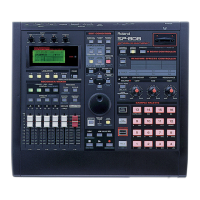
1. Press PAD BANK and use the VALUE/TIME dial to select the desired
bank of samples. Then, press ENTER/YES.
2. Hold SHIFT and press REALTIME ( ) to display the Realtime Record
screen (see Fig. 8).
3. Press STATUS(TRACK SELECT) B so it flashes red.
4. CURSOR down to Quantize and rotate the VALUE/TIME dial to select "q"
(quarter note). You can also quantize using 8th (e) or 16th (x) notes.
5. Press PLAY ( ). There will be a two measure count in before the music
starts.
6. Press the pads in time with the music.
7. Press STOP ( ) when you are done.
8. Press STATUS (TRACK SELECT) B so that it is green (PLAY).
9. Press METRONOME ( ) to return to the beginning of the song and press PLAY (4) to hear
the results.
10. f you do not like what you have recorded, press UNDO/REDO once followed by METRONOME
( ) to return to the top of the song and repeat steps 2-9 until you are satisfied with the
results.
Audio Recording
The Audio recording method is probably the easiest to understand because it is very similar to
recording on a "portable studio" type multitrack recorder. You plug something into the recorder, hit
record, and play your instrument. The SP-808 can record in a similar fashion. Use the following
procedure to record a track directly from the mic/line input:
1. Hold SHIFT and press AUDIO REC ( ) to display the Audio Recording
screen (see Fig. 9).
2. Connect the audio outputs of a CD player or instrument to the LINE
INPUT, or a microphone to the MIC input.
3. Adjust the INPUT or MIC level so that the meter peaks just under the
dotted line on the screen.
4. Press STATUS (TRACK SELECT) C so it flashes red.
5. Press PLAY ( ). There will be a two measure count off before the music starts.
6. Play your instrument/CD or sing into the microphone.
7. Press STOP ( ) when you are done.
8. Press STATUS(TRACK SELECT) C so it is green (PLAY).
9. Press METRONOME ( ) to return to the beginning of the song and press PLAY ( ) to hear
the results.
10. If you do not like what you have recorded, press UNDO/REDO once followed by
METRONOME ( ) to return to the top of the song. Repeat steps 1-9 until you are satisfied
with the results.
Bouncing
Bouncing tracks is the process of combining multiple tracks to a single track. The idea is very similar
to the re-sampling procedure we discussed earlier. It allows you to use one track to play back what
used to require three tracks, enabling you to record new material on the previous tracks. This will
free up more tracks for recording and play back. Use the following procedure to bounce tracks A, B,
and C to track D:
Fig. 8
The Realtime
Record Screen
Fig. 9
The Audio
Recording Screen



 To Next Page
 Loading...