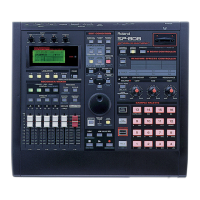
SP-808: Setting Pitch Change Width
The D-Beam can control the pitch of a sample being played back. The range or depth of this pitch
change can be adjusted. Use the following procedure set the D-Beam pitch change width:
1. Hold SHIFT and press PAD TRIG to display "D BEAM SETUP."
2. Use the CURSOR buttons to select "Pitch Width."
3. Use the VALUE dial to set the pitch change width, selecting from "NARROW," "MEDIUM," and
"WIDE."
4. Press PLAY.
Note: The NARROW setting causes the D-Beam to have less of a pitch change result than a WIDE
setting.
SP-808: Varying the Pitch Using the D Beam
The SP-808 can lower the playback pitch of a sample using the D-Beam sensor. This feature can
add unique real-time pitch changes to a performance or recording. Use the following procedure to
use the D-Beam to vary the pitch:
1. Press PITCH under the D-Beam so it is lit.
2. Press a numbered PAD to play a sample and move your other hand slowly over the D-Beam.
Note: As you move your hand closer to the sensor the pitch drops. This gives an effect resembling
that of playback speed being slowed down. Pull your hand away from the sensor and the original
playback speed is restored.
3. Press PITCH so it is not lit to turn off the function.
NOTE: You cannot raise the pitch with the D Beam Controller.
SP-808: Real-time Effects Knobs Options
There are two ways the Real-time Effects knobs can control the effects section - JUMP and NULL.
JUMP: The instant the Real-time Effects knob is rotated, the settings change to match the knob’s
position.
NULL: When the knob is turned, the setting does not change until the new value passes that of the
stored value. After that "null" point is reached, the settings change to match the knob’s position.
To change the settings, use the following procedure:
1. Press [SYSTEM/DISK].
2. Confirm that "Set System Param?" is selected and press [ENTER/YES].
3. Press the down cursor repeatedly to display "KnobControl."
4. Select either JUMP or NULL by rotating the VALUE/TIME dial.
5. Press [PLAY] to return to the basic screens.



 To Next Page
 Loading...