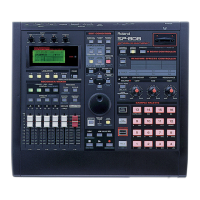
SP-808: Jumping to a Song Location
The SP-808 allows you to instantly jump to any position (locator) in a song. Use the following
procedure to register a locator position and jump to it:
1. Move to the song position you wish to register by either pressing the MEAS left (<<) or right
(>>) buttons or rotating the VALUE/TIME dial.
2. Press one of the LOCATOR 1 -4 buttons to register the song position, or press LOCATOR 1 - 4
while holding SHIFT to register locators on 5 - 8. The button will illuminate indicating that the song
position has been registered to that button.
3. To jump to that song position, simply press the illuminated locator button.
SP-808: Moving Locators
The SP-808 can fine tune registered LOCATORS down to the frame or "tick." This is a useful feature
for providing precise location recall. Use the following procedure to edit or move the location of
registered LOCATORS:
1. Press SONG/TRACK.
2. Use the CURSOR buttons to select "Locator."
3. Press ENTER/YES.
Note: Previously registered LOCATOR buttons [1] - [8] will be displayed in MEASURE/BEAT/TICK
format.
4. Use the CURSOR buttons to highlight a LOCATOR value.
5. Use the VALUE dial to change the highlighted value.
6. Press PLAY to return to the basic screen.
SP-808: Deleting a Locator
At times, it may be necessary to clear or delete a locator. Locators can then be replaced with new
values. Use the following procedure to clear or delete a locator:
1. Hold CLEAR and press the button for the locator you wish to delete.
SP-808: Metronome Level
Use the following procedure to set the Metronome level:
1. Press [SYSTEM/DISK] .
2. Use the [v] or [^] buttons to highlight "Set System Param?"
3. Press [ENTER/YES].
4. Use the [v] or [^] buttons to select "Metro.Level."
5. Rotate the VALUE/TIME dial to set the volume level (from 0 to 100.)
6. Press [PLAY] to return to the basic screen.



 To Next Page
 Loading...