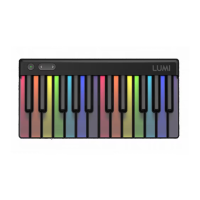
The LUMI Keys is an integrated, interactive system designed to help users learn and play music. It combines a fully illuminated keyboard with a mobile app that offers a wide range of songs and lessons, making music learning accessible and engaging for beginners, while also providing advanced features for experienced musicians.
Function Description
The core function of LUMI Keys is to provide an interactive platform for learning and playing music. The system consists of three interacting components:
- Hardware (LUMI Keys): This is the physical keyboard, featuring 24 fully illuminated RGB keys. These keys are designed to light up in various colors, guided by the LUMI Music app, to indicate which notes to play. The keys conform to the DS 5.5 on the Donison Steinbuhler Standard, meaning they are approximately 7/8 the width of a standard piano key, making them more comfortable for the average human hand. Their plunge depth is 92% of a grand piano key, and combined with their weighting and resistance, they offer a feel similar to piano keys. The keyboard includes a Power/Mode button for turning the device on/off and indicating battery life, and Octave Shift buttons for advanced users to move up and down octaves beyond the two-octave range. It also features USB-C connectivity for charging and data transfer, and eight DNA connectors for modular expansion.
- Software (LUMI Music app and ROLI Studio desktop software): The LUMI Music app, available for mobile and tablet devices, is the primary interface for learners. It syncs with the LUMI Keys, allowing users to choose songs and follow interactive content to learn how to play. For more advanced users and music producers, LUMI Keys comes bundled with ROLI Studio desktop software, which includes ROLI Studio Player (with 300+ sounds, effects, and production tools), ROLI Studio Drums (with 200+ percussion sounds and an MPE drums engine), and ROLI Dashboard (for configuring LUMI with DAWs and third-party plugins). ROLI Connect is a cloud-based platform for downloading and managing ROLI software and device connections.
- Content: The LUMI Music app offers hundreds of songs, spanning pop, classical, and dance music, available through free (LUMI Essential) and subscription-based (LUMI Premium) tiers. It also includes dozens of lessons covering playing technique, music fundamentals, and reading sheet music.
Usage Features
LUMI Keys offers a variety of features to enhance the learning and playing experience:
- Interactive Learning: Users can choose a song from the LUMI Music app and follow the light-up keys and colored notes in the app to start playing immediately. The app provides different "views" for reading music, such as Cascade View (notes falling down) and Rainbow View (notes displayed on a traditional staff with color coding).
- Guided Lessons: The "Learn" section of the app provides instructional content on playing technique (e.g., building right and left-hand skills, playing in step, in jumps, crossing fingers), music fundamentals (e.g., pitch, dynamics, scales, rhythm), and reading sheet music (familiarizing with note symbols and playing with traditional sheet music).
- Modular Design: LUMI Keys features DNA connectors that allow multiple LUMI keyboards to be magnetically connected, expanding the playing surface. These connectors also transmit power and data between units. LUMI Keys can also connect with other ROLI BLOCKS products, such as the Lightpad Block and Seaboard Block, integrating into a larger modular system.
- Bluetooth Connectivity: The keyboard connects wirelessly to the LUMI Music app via Bluetooth 5.0, indicated by pulsing blue lights on the keys during pairing and a rainbow flash once connected.
- Octave Shift: For advanced users, dedicated buttons allow shifting the keyboard's octave range up or down, extending its two-octave physical range to cover seven octaves (84 notes).
- Brightness Controls: Users can adjust the brightness of the illuminated keys.
- Multiple Color Modes: When connected to a DAW, the Power/Mode button allows cycling through different lighting modes:
- ROLI Rainbow Mode: Assigns a specific color to each note (C, C#, D, etc.), helping visualize notes on the keyboard.
- Single Color Mode: Sets the color of root notes and in-scale notes, aiding in finding notes within a specific key.
- Piano Mode: Turns the keys black and white, mimicking a classic piano keyboard with a glow.
- Night Mode: Dims the keys until they are pressed, creating a visually striking effect during performances.
- Custom Color Mode: Allows users to customize key colors via ROLI Dashboard.
- Adjustable Sensitivities: Through ROLI Dashboard, users can adjust the Strike (Velocity), Press (Pressure), and Lift (Note-off Velocity) sensitivities to match their playing style or project requirements. This includes adjusting the curve for more or less sensitivity and making pressure/note-off values more consistent.
- Polyphonic Aftertouch: When connected to a DAW and using a supporting plugin, LUMI Keys supports polyphonic aftertouch, allowing users to add tremolo or modulate sounds by increasing or decreasing pressure on a sustained key.
- Integration with DAWs and Plugins: As a MIDI class-compliant device, LUMI Keys connects to popular digital audio workstations (DAWs) like Logic Pro X, Ableton Live, and Bitwig Studio, and is compatible with various plugins. ROLI Dashboard facilitates configuring LUMI for these integrations.
Maintenance Features
To ensure the longevity and optimal performance of LUMI Keys, several maintenance guidelines are provided:
- Charging: Before initial use, the device should be fully charged using the included USB-C cable and a USB 3 charger or computer port. An amber or green light on the Power/Mode button indicates a full charge.
- Battery Care: The rechargeable Lithium battery (2,300 mAh) provides up to 6 hours of fully illuminated playing, with a charge time of 4-5 hours. To protect the battery's health, it is recommended to charge LUMI Keys every six months at a minimum, especially if it will not be used for three months or longer.
- Cleaning: The key surface should be cleaned with a dry microfibre cloth. Harsh detergents, chemical cleansing agents, bleaches, alcohol, or spraying cleaning fluids directly on the keyboard should be avoided.
- Storage: When not in use, LUMI Keys should be stored horizontally in its normal playing position. For extended periods of non-use (three months or longer), it should be kept fully charged, in an environment with low humidity and a temperature between 10-25°C, away from corrosive gas. Storing it in a LUMI Keys Snapcase or suitable container is recommended, and no items should be placed on top of the keyboard.
- Firmware Updates: When using LUMI Keys with ROLI Dashboard, the application automatically checks for and prompts users to install available firmware updates. While optional, these updates are advisable to receive new features and bug fixes.
- Firmware Reset: In case of issues, the firmware can be reset by pressing and holding all three buttons (Power/Mode and both Octave Shift buttons) for three seconds.
- General Care: Users should avoid applying excessive force to the keys and keep the device away from direct sunlight, sharp objects, liquids, and especially oils and detergents.
- Servicing: There are no user-serviceable parts in LUMI Keys. All servicing should be referred to ROLI Support via ticket submission.

 Need help?
 General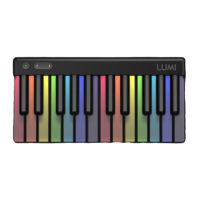

 To Next Page