EasyManua.ls Logo

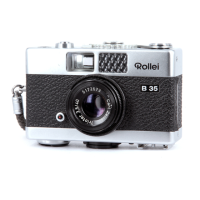
Rollei 35 - Loading the Camera

Rollei 35
Print Icon
To Next Page IconTo Next Page
To Previous Page IconTo Previous Page
Loading...
@
Qotlei
es
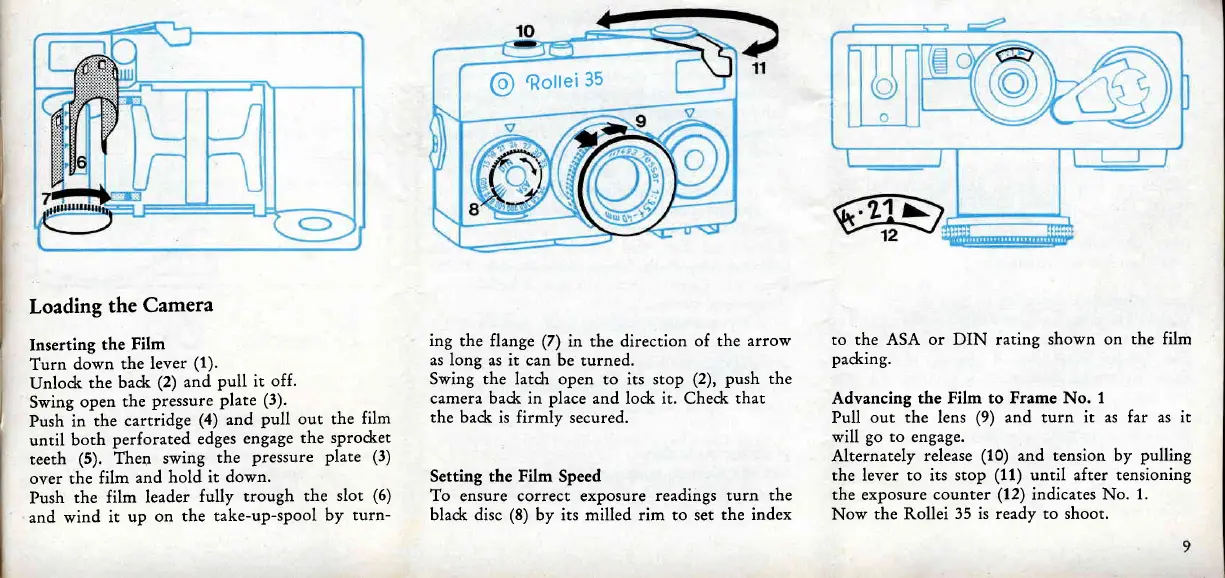
Loading
the
Camera
Inserting
the
Film
Turn
down
the
lever
(1).
Unloc}
the
bad<
(2)
and
pull it
off.
Swing
open
the
pressure
Plate
(3).
Push
in
the cartridge
(4) and
pull out the
film
until
both
perforated
edges
engage
the
sprodret
teeth
(5). Then
swing
the
Pressure
plate
(3)
over the
film
and
hold
it down.
Push
the film
leader
fully
trough
the
slot
(6)
and
wind
it
up on
the take-up-spool
by
turn-
ing
the flange
(Z)
in the direction
of the
arrow
as long
as it can be
turned.
Swing the latch open
to its
stop
(2), push the
camera badr in
place
and lo&
it.
Chedr
that
the badc is firmly
secured.
Setting
the Film
Speed
To ensure correct exposure
readings turn
the
blad< disc
(g)
by its milled rim to set
the index
to the ASA or DIN rating
shown on
the film
pad<ing.
Advancing
the Film to
Frame
No.
1
Pull
out the lens
(9)
and turn
it as far as it
will
go to
engage.
Alternately
release
(10)
and tension by
pulling
the lever to its stop
(11)
until after tensioning
the exposure
counter
(12)
indicates No.
1.
Now
the Rollei
35 is ready to shoot.

Related product manuals