EasyManua.ls Logo

Rollei 35 - Practical Notes; O Film Transport 1; Is the Camera Loaded? 1; Setting the Film Type Indicator

Rollei 35
Print Icon
To Next Page IconTo Next Page
To Previous Page IconTo Previous Page
Loading...
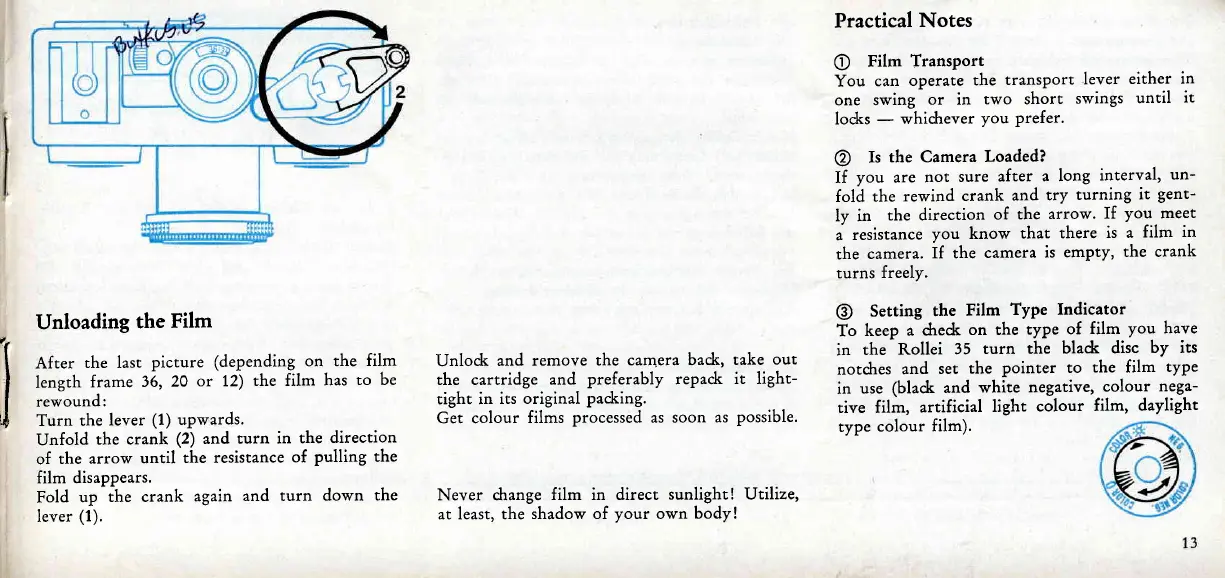
Unloading
the
Film
After
the last
picture
(depending
on the
film
length
frame
36,
20
or 12)
the film
has
to be
rewound:
Turn the
lever
(1)
upwards.
Unfold
the crank
(2)
and
turn in
the
direction
of
the
arrow
until
the resistance
of
pulling
the
film disappears.
Fold
up
the crank
again
and turn
down the
lever
(1).
Unlod<
and
remove the
camera badr,
take
out
the cartridge
and
preferably repaclr
it light-
right in
its original
padring.
Get colour
films
processed as soon
as
possible.
Never
change
film in direct
sunlight! Utilize,
at least, the
shadow of
your
own
body !
Practical
Notes
O
Film
Transport
You
can
operate
the
transport
lever
either
in
one swing
or in
two short
swings
until
it
locks
-
whichever
you prefer.
@
Is
the Camera
Loaded?
If
you
are
not
sure
after
a long
interval,
un-
fold
the
rewind
crank
and
try
turning
it
gent-
ly in
the direction
of
the
arrow.
If
you
meet
a
resistance
you
know
that
there
is a
film
in
the
camera.
If the
camera
is
empty,
the crank
turns
freely.
@
Setting
the
Film
Type Indicator
To
keep
a dred<
on the
type
of
film
you have
in
the
Rollei
35
turn the
bladc
disc
by its
notdres
and
set
the
pointer to
the film
type
in
use
(black and
white
negative,
colour
nega-
tive film,
artificial
light
colour
film,
daylight
type
colour
film).

Related product manuals