EasyManua.ls Logo

Rollei 35 - Shooting L

Rollei 35
Print Icon
To Next Page IconTo Next Page
To Previous Page IconTo Previous Page
Loading...
r,
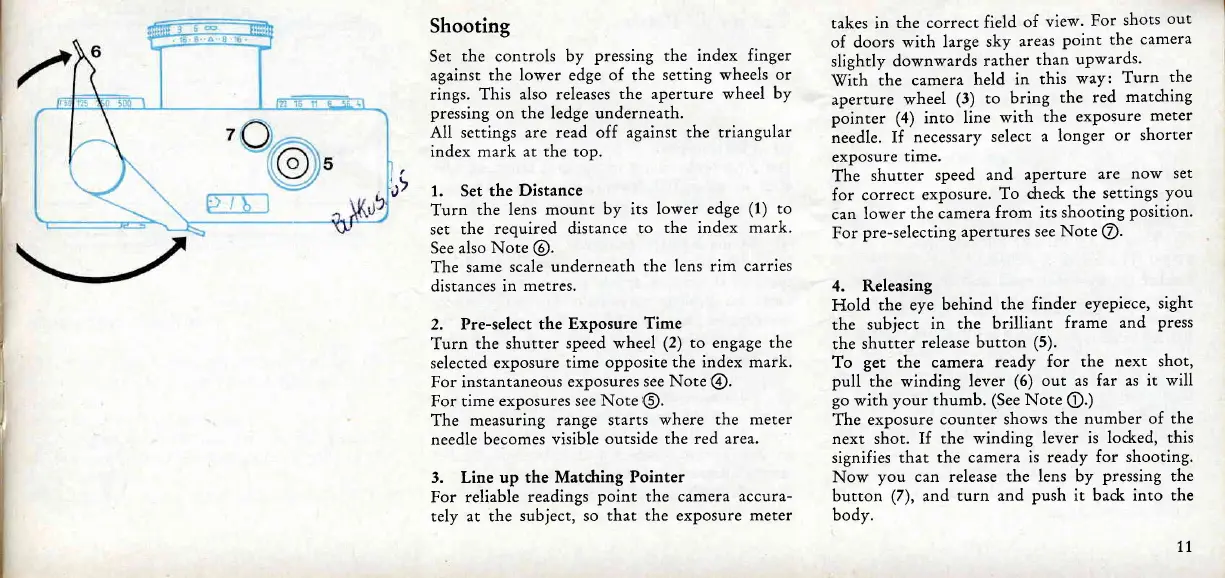
Shooting
Set
the
controls
by
pressing the index finger
against
the lower
edge
of the
setting wheels
or
rings.
This also releases
the aperture wheel
by
pressing
on the ledge underneath.
All
settings are read off against the triangular
index mark at the top.
1. Set the
Distance
Turn
the lens
mount
by its lower
edge
(1)
to
set
the
required distance
to
the index
mark.
See also Note
@.
The same
scale underneath
the lens rim carries
distances
in
metres.
2. Pre-select
the
Exposure
Time
Turn
the shutter
speed wheel
(2)
to engage
the
selected exposure
time opposite
the
index
mark.
For instantaneous
exposures
see
Note
@.
For time
exposures see Note
@.
The
measuring
range starts
where the
meter
needle becomes
visible
outside the red
area.
3. Line up the
Matdring Pointer
For reliable
readings
point the camera
accura-
tely at the
subject, so
that the exposure meter
takes in
the correct
field
of
view.
For
shots
out
of doors
with large
sky
areas
point
the camera
slightly
downwards
rather
than
upwards.
\(ith
the
camera
held
in
this
way:
Turn
the
aperture
wheel
(3)
to
bring
the
red
matcJring
pointer
(4)
into line
with
the
exposure
meter
needle.
If
necessary
select
a
longer
or
shorter
exposure
time.
The
shutter
speed
and
aperture
are
now
set
for correct exposure.
To
dreck
the
settings
you
can
lower
the camera
from
its shooting
position.
For
pre-selecting
apertures
see Note
@.
4.
Releasing
Hold
the
eye
behind
the
finder
eyepiece,
sight
the
subject
in the
brilliant
frame
and
press
the
shutter
release
button
(5).
To
get
the
camer a
ready
for the
next shot,
pull
the winding lever
(6)
out as
far as it will
go
with
your thumb.
(See
Note
@.)
The
exposure
counter shows
the number
of the
next shot.
If the winding
lever is
locked, this
signifies that
the camera
is ready
for shooting.
Now
you
can release the
lens by
pressing
the
button
(7),
and
turn and
push it bad< into the
bodv.
7l

Related product manuals