10
Settings
General Setting:
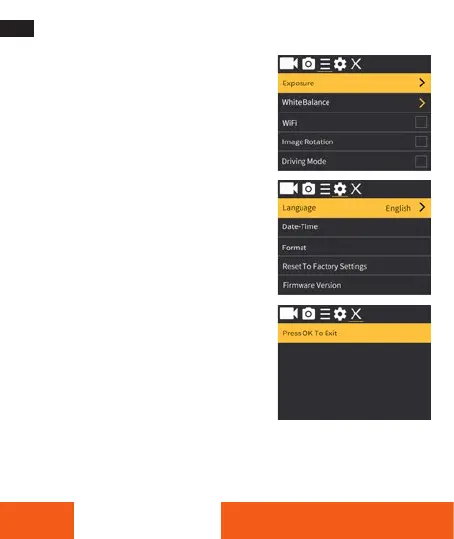
Exposure: +/–3~0
White Balance: Auto/Sunny/Cloudy/
Incandescent Light/Fluorescent Light
WiFi: On/Off. Press OK to activate the WIFI.
To deactivate the WIFI again, press the Up-
Button. With the Up-Button you can control
the WIFI function without entering the Menu.
Image Rotation: On/Off
Driving Mode: On/Off
Light Source Frequency: Auto/50 Hz/60 Hz
LED Indicator Light: On/Off
Auto Screensaver: 10 sec/20 sec/30 sec/off
Auto Shutdown: 1 min/3 min/5 min/off
Time Watermark: On/Off
System Setting:
Language: English, French, German,
Italian, Czech, Portuguese, Spanish, Slovak,
Swedish, Danish, Polish, Norwegian, Dutch,
Finnish, Greek, Hungarian
Date-Time: YYYY/MM/DD hh:mm:ss
Format (Memory Card): Yes/No
Reset To Factory Setting: Yes/No
Firmware Version
Exit: Press the Shutter Button (OK) to Exit the Menu.
ENGLISH








 To Next Page