9
Settings
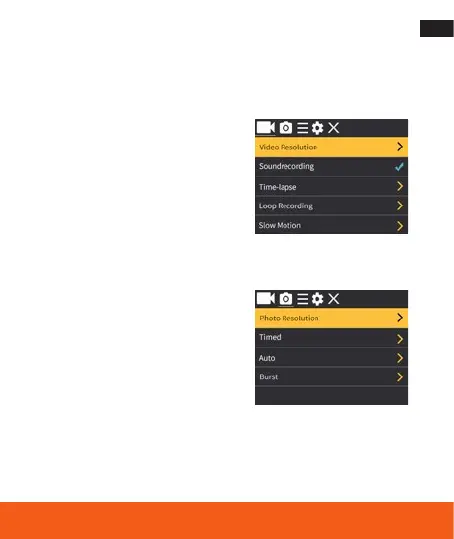
Repeatedly press the Power/Mode Button to enter the Setting Menu, use
the Up or Down Button to cycle through the various options, and press the
Shutter/Select Button to select selected option.
Video Setting:
Video Resolution:
4K@30
fps (interpolated),
2.7K@30 fps, 1080P@60 fps, 1080P@30 fps,
720P@90 fps, 720P@60 fps, 720P@30 fps
Soundrecording: On/Off
Time-Lapse: Off/0.5 sec/1 sec/2 sec/5 sec/
10 sec/30 sec/60 sec
Loop Recording: Off/2 min/3 min/5 min
Slow Motion: 1080P@60 fps/720p@90 fps
Photo Setting:
Photo Resolution:
16M (4640x3480) (interpolated)/
12M (4000x3000) (interpolated)/
8M (3264x2448)/5M (2592x1936)/
2M (1600x1200)
Timed: Off/3 sec/5 sec/10 sec/20 sec
Auto: Off/3 sec/10 sec/15 sec/20 sec/30 sec
Burst: Off/3 pic/5 pic/10 pic



 To Next Page