12
OPERATION WITH THE ALARM
The alarm is triggered for 2 minutes if the door is raised manually. No movement of the door is possible
when the alarm is sounding.
When the alarm sounds, press a button on a remote control memorised in the receiver to stop it. The alarm
can only be stopped with a memorised remote control.
OPERATION IN AUTOMATIC CLOSURE MODE
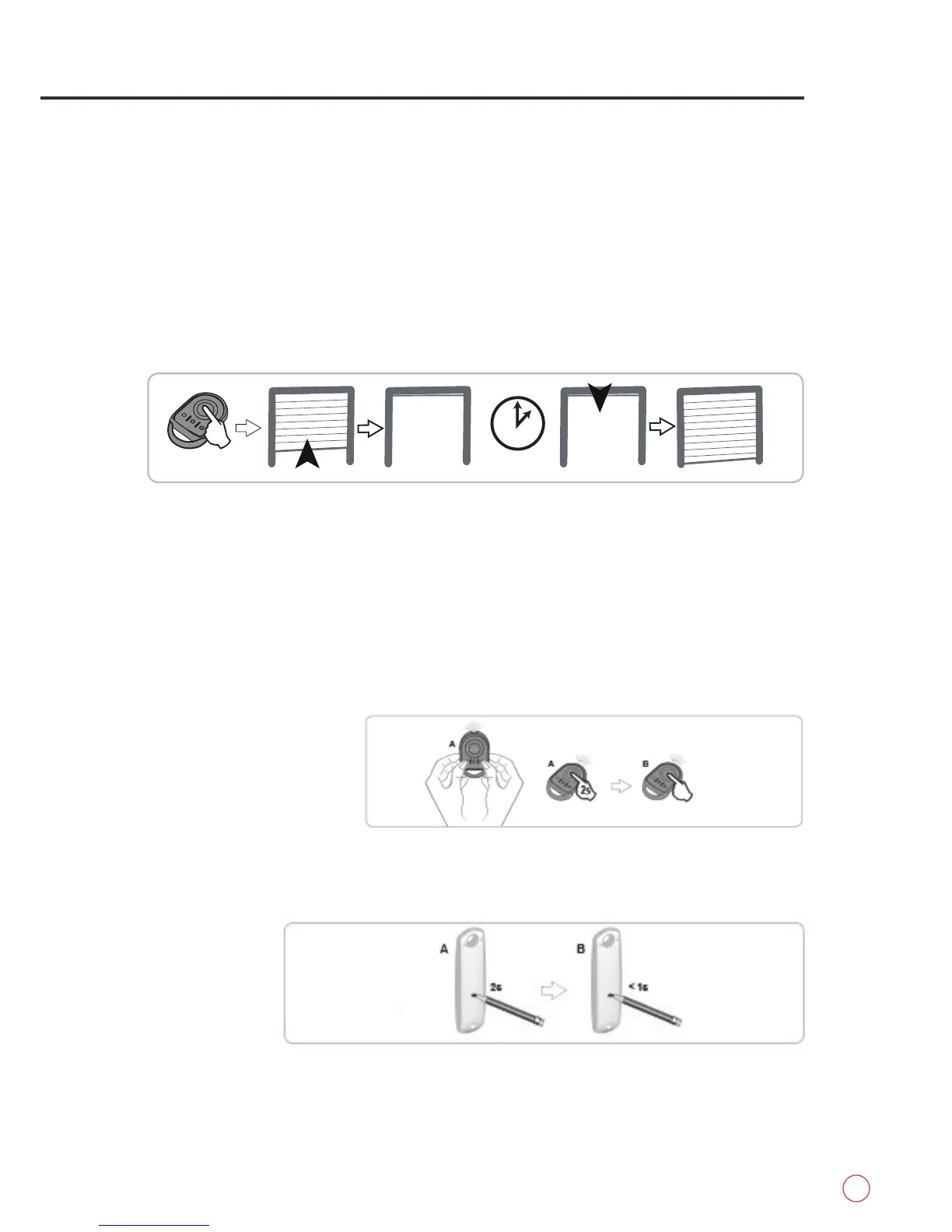
Automatic closure of the door occurs out after a time delay programmed during installation.
ADDING REMOTE CONTROLS
This operation must be carried out close to the receiver.
A new command during this time delay cancels automatic closing and the door remains open.
The following command results in the closure of the door.
This operation involves adding a remote control to your installation by copying a remote control already
used on your installation.
Remote control “A” = “source” remote control already memorised
Remote control “B” = “target” remote control to be added
2 or 4-button
remote control
[1]. Press the outer left and right buttons on the previously memorised remote control simultaneously until
the green indicator light flashes.
[2]. Press the remote control button A which controls your roller garage door for two seconds.
[3]. Press the button on new remote control B which will control your roller garage door.
3-button
remote control
Rollerdor RD55 and RD77 Roller Garage Door User Guide


 To Next Page