Need help?
Do you have a question about the Rongta Technology RP400 and is the answer not in the manual?
Defines the label width and length.
Defines the gap distance between two labels.
Sets black line height and extra label feeding.
Defines the print speed.
Sets the printing darkness.
Defines the reference point of the label.
Prints 1D barcodes.
Draws bitmap images.
Draws rectangles on the label.
Prints text on label.
Obtains printer status.
Resets the printer.
Inquires about files and fonts resident in memory.
Saves files to printer memory.
Deletes a file in printer memory.
Executes a resident program.
Executes program lines repetitively.
Executes statements conditionally.
Branches to a subroutine.
Branches to a specified label.
Sets counter number and increments.
Defines communication parameters for serial port.
Configures print key behavior.
Counts how many pieces of labels have been printed.
 General
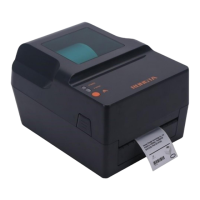
| Brand | Rongta Technology |
|---|---|
| Model | RP400 |
| Category | Printer |
| Language | English |

 To Next Page