11
RootsScrub B45 Series
V5.4 LA
0016:10
0016:10
0016:10
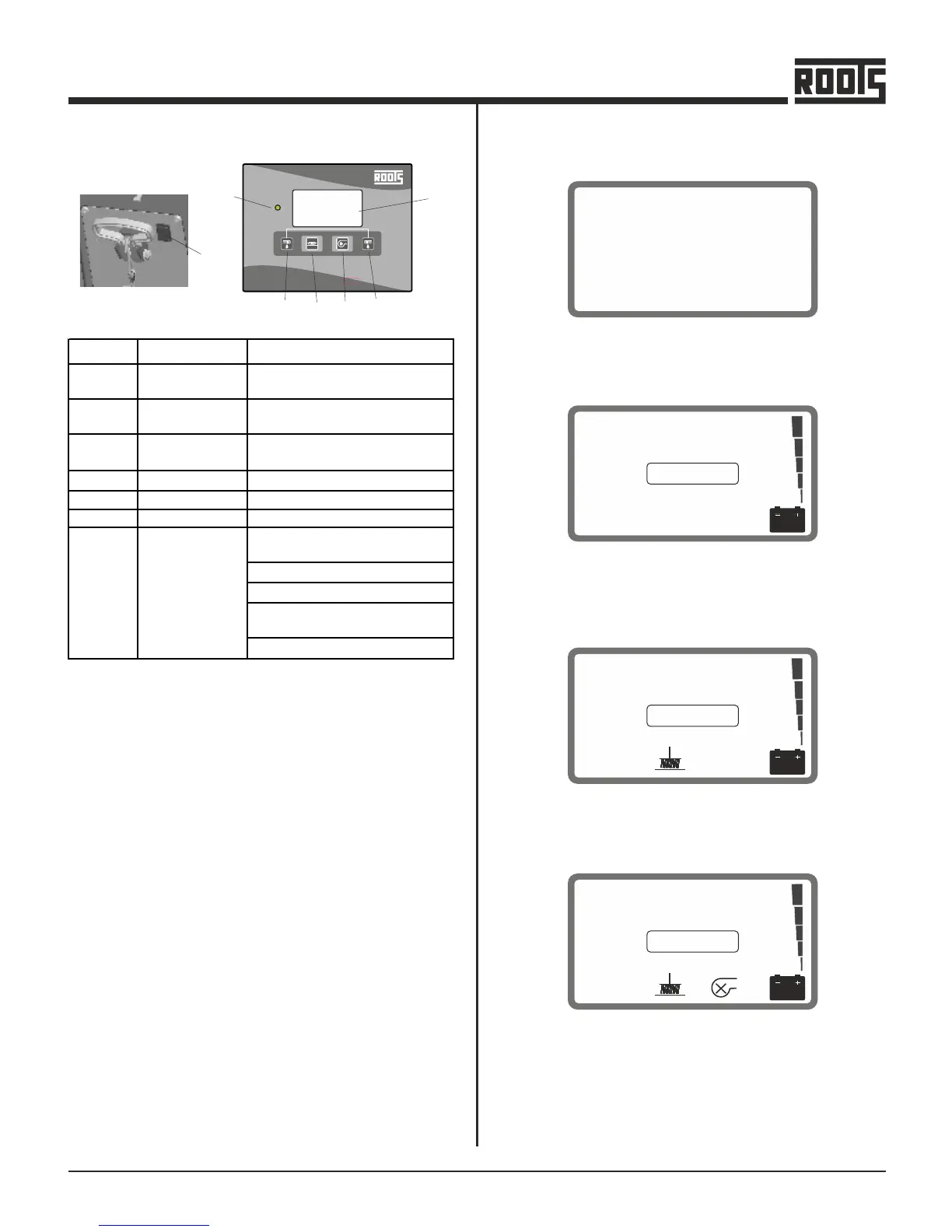
DISPLAY LAYOUT OF LCD
1 . On Power up- Shows the software version (V5.4) & set
battery type when switched On (while booting)
2 . On Start Up- On start up it displays the total previously
run hours of the machine - Format - hhhh:mm and battery
voltage tower.
3 . Brush Motor ON- A brush symbol is displayed when the
brush motor is switched ON.
4 . Suction Turbine ON- A turbine symbol is displayed when
the suction turbine is switched On.
FIRST OPERATION
Controls - B4545x & B4550x
LEGEND DESCRIPTION PURPOSE
A
Main Power
Switch
Solenoid
Initiates power supply to the
To control the water flow
system
B
Brush Motor
Switch
For On/Off
C
D
Suction Turbine For On/Off
Brush Release
LED
To release the brush
Glows Green when power is On
Shows information - software
version
B & E
F
G
set battery and type
battery charging and status
brush motor & suction turbine
On/Off
total hours run
Display
control
A
RootsScrub B 4545
B
F
C D2
D1
E


 To Next Page