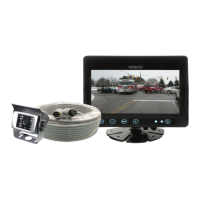
Safe-T-Scope
®
Backup Camera System STSK7465
10 3
• No changes can be made to the monitor while the vehicle is in reverse.
Never change settings while the vehicle is in operation.
• Press the MENU button once to set desired brightness. Press +/- to increase/reduce the brightness.
Wait 3 seconds to exit setup mode.
• Press the MENU button twice to set desired contrast. Press +/- to increase/reduce the contrast.
Wait 3 seconds to exit setup mode.
• Press the MENU button three times to set desired color. Press +/- to increase/reduce the color.
Wait 3 seconds to exit setup mode.
• Press the MENU button four times to set desired tint. Press +/- to increase/reduce the tint.
Wait 3 seconds to exit setup mode.
• Press the MENU button five times to set desired language. Press +/- to select English/French/Spanish.
Wait 3 seconds to exit setup mode.
• Press the MENU button six times to reset. Press +/- to store factory defaults.
Wait 3 seconds to exit setup mode.
• Press the MENU button seven times to set CAM1. Press +/- to select Normal/Mirror mode.
Wait 3 seconds to exit setup mode.
• Press the MENU button eight times to set CAM2. Press +/- to select Normal/Mirror mode.
Wait 3 seconds to exit setup mode.
• Press the MENU button nine times to set Vertical. Press +/- to select Auto/Day/Night.
Wait 3 seconds to exit setup mode.
• Press the MENU button ten times to set Dimmer. Press +/- to select Auto/Day/Night.
Wait 3 seconds to exit setup mode.
• Press the MENU button eleven times to set Scale. Press +/- to select On/Off.
Wait 3 seconds to exit setup mode
• Press the MENU button twelve times to set Scale Adjustment. Press - to change selected.
HOW TO SET UP YOUR SYSTEM REQUIREMENTS
i
NOTE


 To Next Page
 Loading...