2
GETTING STARTED
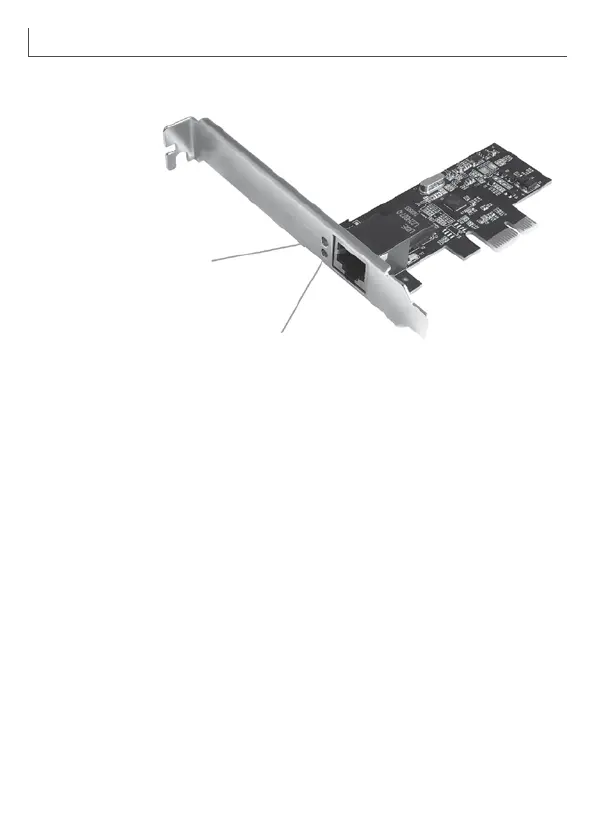
2.1 Hardware Layout
Link/Activity Indicator:
• When the LED is off, there is no link between the PCIe 2.5G 4-Speed
Multi-Gigabit Network Card and the network.
• When the LED is on, a link is established, but there is no trafc on the
network.
• When the LED is ashing, there is trafc on the network to which the
PCIe 2.5G 4-Speed Multi-Gigabit Network Card is connected.
2.2 Hardware Installation
1. Turn off the power to your computer.
2. Unplug the power cord and remove your computer’s cover.
3. Remove the slot bracket from an available PCIe slot.
4. To install the card, carefully align the card’s bus connector with the
selected PCIe slot on the motherboard. Push the board down rmly.
5. Replace the slot bracket’s holding screw to secure the card.
6. Secure the computer cover and reconnect the power cord.
10/100/1000 M
Link/Activity Indicator
2.5 G Link/Activity Indicator


 To Next Page