USING THE VACUUM CLEANER
Vacuum cleaning
o Open the dust compartment cover and check that the
dust bag is in place.
o Attach the desired nozzle to the telescopic tube and
make sure it clicks into position.
o Pull out the power cord by grasping its plug, until the
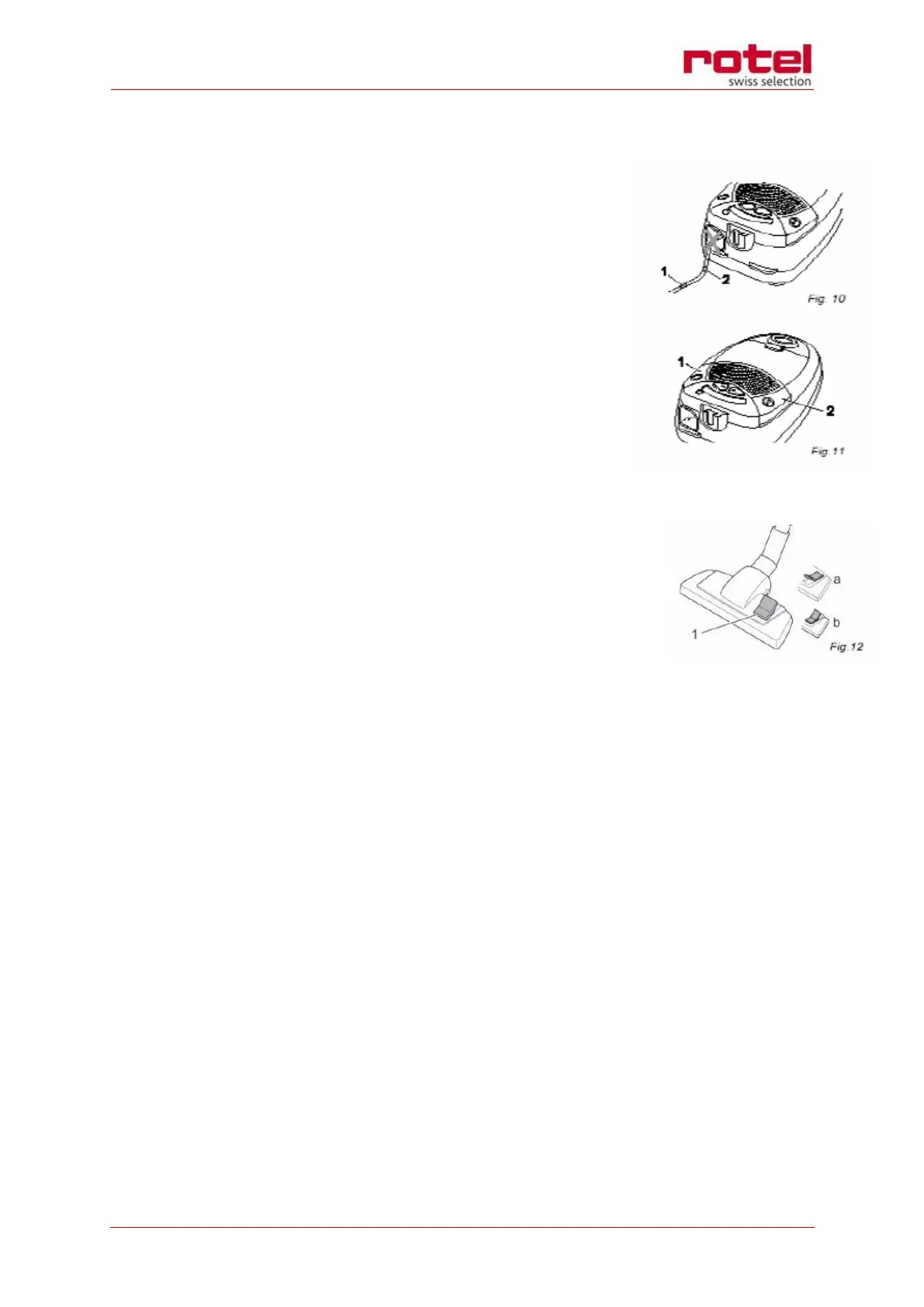
yellow marking is visible (Fig. 10/1) and plug into an
earthed socket.
o Switch on the vacuum cleaner (Fig. 11/1).
WARNING:
If the red marking shows (Fig. 10/2), retract the cord by pressing
the retract button (Fig. 11/2) up to the yellow mark again. The
cord must not be pulled further than its maximum length, other-
wise there is a danger of overheating and damage.
o Set the floor nozzle switch (Fig. 12/1) to “carpet” or
“hard floor” to suit the surface to be cleaned.
Hard floor (Fig. 12/a): laminate, tiles, PVC, etc.
Carpet (Fig. 12/b): short- and deep-pile carpets, rugs, runners, etc.
ATTENTION:
o Only use the vacuum cleaner with all filters, for dry substances.
o Never vacuum sharp-edged objects.
o Make sure that the openings of the vacuum cleaner are not obstructed.
o Keep hair, fingers, clothing and the like away from the nozzle while the vacuum cleaner
is connected to the mains.
WARNING:
Danger of injury! Especially when vacuum-cleaning stairs, make sure that you always stand on
a higher level than the appliance.
NOTE:
Your vacuum cleaner is equipped with a safety switch to prevent overheating. It will stop au-
tomatically if overheated (e.g. due to clogged suction channels). If this occurs, switch off the
vacuum cleaner and disconnect it from the mains. Eliminate the cause of the overheating and
switch the vacuum cleaner again after it has cooled off for about 45 minutes.


 To Next Page
 Loading...