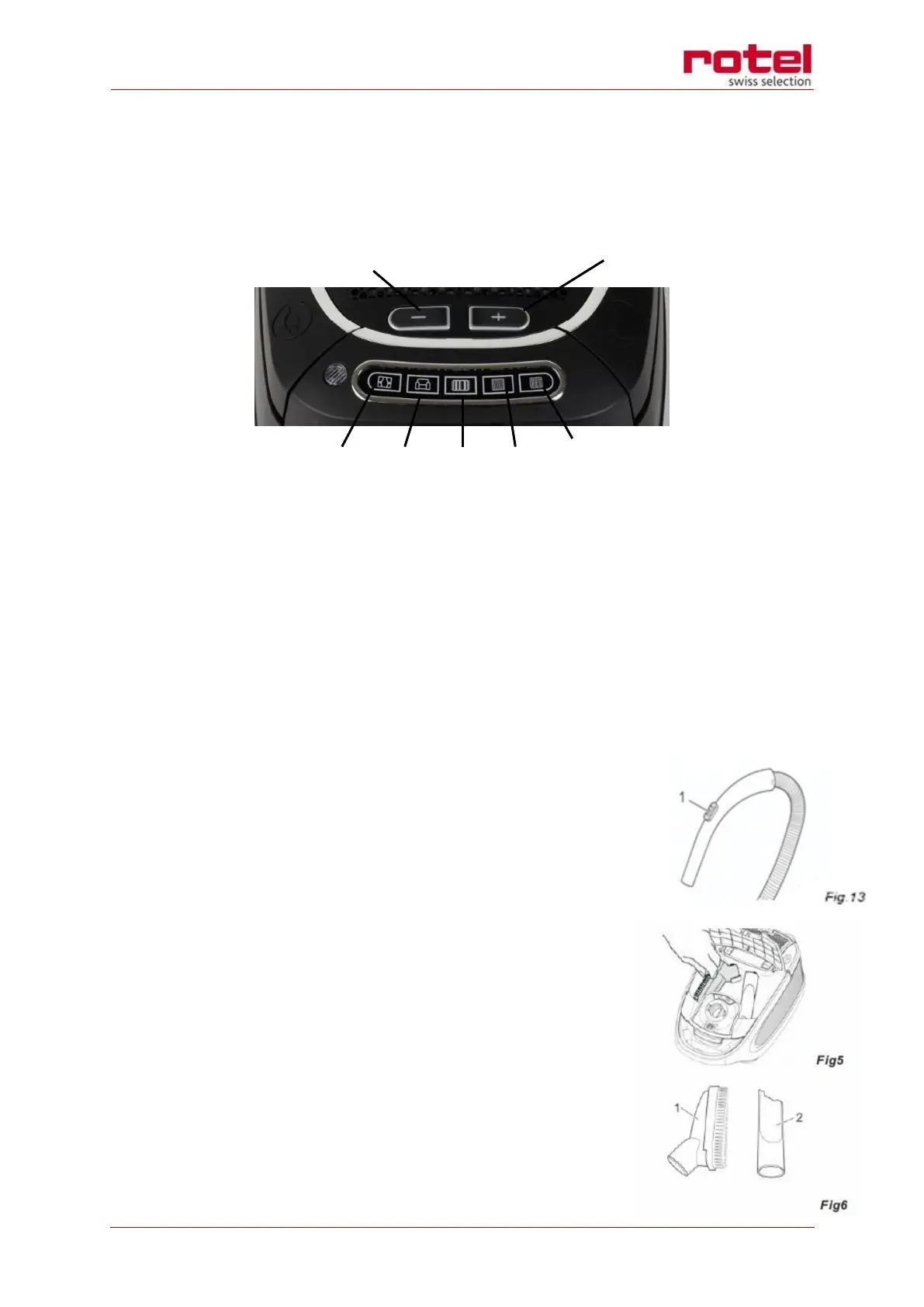
Setting the suction power
o You can adjust the suction power to suit the type of surface to be cleaned, as the
following symbols on the display will show:
5 Increase suction power
6 Reduce suction power
K. For curtains, textiles (lowest setting)
L. For upholstery, cushions
M. For high-class carpets, rugs and runners
N. For slightly soiled carpets and hard floors
O. For heavily soiled carpets and hard floors with coarse dirt (highest setting)
o To adjust the desired power setting, press the + button or the – button several times
until the desired setting lights up on the suction power display.
NOTE:
The bypass vent (Fig. 13/1) on the handle allows to quickly re-
duce the suction power, to release objects accidentally sucked
in.
Accessories
The floor nozzle serves solely to vacuum regular flooring, non-
sensitive carpets, runners, doormats, and the like. For furniture
or material with a delicate texture, you may use the other acces-
sories: the combi-brush and the crevice nozzle. They can be
stored in the accessory compartment when not in use (Fig. 5).
o Combi-brush (Fig. 6/1): use this nozzle to remove dust
from objects with delicate surfaces (e.g. cupboards and
tables) or to vacuum upholstery.


 To Next Page