EasyManua.ls Logo

Rotel RCD 970BX - Front Panel Controls and Operation; Basic Playback Buttons

Rotel RCD 970BX
7 pages
Print Icon
To Next Page IconTo Next Page
To Previous Page IconTo Previous Page
Loading...
power
cord
from
the
wall
always
hold
the
plug
firmly
and
then
pull
it
out
of
the
wall
socket.
Do
not
unplug
the
power
cord
from
the
wall
by
pulling
the
cord
only.
This
may
damage
the
power
cord
and
create
a
hazardous
condition.
We
recommend
that
the
RCD
970BX
be
connected
to
the
mains'
wall
socket
or
a
power
line
filter,
not
an
extension
cord.
If
you
wish
to
clean
the
cabinet
on
the
RCD
970BX
we
suggest
that
you
clean
it
with
a
soft,
DRY
cloth.
Never
use
cleaning
compounds
or
solvents
to
clean
the
cabinet
as
they
may
damage
the
finish
or
remove
the
labels.
They
could
also
damage
the
circuitry
if
any
residue
falls
inside
the
CD
player.
There
are
NO
user
serviceable
parts
inside
the
RCD
970BX.
Please
do
not
open
the
cabinet
as
this
will
expose
you
to
the
risk
of
potentially
dangerous
high
voltage,
the
risk
of
shock
and
the
LASER
inside
could
also
be
HAZARDOUS
to
your
health
and
eyesight.
This
could
also
damage
the
circuits
and
possibly
void
your
warranty.
PROC
SHUFFLE
REPT
41
SEARCH
»
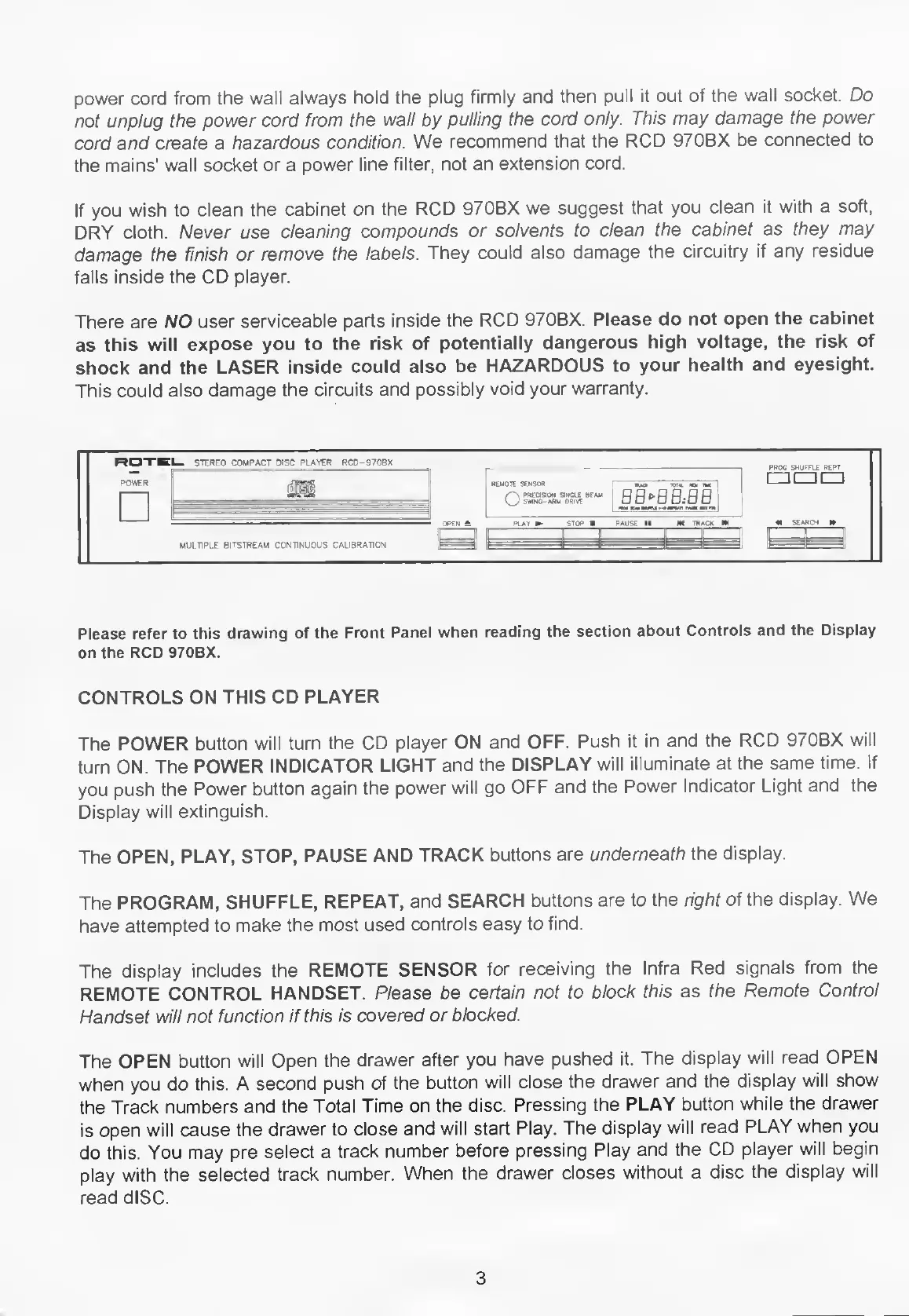
Please
refer
to
this
drawing
of
the
Front
Panel
when
reading
the
section
about
Controls
and
the
Display
on
the
RCD
970BX.
CONTROLS
ON
THIS
CD
PLAYER
The
POWER
button
will
turn
the
CD
player
ON
and
OFF.
Push
it
in
and
the
RCD
970BX
will
turn
ON.
The
POWER
INDICATOR
LIGHT
and
the
DISPLAY
will
illuminate
at
the
same
time.
If
you
push
the
Power
button
again
the
power
will
go
OFF
and
the
Power
Indicator
Light
and
the
Display
will
extinguish.
The
OPEN,
PLAY,
STOP,
PAUSE
AND
TRACK
buttons
are
underneath
the
display.
The
PROGRAM,
SHUFFLE,
REPEAT,
and
SEARCH
buttons
are
to
the
right
of
the
display.
We
have
attempted
to
make
the
most
used
controls
easy
to
find.
The
display
includes
the
REMOTE
SENSOR
for
receiving
the
Infra
Red
signals
from
the
REMOTE
CONTROL
HANDSET.
Please
be
certain
not
to
block
this
as
the
Remote
Control
Handset
will
not
function
if
this
is
covered
or
blocked.
The
OPEN
button
will
Open
the
drawer
after
you
have
pushed
it.
The
display
will
read
OPEN
when
you
do
this.
A
second
push
of
the
button
will
close
the
drawer
and
the
display
will
show
the
Track
numbers
and
the
Total
Time
on
the
disc.
Pressing
the
PLAY
button
while
the
drawer
is
open
will
cause
the
drawer
to
close
and
will
start
Play.
The
display
will
read
PLAY
when
you
do
this.
You
may
pre
select
a
track
number
before
pressing
Play
and
the
CD
player
will
begin
play
with
the
selected
track
number.
When
the
drawer
closes
without
a
disc
the
display
will
read
dISC.
3

Related product manuals