EasyManua.ls Logo

Rotel RCD 970BX - Page 5

Rotel RCD 970BX
7 pages
Print Icon
To Next Page IconTo Next Page
To Previous Page IconTo Previous Page
Loading...
The
STOP
button
will
stop
all
functions
and
the
display
will
show
the
Track
numbers
and
the
Total
Time
of
the
disc.
Pressing
the
PAUSE
button
will
make
the
CD
player
stay
in
the
same
place
on
the
CD,
the
CD
will
still
spin
and
the
display
will
show
the
word
PAUSE.
No
sound
will
be
heard
until
you
press
the
PLAY
button.
The
TRACK
buttons
(l«,
»l)
will
advance
to
the
next
Track
(»l)
or
will
go
back
to
the
previous
Track
(l«)
on
the
disc.
If
you
are
in
the
middle
of
a
song
and
you
press
the
Track
button
once,
the
player
will
begin
the
previous
song
again.
If
you
are
in
PAUSE
and
you
press
the
Track
button
once
it
will
proceed
to
the
previous
track
and
wait
for
you
to
press
the
PLAY
button.
Pressing
the
»l
Track
button
during
PLAY
will
cause
the
CD
player
to
skip
to
the
next
track
on
the
disc.
If
you
press
the
PLAY
button
during
a
song
then
the
RCD
970BX
will
begin
the
same
song
again.
The
PROGRAM
button
will
be
used
when
you
Program
songs
on
the
disc
for
play
in
a
specific
order
or
to
make
a
recording
of
your
favorite
songs.
To
begin
a
Program,
load
a
disc
into
the
drawer
and
press
the
OPEN
button.
The
RCD
970BX
will
read
the
table
of
contents
and
show
the
Total
Track
Numbers
and
the
Total
Time.
Next
select
the
Track
Number
you
wish
to
Program.
It
will
be
shown
in
the
display.
Press
the
Program
button
and
the
song
will
be
entered
into
the
Program
memory.
The
display
will
show
the
word
PROGRAM,
the
Program
number
for
the
song
and
the
Total
Time
of
the
Program.
Repeat
this
for
the
tracks
you
wish
to
program.
The
RCD
970BX
will
remember
up
to
20
tracks
in
a
Program.
Press
the
Program
button
again
and
it
will
cause
the
programmed
tracks
to
appear
in
sequence,
one
at
a
time,
in
the
display
panel.
Pressing
the
OPEN
or
the
STOP
button
will
erase
a
PROGRAM
from
the
memory.
SHUFFLE
play
will
play
a
disc
randomly
till
it
finishes
all
of
the
songs
on
the
disc.
SHUFFLE
will
appear
in
the
display
when
you
use
this
function.
The
REPEAT
button
will
allow
you
to
play
a
whole
disc
or
a
programmed
song
or
songs
repeatedly
until
you
cancel
this
function
by
pressing
STOP.
This
may
be
combined
with
SHUFFLE
play
as
well.
The
word
REPEAT
is
shown
in
the
display
when
you
choose
this
function.
The
SEARCH
buttons
(«,
»)
will
cause
the
CD
player
to
go
forward
or
backwards
in
time
quickly
when
playing
a
song.
This
is
a
two
speed
design
and
will
begin
slowly
and
then
become
fast.
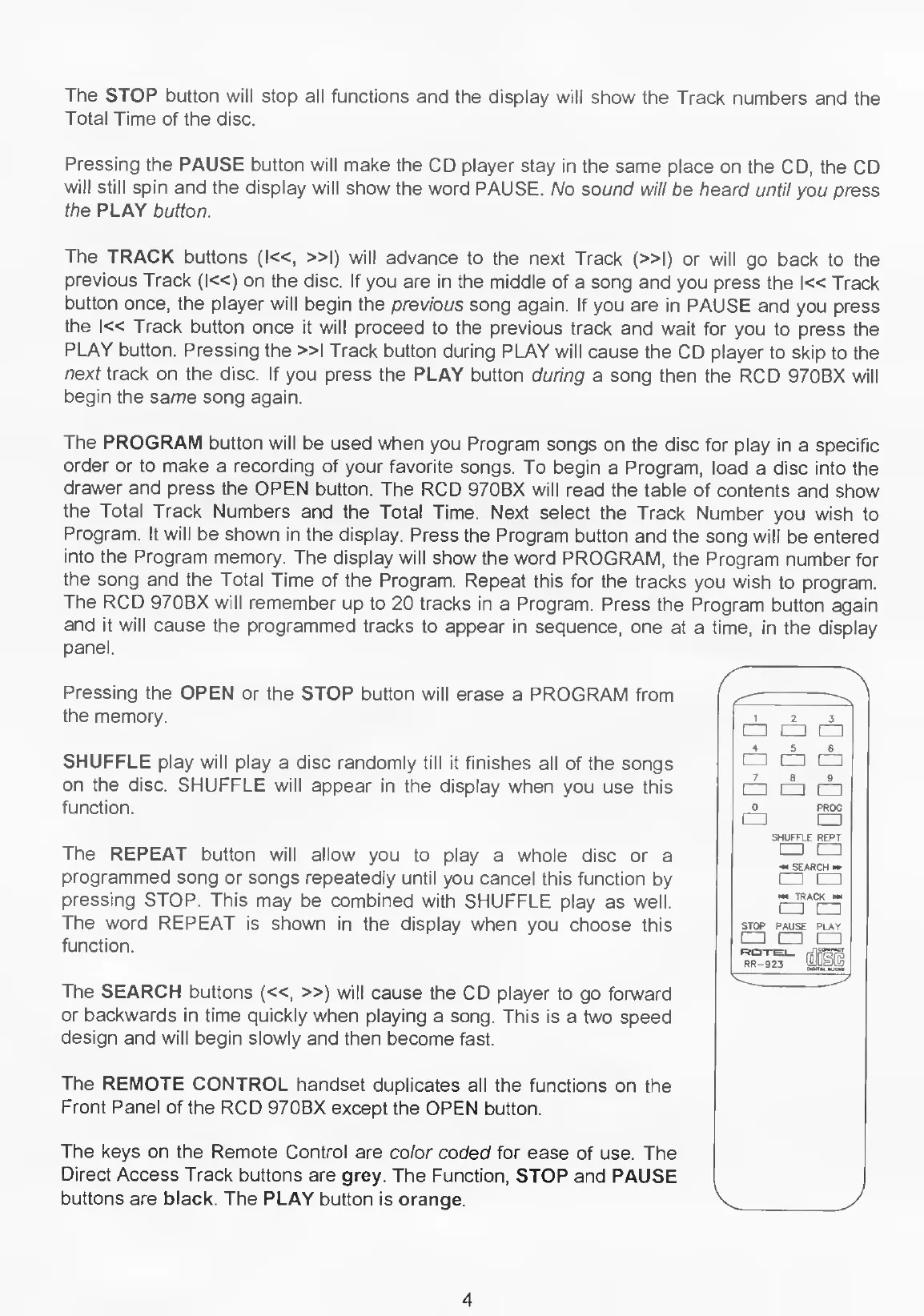
The
REMOTE
CONTROL
handset
duplicates
all
the
functions
on
the
Front
Panel
of
the
RCD
970BX
except
the
OPEN
button.
The
keys
on
the
Remote
Control
are
color
coded
for
ease
of
use.
The
Direct
Access
Track
buttons
are
grey.
The
Function,
STOP
and
PAUSE
buttons
are
black.
The
PLAY
button
is
orange.
1
2
3
E=n
CD
4
5
6
[=
!
=
[=
7
8
9
[=
□□
=]
0
PROG
[=1
S
HUFFL
E
REPT
n
*>
SEARCH
TRACK
STOP
PAUSE
PLAY
!=
□□
=]
4

Related product manuals