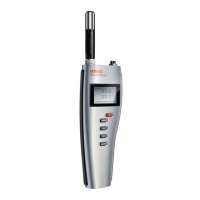
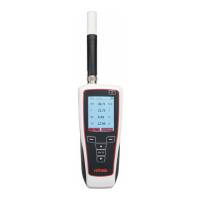
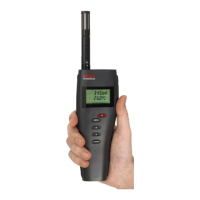
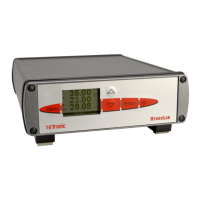
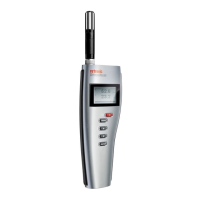
The Rotronic HygroPalm HP22-A is a highly accurate hand-held indicator designed to measure relative humidity, temperature, and a calculated psychrometric parameter such as the dew or frost point. It operates with a standard 9V alkaline battery and is compatible with a wide range of HygroClip 2 humidity-temperature probes, allowing it to meet diverse application requirements. The device utilizes ROTRONIC AirChip 3000 digital technology, ensuring consistent product performance and facilitating field maintenance through features like potentiometer-free digital calibration.
Function Description:
The HP22-A serves as a versatile instrument for environmental monitoring. Its core function is to display relative humidity (%RH), temperature (°C or °F), and a user-configurable calculated parameter. The calculated parameters, configurable via the ROTRONIC HW4 software, include:
- Dew point (Dp) above and below freezing
- Frost point (Fp) below freezing and dew point above freezing
- Wet bulb temperature (Tw)
- Enthalpy (H)
- Vapor concentration (Dv)
- Specific humidity (Q)
- Mixing ratio by weight (R)
- Vapor concentration at saturation (Dvs)
- Vapor partial pressure (E)
- Vapor saturation pressure (Ew)
Some of these parameters depend on the barometric pressure, which can be specified as a fixed value using the HW4 software.
The device offers several user-configurable settings and functions, enhancing its adaptability:
- User Configurable Settings: Allows customization of unit system (Metric or English), psychrometric calculation type, fixed pressure value, data refresh rate, display resolution, display backlight behavior, displayed parameters, trend indicator, communication protocol (RO-ASCII), and RS-485 address.
- Measurement Accuracy and Reliability (Probe Functions):
- Humidity / Temperature Adjustment: Supports 1-point or multi-point humidity calibration/adjustment and 1-point or 2-point temperature calibration/adjustment. It generates time stamps for calibrations, retains and displays the last adjustment date and values, and can generate calibration protocols.
- Automatic Humidity Sensor Test and Optional Drift Compensation: Tests the humidity sensor for drift caused by contaminants and can automatically apply corrections. The test runs at regular intervals and can be configured, enabled, or disabled. The sensor status is displayed as Good, SQ-tuned (corrected for drift), or Bad (defective).
- Data Recording: Functions as a data recorder, storing up to 2000 value pairs (%RH and temperature). While it doesn't time-stamp data directly, recorded data can be downloaded to a PC with HW4 software for time-stamping and viewing. Recording sessions can be started/stopped, and the recording mode and log interval can be specified. Sessions pause when the device is powered off and resume automatically when powered on, as long as the session hasn't been ended.
- Measurement Loop Validation:
- Simulator Mode: Allows the HP22 to generate fixed values for humidity, temperature, and calculated parameters, useful for testing and validation. This mode can be configured, enabled, or disabled.
- Device Safeguards:
- Device Write Protection: Protects the HP22 with a password to prevent unauthorized digital access, configurable as enabled or disabled.
- Internal Menu Access from Keypad: Prevents accidental changes to settings and adjustments by disabling the MENU key on the keypad, configurable as enabled or disabled.
Important Technical Specifications:
- Device Type: Humidity-temperature hand-held indicator with one probe input (HygroClip 2).
- Power Supply: 9V alkaline battery.
- Low Battery Indication: Yes.
- Measurement Range (Probe Dependent): 0 to 100%RH and -100 to 200°C (-148 to 392°F).
- HP22 Electronics Operating Range: -10 to 60°C.
- Start-up Time: 3 seconds (typical).
- Data Refresh Rate: 1 second (typical).
- Display: LC display with 1 or 2 decimals resolution, backlight, trend indicator, alarm, and low battery indication.
- Interface Type (Service Connector): UART (Universal Asynchronous Receiver Transmitter) with a mini-USB type connector.
- Maximum Service Cable Length: 5 meters (16.4 ft).
- Overall Dimensions: 270 x 70 x 30 mm (10.63 x 2.76 x 1.17 inches).
- Probe Dimensions: 80 x 15 mm (3.15 x 0.59 inches).
- Weight: Approximately 198 g (7.0 oz).
- Probe Material: Polycarbonate.
- Probe Dust Filter Material: Polyethylene.
- Housing Material: ABS.
- Housing Protection Grade: IP 40.
- Conformity with Standards: EMC Directive 2004/108/EG (EN 61000-6-1: 2001, EN 61000-6-2: 2005, EN 61000-6-3: 2005, EN 61000-6-4: 2001 + A11).
- Solder Type: Lead-free (RoHS directive).
- FDA/GAMP Directives: Compatible.
- Environmental Limits (Storage and Transit): -20 to +70°C / 0 to 100%RH, non-condensing.
- Environmental Limits (Operating at Electronics): -10 to 60°C (limited by LC display) / 0 to 100%RH, non-condensing.
- Maximum Humidity at Probe: 100%RH up to 80°C (176°F), 75%RH at 100°C (212°F), 45%RH at 125°C (260°F), 15%RH at 150°C (302°F).
- Maximum Air Velocity at Probe: 20 m/s (3,935 ft/min).
- Critical Environments: Humidity sensor as per DV04-14.0803.02 - Critical chemicals.
Usage Features:
- Display: The LC display shows relative humidity or dew/frost point on the upper line and temperature on the bottom line. It can also show a trend indicator (up/down arrows) for each line. An alarm symbol (!) appears next to the value if an alarm is triggered. The backlight can be configured to be always on, on key press, or disabled.
- Keypad:
- ON/OFF Key: Turns the instrument on/off (long press for off) and activates/deactivates the HOLD function (brief press).
- MENU Key: Activates and exits the internal menu.
- UP/DOWN Keys: Navigate the internal menu, make selections, or change values when the menu is active.
- ENTER Key: Confirms selections when the menu is active. When the menu is not active, it changes the parameters shown on the display (relative humidity and temperature; or relative humidity, temperature, and calculated parameter).
- HOLD Function: Freezes the display values and communication with HW4 software. The word "HOLD" appears on the display. It is automatically disabled when the instrument is turned off, and values are not memorized.
- Unit System Change: The unit system (metric or English) can be changed directly from the keypad via the internal menu (Menu > Settings > Unit).
- Internal Menu: Provides access to device settings (units, backlight, contrast, trend), device information (firmware version, serial number, RS-485 address, type, name), probe information (firmware version, serial number, RS-485 address, name, SensorTest status, data recording status), humidity adjustment, and temperature adjustment. Access to the internal menu can be restricted via HW4 software.
- Practical Advice for Measuring Humidity: Emphasizes the importance of temperature equilibration between the probe and the environment to avoid measurement errors. Recommends monitoring display for temperature stability and allowing sufficient time for equilibration. Notes that condensation does not alter sensor calibration but requires the sensor to dry before providing valid measurements. Suggests air movement at the probe for faster and more accurate measurements.
Maintenance Features:
- Battery Replacement: To replace the 9V alkaline battery, turn the latching button counter-clockwise and pull out the battery holder.
- Service Connector: A mini-USB type UART digital interface allows connection to a PC running ROTRONIC HW4 software or to a probe input of another compatible instrument (e.g., HP23 hand-held calibrator). This connector is used for configuring the HP22, accessing probe functions (calibration, adjustment), reading data, and updating firmware. The service connector is accessed by removing a protective red round cover.
- Periodic Calibration Check of the Probe:
- Temperature Adjustment (from keypad): Allows a 1-point offset adjustment of temperature. The procedure involves navigating the internal menu to "Temperature Adjust," setting the reference value, and confirming the adjustment.
- Humidity Adjustment (from keypad): Allows multi-point humidity adjustment. The effect depends on the number of calibration points stored in the probe memory (offset for 1 point, offset and slope for 2 points, offset, slope, and linearity for 3+ points). The procedure involves navigating the internal menu to "Humidity Adjust," setting the reference value, acquiring calibration points, and confirming the adjustment. For maximum accuracy, 3 to 4 calibration points distributed across the measurement range are recommended.
- Calibration using HW4 Software: Provides more comprehensive calibration capabilities, including writing the adjustment date to the probe memory (which the HP22 keypad cannot do due to lack of real-time clock). Requires connecting the HP22 to a PC with HW4 software via service cable AC3006.
- Cleaning or Replacing the Probe Dust Filter: Instructions are provided in the E-M-HC2 Probes-V1 document.
- Firmware Updates: Firmware files are available on the ROTRONIC website and can be updated via the HW4 software by connecting the HP22 to a PC with service cable AC3006. Note that older HP22 PCBs updated to firmware version 2.x may not support the HOLD function.

 Need help?
 General

 To Next Page