II
16
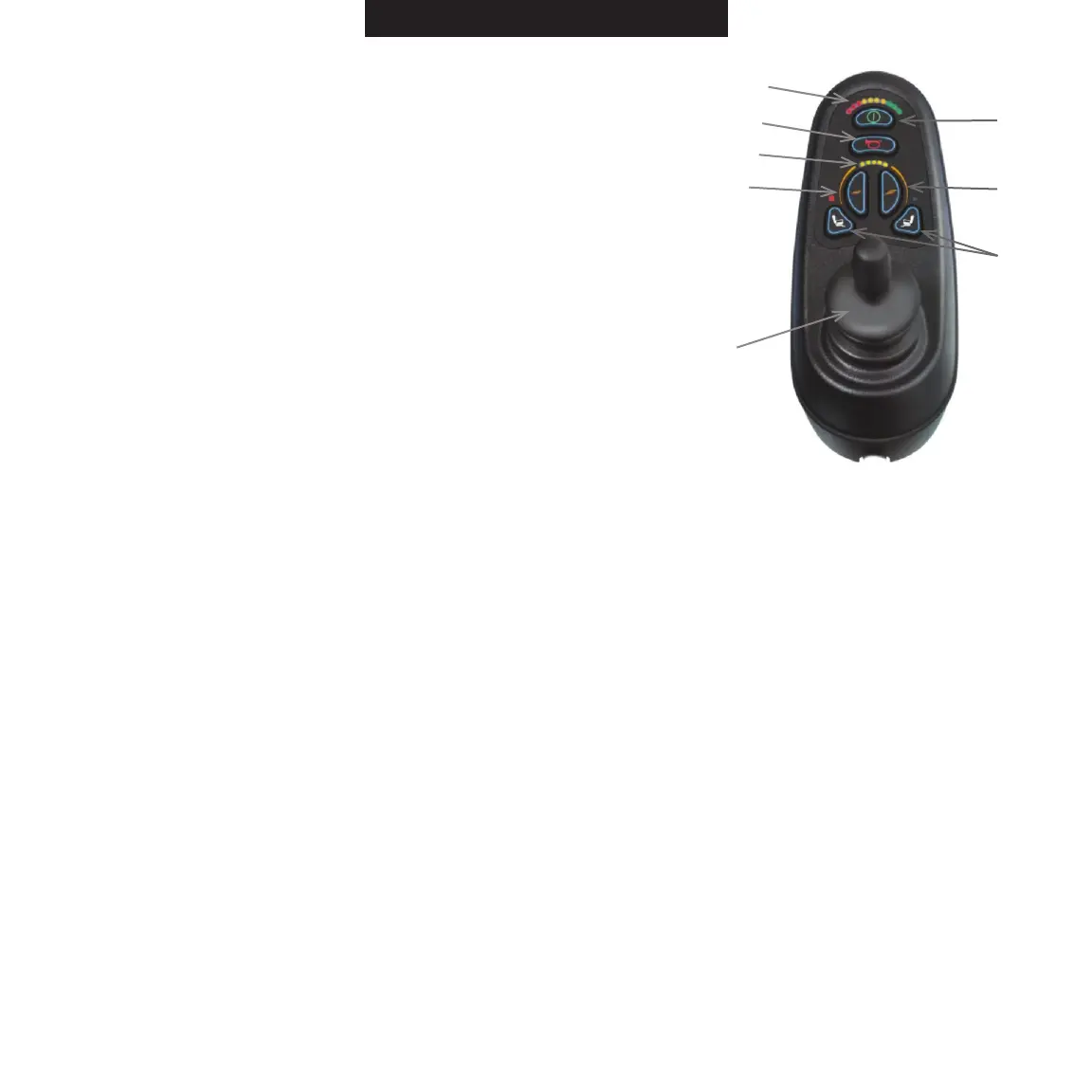
Horn Button: Press this button to sound the warning horn B
(Item C-Figure 13). C A
D
Maximum Speed Indicator: This is a 5-segment display that E F
indicates the maximum speed setting selected (Item D-Figure 12).
H
Speed Decrease Button: Press this button to decrease the
maximum speed (Item E-Figure 13).
G
Speed Increase Button: Press this button to increase the
maximum speed (Item F-Figure 13).
Joystick: The joystick (Item G-Figure 13) controls the speed
and direction of the power wheelchair. Push the joystick in Figure 13
the direction you want to go. The farther you push the joystick
from the neutral position, the faster the power wheelchair will travel.
Releasing the joystick will automatically engage the brakes and stop
the power wheelchair.
Note: The controller can be fitted to suit either right-or left-handed users. Please contact your pro-
vider for further assistance.
Actuator Control (Optional) (Item H-Figure 13)
If your ROVI
®
X3 Power Wheelchair is equipped with optional power actuators, there will be two
additional keys on the VR2 controller for actuator adjustment. The functions of these keys will
differ depending on the number of actuators installed on the power wheelchair. The ROVI
®
X3


 To Next Page