EasyManua.ls Logo

Royal Portable typewriter - Typewriter Scales and Alignment

Royal Portable typewriter
24 pages
Print Icon
To Next Page IconTo Next Page
To Previous Page IconTo Previous Page
Loading...
r
t
i
-
~
.
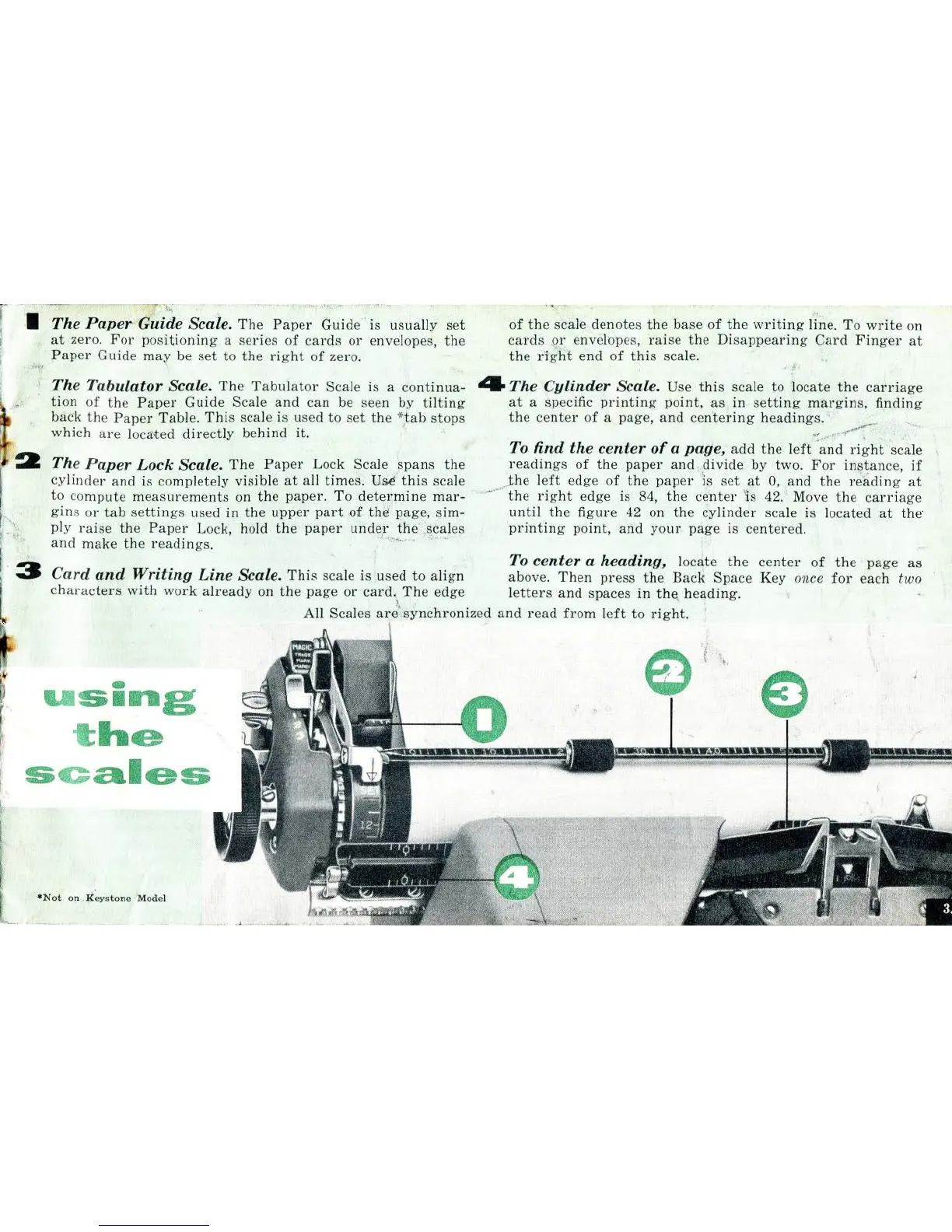
. 1 The
Paper
Guide Scale.
The
Paper
Guide
· is u
sua
ll
y
set
at
zero.
For
positioning
a
series
of
cards
or
envelopes,
the
,,,
Paper
Guide rna{' be
set
to
the
right
of
zero.
The
Tabulator
Scale.
The
Tabulator
Scale is a
continua-
tion
of
the
Paper
Guide Scale
and
can be seen by
tilting
back
the
Paper
Tabl
e.
This
scale is used to
set
the
*,
tab
stops
which
are
loca'ted
directly
behind
it.
The
Paper
Lock
Scale.
Th
e
Paper
Lock Scale
spans
the
cylinder
and
is compl
ete
ly visible
at
all times.
Usi
this
scale
of
the
sca
le
denot
es
the
bas
e
of
the
writing
lin
e.
To
write
on
cards
or
envelopes,
raise
the
Disappearing
Card
Finger
at
the
dght
end
of
this
scal
e.
'r
4 The
Cylinder
Scale.
Use
this
scale
to
locate
the
carr
i
age
at
a spec
ifi
c
printing
point,
as
in
setting
margins,
finding
the
cente
r
of
a page,
and
cen
teri
ng
headings.
·:
........•
.,
........
.
~:-
-
...
,:
To
find
the
center
of
a
page,
add
the
l
eft
and
right
scale
readings
of
the
paper
and
..
divide
by
two
.
For
instance,
if
to
co
mpute
measurements
on
th
e
paper.
To
determine
mar
-
....
gin
s
or
tab
settings
used in
the
upper
part
of
thii page,
sim-
pl
y
ra
ise
the
Paper
Lock, ho
ld
the
paper
under
the
.
sca
les
,{4_
.......
_-
.•
,-.,
Jhe
l
eft
edge
of
the
paper
is
set
at
0,
and
the
reading
at
the
right
edge is 84,
the
center
'
is
42. · Move
the
carriage
until
the
fi
gure
42 on
the
cy
linder
scale is located
at
the·
printing
point,
and
your
page
is
centered.
and
make
the
readings.
. ·
..
· ·
To
center
a
heading,
locate
the
center
of
the
page
as
Card
and
Writing
Line
Scale.
Thi
s scale is used
to
align
above.
Then
press
the
Back
Space
Key once
for
each two
characters
with
work
already
on
the
page
or
card.
Th
e edge l
etters
and
spaces
in
th<>
h
eadi
ng.
-
U
Sing
t
he
s c
ales
·
•N
ot
on
,
I(eystone
Model
)
~
'
All Scales
are
',
synchronized
and
read
from
l
eft
to
right.
,,
[
..

Related product manuals