EasyManua.ls Logo

RPS sonic HC-CS2000C - User Manual

RPS sonic HC-CS2000C
9 pages
Print Icon
To Next Page IconTo Next Page
Loading...
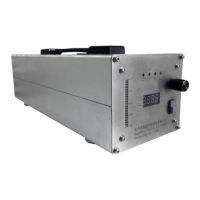
20K ULTRASONIC GENERATOR
HC-CS2000C
OPERATE MANUAL
First of all, thank you for purchasing our ultrasonic industrial grade ultrasonic equipment.
Please read this manual carefully before use. Please keep it in a safe place for future reference.
一、About this manual
1.
Unless otherwise stated, all sample operations in this manual assume that the device uses the initial
default settings.
2.
The contents of this manual are subject to change without prior notice.
3.
The displays and illustrations in this User's Guide (such as the initial values of each parameter) are for
illustrative purposes only and may differ from the actual items indicated.
1
Question and Answer IconNeed help?

Do you have a question about the RPS sonic HC-CS2000C and is the answer not in the manual?

Summary

Initialization and Safety

Generator Initialization

Notes that all initial parameters are pre-set by staff for the generator.

Safety Precautions

Crucial safety warnings regarding high voltage, handling, environment, and component connections.

Work Environment Requirements

Defines acceptable temperature, humidity, and electromagnetic interference levels for operation.

Power Supply and Wiring

Power Supply Requirements

Specifies input voltage, frequency, fluctuation range, harmonic content, and cable diameter.

Equipment Wiring Diagram

Diagrams and labels for connecting external components like the transducer and power switch.

Operating Instructions

Initial Interface and Controls

Overview of the generator's initial display, LEDs, and basic operational buttons.

Delay Time Adjustment

Instructions for setting and adjusting the delay time parameter on the generator.

Welding Time and Energy Adjustment

Guides on selecting and modifying welding time or energy settings.

Holding Time Adjustment

Procedure for adjusting the holding time parameter of the ultrasonic generator.

AM Adjustment

Details on how to configure the AM (Amplitude Modulation) setting.

Counter Adjustment

Instructions for setting and managing the counter function of the device.

Fault Protection and Troubleshooting

Error Code Identification

Explains how errors are displayed and lists common fault codes (E-01 to E-06).

Troubleshooting: Power Overload (E-01)

Solutions for power overload errors, including reducing amplitude and checking pressure.

Troubleshooting: Frequency Errors (E-02, E-03)

Addresses frequency out of range and too low errors by checking mold connection and transducer.

Troubleshooting: Operational & Parameter Errors (E-04, E-05, E-06)

Solutions for operational faults, parameter read failures, and loading errors.

Overview

This document describes the 20K ULTRASONIC GENERATOR (HC-CS2000C), an industrial-grade ultrasonic equipment designed for various applications, likely involving welding or similar processes that utilize ultrasonic vibrations. The manual emphasizes the importance of professional operation to prevent irreparable damage and provides detailed instructions for setup, operation, and troubleshooting.

Function Description

The HC-CS2000C is an ultrasonic generator that produces 20KHz ultrasonic vibrations. It is designed to be integrated into industrial processes, likely for tasks such as ultrasonic welding, cutting, or cleaning, where precise control over ultrasonic parameters is crucial. The device features a digital display for scanned frequency and various LEDs to indicate current operating modes (time or energy). It allows for adjustment of several key parameters, including delay time, welding time/energy, holding time, and amplitude, to suit different application requirements. The generator also incorporates fault protection mechanisms that display specific error codes and suggest solutions, ensuring operational safety and facilitating maintenance.

Important Technical Specifications

Power Supply Requirements:

  • Input Standard: Single phase AC220V 50HZ/60HZ.
  • Voltage Fluctuation Range: <10%.
  • Power Grid Harmonic Content: <20%.
  • Supply Current: <20A.
  • Power Cable Diameter: >2.5MM².

Environmental Requirements:

  • Operating Temperature: -20°C to 40°C. Exceeding this range can lead to work errors and fire.
  • Air Humidity: Less than 70%. High humidity can cause internal condensation, short-circuiting electronic components, and abnormal operation.
  • Electromagnetic Interference (EMI) Intensity: Less than 120E. Higher EMI can severely interfere with operation and damage the device. The manual notes that the ultrasonic power supply itself is a large source of electromagnetic radiation, recommending shielded and coaxial communication lines and energy output cables when multiple devices are installed tightly.

Interfaces:

  • Transducer Interface: Single-core high-voltage RF interface. The center line is the positive end of the transducer, and the shield is the negative end. Reversing this connection is strictly forbidden.
  • DB9 Female Interface: Uses conventional DB9 core wire connection, with an adapter board provided.
  • 24V Power Supply Terminal: Provides a constant 24V, with a maximum current of 100mA.
  • Pressure Trigger Port: Valid when the device operates in pressure trigger mode.
  • Solenoid Valve Interface: Connects to a 24V solenoid valve with a maximum power of 5W.
  • Automatic Operation Start and Emergency Stop Wiring Port.
  • Power Socket: Character type interface.
  • Fuse Holder: Uses a 15A, 250V fuse.

Usage Features

Initial Setup:

  • All initial parameters are factory-set.
  • Requires professional operation due to high voltage and potential for damage.
  • Emphasizes safety warnings: do not operate with the housing open, avoid impact, use a grounded power supply, keep hands away from the welding horn, and do not operate without transducer and mold connected.
  • Before use, check for loose molds and ensure safety when replacing large molds. In case of abnormal conditions, resolve the fault before restarting to prevent further damage.

Operating Instructions (Initial Interface):

  • The digital display shows the scanned frequency.
  • Upper five LEDs are off; lower two LEDs indicate current time mode or energy mode.
  • A ship-type switch allows switching between automatic and manual mode adjustment.
  • A left LED light bar shows current power.
  • A right-side spring switch enables sound wave detection.
  • An upper right coding switch allows selection and adjustment of parameters.

Parameter Adjustment States: The device operates through several adjustment states, each controlled by an "EDIT" button and left/right turns of a coding switch:

  1. Delay Time Adjustment (State One):

    • Indicated by the "Delay" light being on.
    • Left-hand EDIT: Decline (decrease value).
    • Right-hand EDIT: Increase (increase value).
    • Short press EDIT: Edit next parameter.
    • Long press EDIT: Keep and exit.
  2. Welding Time / Energy Adjustment (State Two):

    • Indicated by the "Weld" light being on.
    • Left-hand EDIT: Decline.
    • Right-hand EDIT: Increase.
    • Press & Right-hand EDIT: Switch to time model.
    • Press & Left-hand EDIT: Switch to energy model.
    • Short press EDIT: Edit next parameter.
    • Long press EDIT: Keep and exit.
  3. Holding Time Adjustment (State Three):

    • Indicated by the "Hold" light being on.
    • Left-hand EDIT: Decline.
    • Right-hand EDIT: Increase.
    • Short press EDIT: Edit next parameter.
    • Long press EDIT: Keep and exit.
  4. AM Adjustment (State Four - Amplitude):

    • Indicated by the "AM" light being on.
    • Left-hand EDIT: Decline.
    • Right-hand EDIT: Increase.
    • Short press EDIT: Edit next parameter.
    • Long press EDIT: Keep and exit.
  5. Counter Adjustment (State Five):

    • Indicated by the "Counter" light being on.
    • Left-hand EDIT: Check the front number.
    • Right-hand EDIT: Check the behind number.
    • Press & Right-hand EDIT: No meaning.
    • Press & Left-hand EDIT: Clear AS 0.
    • Short press EDIT: Edit next parameter.
    • Long press EDIT: Keep and exit.

Maintenance Features

Fault Protection Display and Solution: When the generator enters "Protection status," indicated by four lamps on and an alarm, the screen displays specific error codes to guide troubleshooting:

  • E-01: Power over loading.
    • Solution: Reduce amplitude or loading (e.g., reduce pressure); replace with a larger ultrasonic generator.
  • E-02: Frequency out range.
    • Solution: Cool the mold; check mold connection and transducer.
  • E-03: Frequency too low.
    • Solution: Check mold connection.
  • E-04: Equipment operation fault.
    • Solution: Check mold connection and transducer.
  • E-05: Parameters read failed.
    • Solution: Close the equipment and reopen after one minute.
  • E-06: Loading error.
    • Solution: Check the transducer, change it, or reconnect it.

The manual emphasizes the importance of following local laws and regulations when disposing of the device or replacing internal parts due to the large number of electronic components.

RPS sonic HC-CS2000C Specifications

General IconGeneral
BrandRPS sonic
ModelHC-CS2000C
CategoryPortable Generator
LanguageEnglish