E-14
Note:
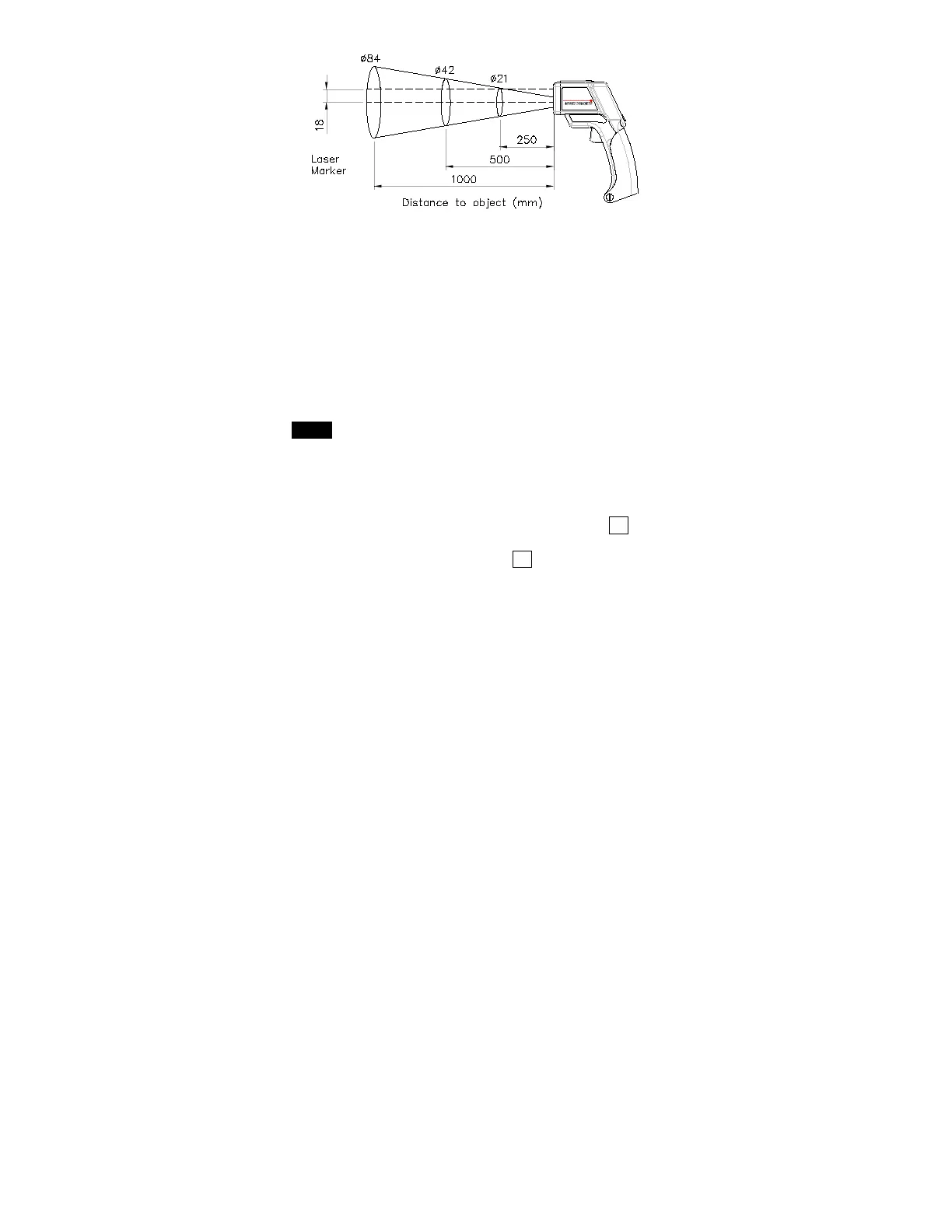
Laser offset: The laser beam is offset 18mm(0.71in) from
the focal lens. Choose a sampling spot that is large enough
to include the laser offset.
Surface Temperature: The thermometer will measure the
temperature of the first surface it detects, e.g. a glass cover,
dust or fog. Ensure the object whose temperature is to be
measured is not obstructed.
4. Selecting °C/
°F units:
When the instrument is turned on, the units that appear in the
LCD are the last units measured. To change the temperature
units, pull the trigger to turn the meter on, then press and hold
MODE for 3 seconds until the “SET” mark appears on the LCD.
Press ▲ or ▼ to select the desired °C or °F units and then pull
trigger to store the setting.
5. Data memory store and read procedure :
c To clear the data from the memory:
With the instrument turned off, press and hold the M
button,
then pull trigger until “CLR” appears on the LCD.
d Data memory: Press and hold the M
button for 3 seconds to
store the current set of readings into memory.


 To Next Page