E-13
Ⅶ. TEMPERATURE MEASUREMENT
1. Non-contact measurement :
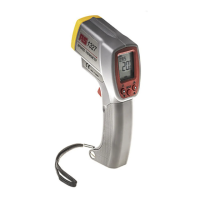
c Point the instrument at the target and pull the trigger to turn it on
and start measuring (use the laser to select the target if required).
Release the trigger to stop measuring and auto-hold the reading.
The meter will turn off automatically after 15 seconds.
d Auto detection type K thermocouple plug-in or pull-out.
If a type K thermocouple is connected to the instrument, the
emissivity symbol
will automatically change to K and the
temperature measured by the thermocouple will be displayed.
The Infrared sensor is disabled when a thermocouple is
detected by the instrument.
2. MAX/MIN hold function :
Pull & hold the trigger, then press
MODE once to cycle through
maximum (MAX), minimum (MIN) and current reading
(MAX/MIN) modes.
Press and hold the
MODE button for 3 seconds to exit this mode.
3. Continuous measurement :
Start with the instrument turned off. Press and hold the
MODE
button and then pull the trigger to turn the meter on. Release
the MODE button and the instrument will enter continuous
measurement mode. The
H symbol will not be visible in the
LCD, indicating the Hold function is disabled
c To exit continuous measurement mode: Pull the trigger to
stop continuous measurement and turn the meter off.
d MAX/MIN reading: When in continuous measurement mode,
press the MODE button once to cycle through maximum (MAX),
minimum (MIN) and current reading (MAX/MIN) modes.
Press and hold the
MODE button for 3 seconds to exit this
mode.


 To Next Page