2 3
Temperature and Humidity data logger / EnglishTemperature and Humidity data logger / English
3-Simple start:
1. Check the battery indicator is normal.
2. Connect the USB data logger to the Windows PC. The first time using, according to the
computer instructions, install the system’s own driver. Similar to A new U disk.
3. Setting the data logger. Please check the software CD, use the PC software setting the
data logger. For more information, please refer to the PC software help document.
4. Recording and download data.
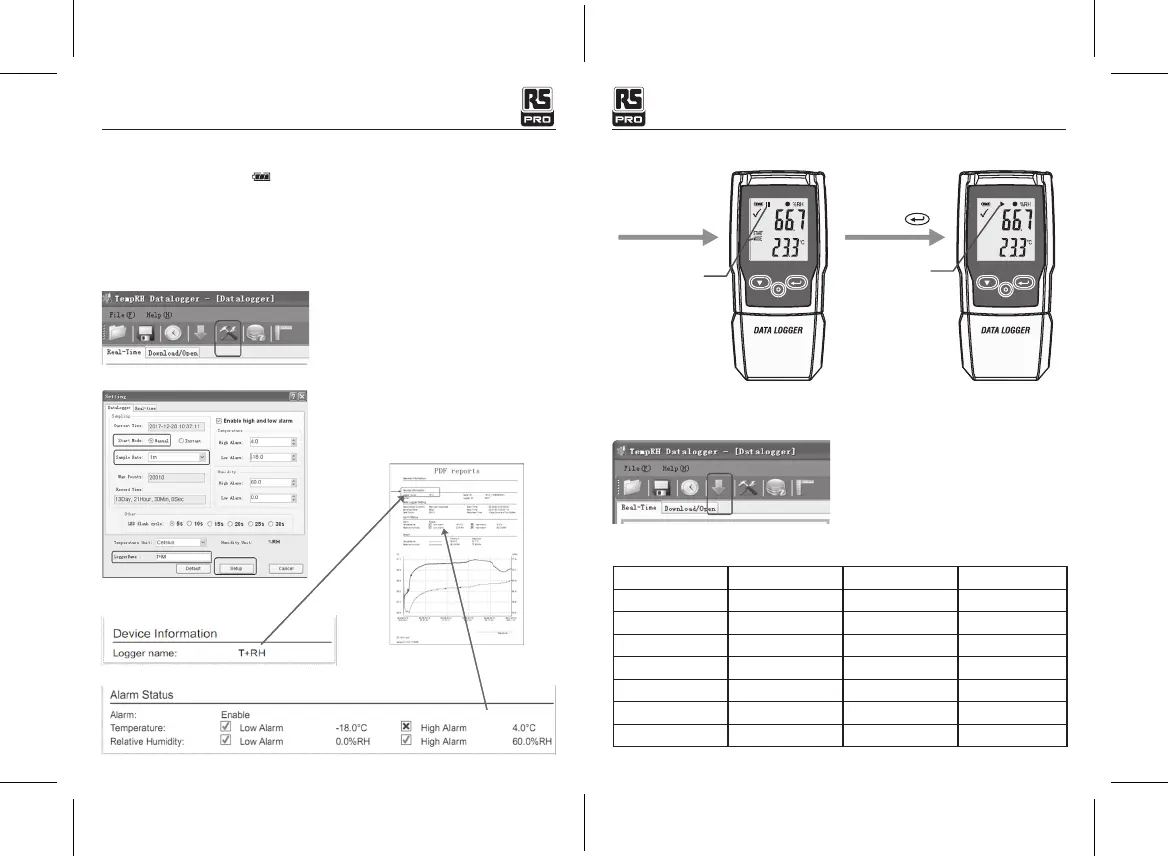
First step:
Open the software. Then open the setting window.
Second step:
refer to the picture.
*Enable high and low alarm parameter will synchronize to the PDF reports.
Third step:
After Setting
“Manual” mode
Waiting start
Long Press
Recording
Fourth step:
After recording some data, you can use the PC software download data.
Sample rate is 1minute, 10 minutes is ten data.
4-Sample rate & Record time
Sample rate/ min Record time/ day Sample rate/ min Record time/ day
1 13.9 8 111 . 2
2 27.8 9 125.1
3 41.7 10 139.0
4 55.6 15 208.4
5 69.5 20 277.9
6 83.4 25 347.4
7 97.3 27 375.2
*Logger Name will synchronize to the
PDF reports.


 To Next Page