6 7
Temperature and Humidity data logger / English
Temperature and Humidity data logger / English
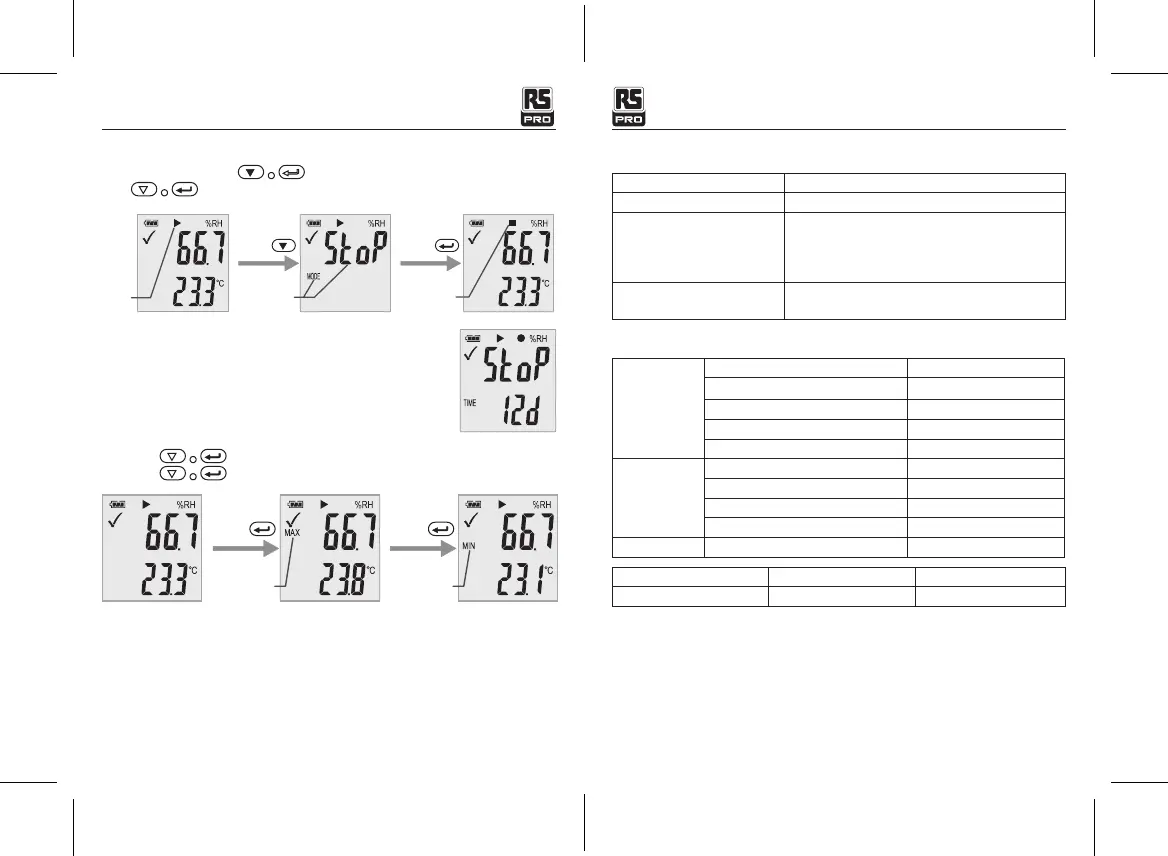
• Stop Recording
In recording state, Press the button to select this function to stop recording.
Press button and hold it for three seconds.
Recording
Short press
Manual stop
page
Long press
Stop record
• Remaining Recording Time
Display the remaining time until end of recording.
The following picture shows remaining recording time is 12 days.
• Max & Min
Short press button switch shows the highest reading since start of recording.
Short press button switch shows the lowest reading since start of recording.
Short press
Max Min
Short press
• Generating a PDF-File
As soon as the logger is connected to a USB-slot, a PDF file with all recorded data in chart and
an overview of alarms is generated automatically. During PDF generation “USB PDF” appears
on the display, green and red led light indicator, when the PDF file is ready “PDF” disappear and
remaining “USB” on the display.
Depending on the number of stored measurements, generating the PDF-le might take
up to 30 seconds.
As soon as the logger is reprogrammed, the PDF file on the logger will be deleted.
7-LED Status Guide
LED Indication Action
Cycle green single flash -Logging
Cycle red single flash -Logging, low alarm or high alarm.
-Manual mode waiting start
-Memory full
-Stop upon key
Green double flash one time -Setup successful
-check upgrade file successful
8. Specication
Relative Humidity
Overall Range 0 to 100%
Accuracy (0 to 20 and 80 to 100%) ±5.0%
Accuracy (20 to 40 and 60 to 80%) ±3.5%
Accuracy (40 to 60%) ±3.0%
resolution 0.1
Temperature
Overall Range -30 to 60
o
C (-22 to 140
o
F)
Accuracy (-30 to +0
o
C,-22 to 32
o
F) ±1
o
C, ±1.8
o
F
Accuracy (0 to 60
o
C,32 to 140
o
F) ±0.5
o
C, ±0.9
o
F
resolution 0.1
Display condition -30~60
o
C
Type Data memory Sample rate
Temperature and Humidity 20010 1min~24h
(T = 25
o
C
unless otherwise noted)
Remark:
CR2450 battery performance is optimal in room temperature. Battery life cycle will reduce at
low temperature (-18
o
C). If the device is to be used to record in extremely low temperature, it
is advised to take measures to reduce power consumption to prolong operation time. An option
includes:
• Choose battery that is designed to operate at low temperature
• Disable LED to reduce power consumption
• Set longer sample interval, 5 minutes for example


 To Next Page