4 5
Temperature and Humidity data logger / English
Temperature and Humidity data logger / English
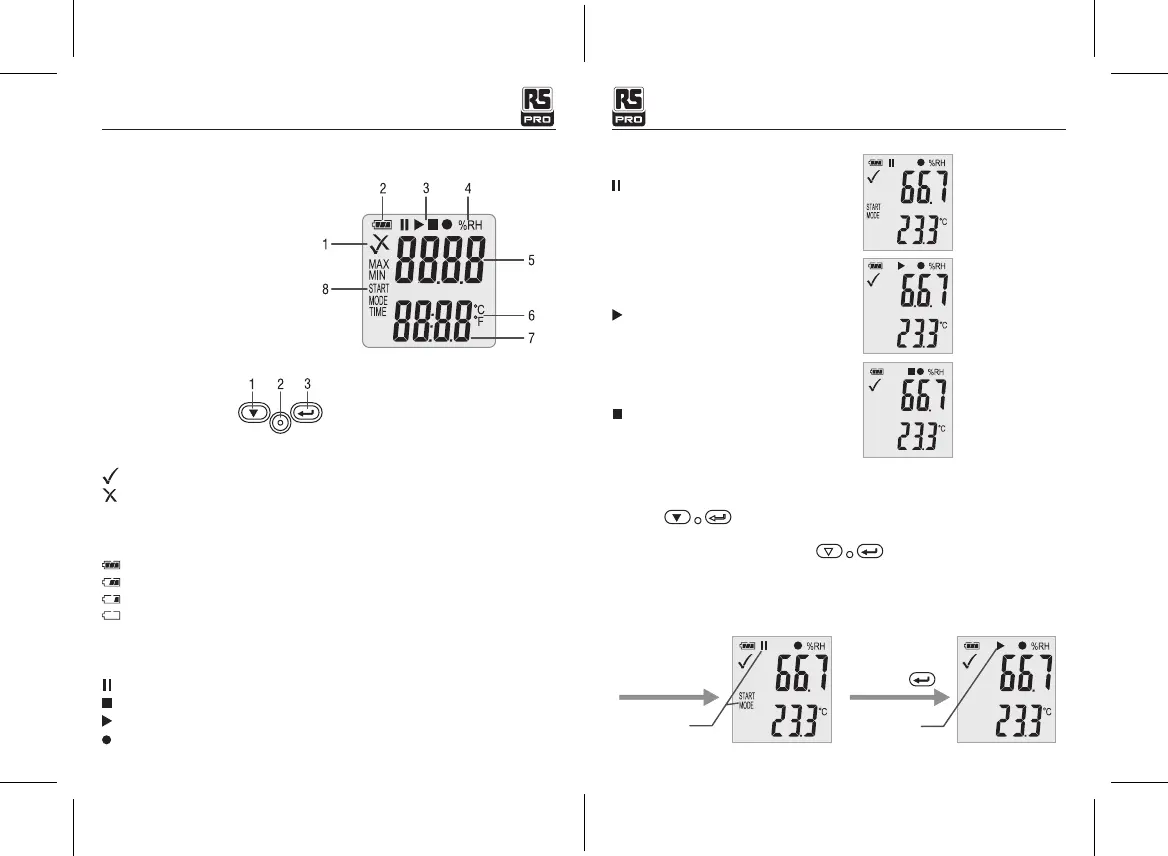
5-LCD display and button
Display:
①
... Alarm indicator
②
... Battery indicator
③
... Record indicator
④
... Humidity unit
⑤
... Humidity reading
⑥
... Temperature unit
⑦
... Temperature reading
⑧
... Function indicator
Buttons:
①
Down key
②
Replace battery
③
Enter key
Alarm indicator
Measurement values are within programmed limits. Green LED is flashing.
Measurement exceeded the programmed limits. If activated during programming a red LED is
flashing.
• Battery indicator
Full battery
Battery OK
Low battery
Empty battery, replace
• Recording indicators
The current state of the recording is indicated by the following symbols:
Waiting start
Recording stopped
Recording started
Appear after setting
State 1:
State 2:
State 3:
The logger is in the “Manual ” mode, but the
start key has not been not pressed yet.
The logger is recording.
Recording is stopped.
6-Function Menu
If the logger is not recording, only Start Recording is available.
Press the button to enter the function menu and to display humidity or air
pressure, and select the menu functions.
To activate a user menu function press the button and hold it for three seconds.
• Start Recording
To start the recording if the logger is in “Manual” mode.
After Setting
“Manual” mode
Waiting start
Long Press
Recording


 To Next Page