8
0dB
-30
-20
-15
-3
SIG
AB
POWER
-6dB PEAK PROTECT
CHANNEL A
CHANNEL B
BRIDGE
AX
2500
P r o f e s s i o n a l P o w e r A m p l i f i e r
8
0dB
-30
-20
-15
-3
I
O
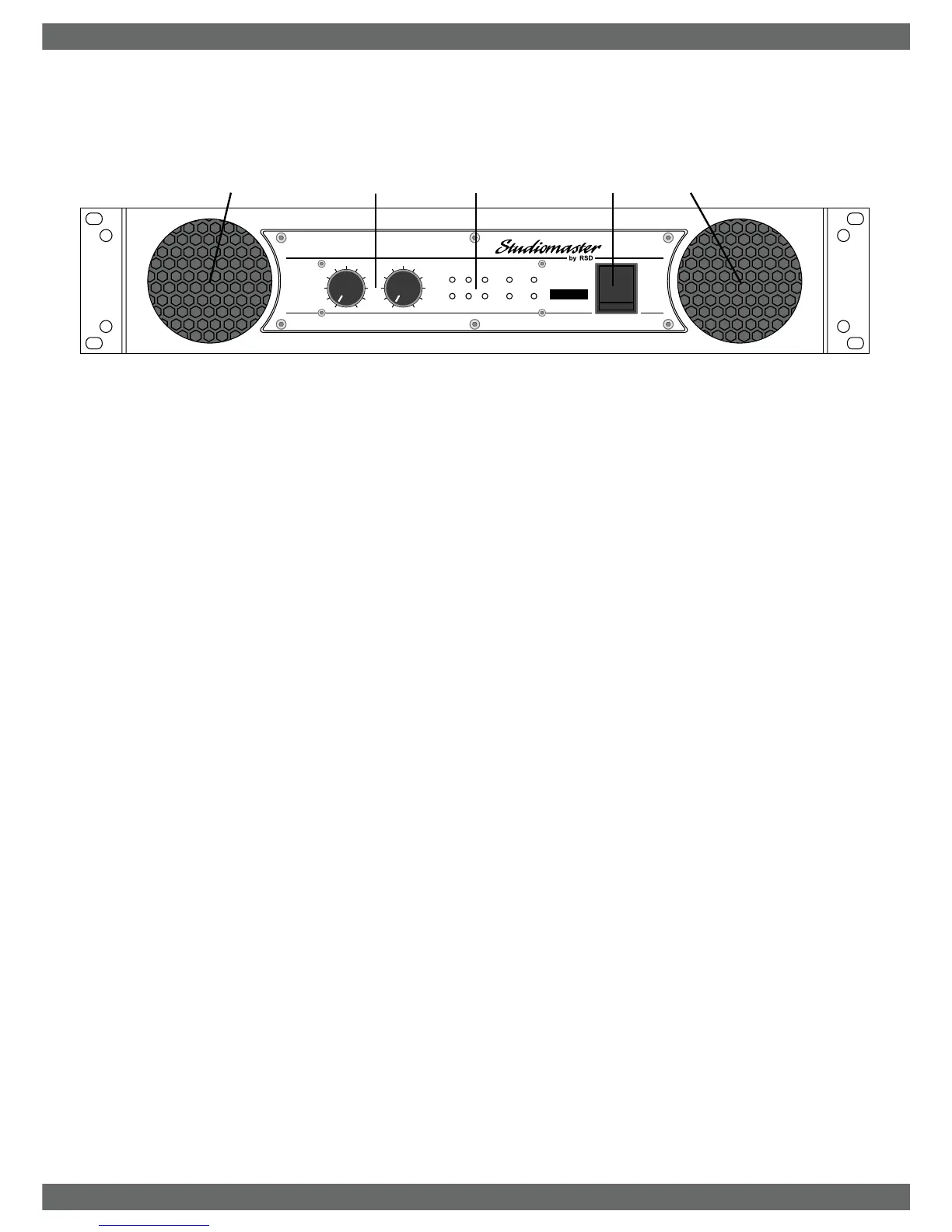
1. LEVEL controls adjust signal levels for channels A and B.
2. Status LEDS indicate the following:
a SIG indicates a signal is present and sound should be heard from the
speakers.
b -6 shows a strong signal is present.
c PEAK shows maximum output power has been reached. Increasing
the level control or input signal will not increase the output power.
d PROTECT illuminates when the amplifier is muted at switch on. After a
couple of seconds they will turn off and the speakers are connected for
normal operation. If at any stage, they stay illuminated, a fault has
occurred. See section under PROTECT LEDs for more information.
e POWER shows the amplifier is switched on.
f BRIDGE indicates the amplifier is in BRIDGE mode.
3. POWER switch.
4. Fan ventilation holes. Do not obstruct.
Front panel controls and features
STUDIOMASTER AX Amplifier Series
STUDIOMASTER AX Amplifier Series2
1
2
3
4
4
-10
-5
-10
-5


 To Next Page