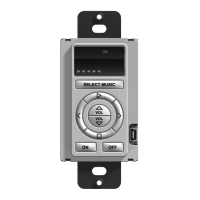
Introduction
CLEANING
Occasional cleaning may be required, depending on use.
To clean your RK1, lightly dampen a lint-free cloth with a glass
cleaner or mild detergent, and wipe the buttons, surrounding
bezel, and faceplate.
GETTING STARTED
The RK1 is turned-on by simply applying power to it. RTI
provides two power supply solutions which are sold separately:
Single Unit Power Supply
§ 16VDC, 1.6Amp
§ Provides power for up to six RK1’s
§ Part Number: 40-210285-22
CB-4 Connecting Block
§ Includes 16VDC, 4.3Amp power supply
§ Provides power for up to sixteen RK1’s
§ Provides a convenient connection hub
§ Part Number: 10-210052-11
The RK1 will enter an idle mode after a programmed time of
inactivity. After entering idle mode, the RK1 is activated by
touching any button.



 To Next Page