VX88-18G USER GUIDE
www.rticorp.com
04
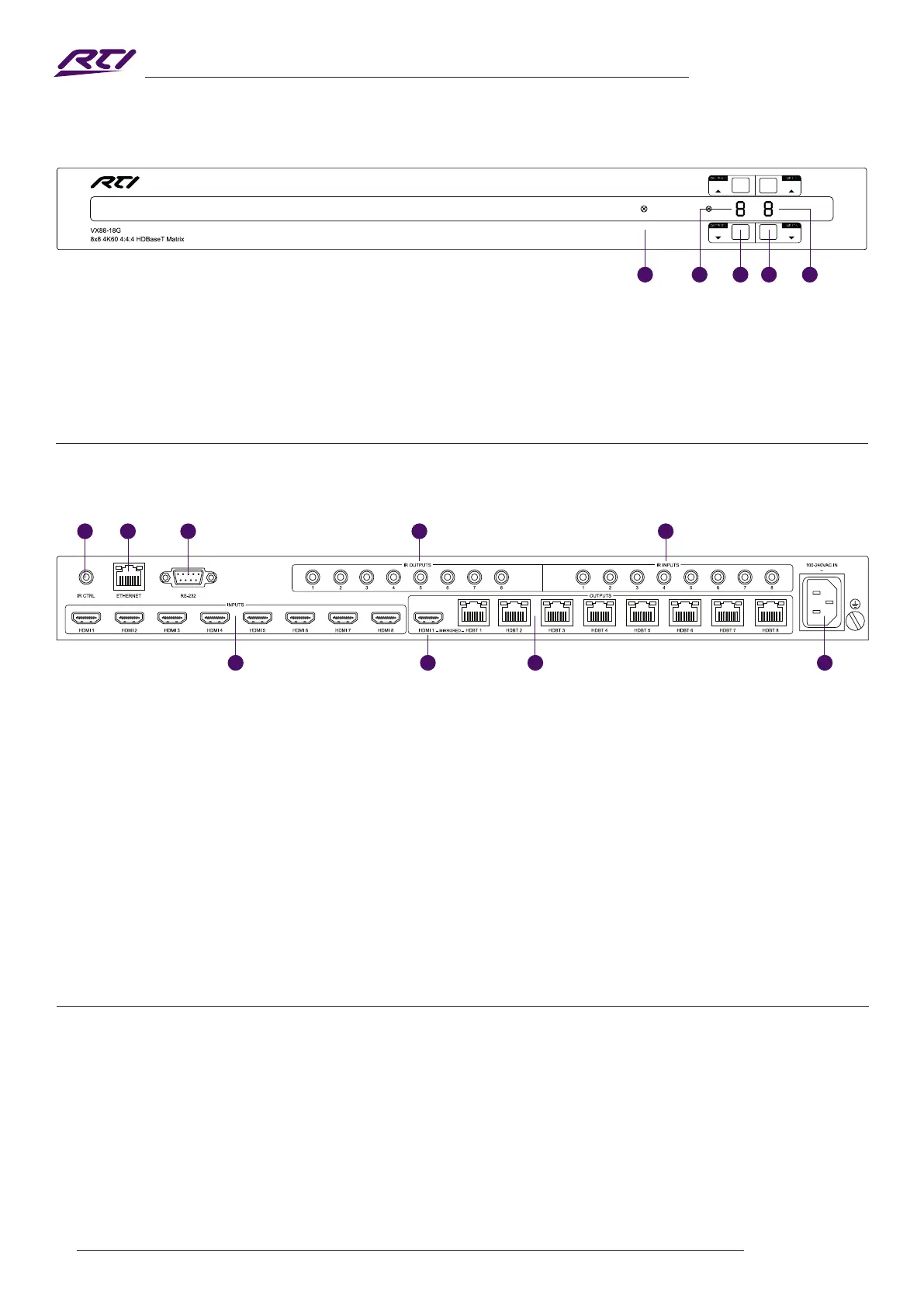
Front Panel Description
1 IR Receiver - Built in IR sensor for IR remote control of matrix
2 Output LCD - Shows the currently selected output
3 Output Up / Down Button - Press to adjust the selected output up or down
4 Input Up / Down Button - Press to adjust the selected input up or down
5 Input LCD - Shows the currently selected input
1 IR Control Input - 3.5mm stereo connector to connect to RTI MPIO port for IR control of the matrix. IRC-SM12V
required
2 TCP/IP - RJ45 connector for TCP/IP and Web GUI control of the matrix
3 RS-232 - DB9 connector for RS-232 control of the matrix, and RS-232 pass-through
4 IR Emitter Outputs - 3.5mm mono connector to connect to RTI IR emitter. Used for local source control
5 IR Receiver Inputs - 3.5mm stereo connector to connect to RTI IR receiver. Used to extend IR from matrix to
HDBaseT™ outputs 1-8
6 HDMI Inputs - Connect to source devices
7 HDMI Output - Connect to display device or AVR
8 HDBaseT™ Outputs - RJ45 HDBaseT™ port to connect to the HDBaseT™ input port of the VRX70-18G RTI
HDBaseT™ receiver
9 IEC Power Socket - Use supplied IEC power cable
Rear Panel Description
6 7 8 9
1 2 3 4 5
1 3 4 52
The Matrix features CEC control of source devices and displays via the products Web GUI and RS-232. It is possible to
send CEC commands such as power on / o, input selection as well as volume up or down.
Please see the RS-232 command list at the end of this document for a full list of CEC commands available.
Please Note: CEC is subject to the support of the sources, and displays connected to the Matrix.
CEC Control



 To Next Page