PortaMonitorPage 8-6 Calibration and Service
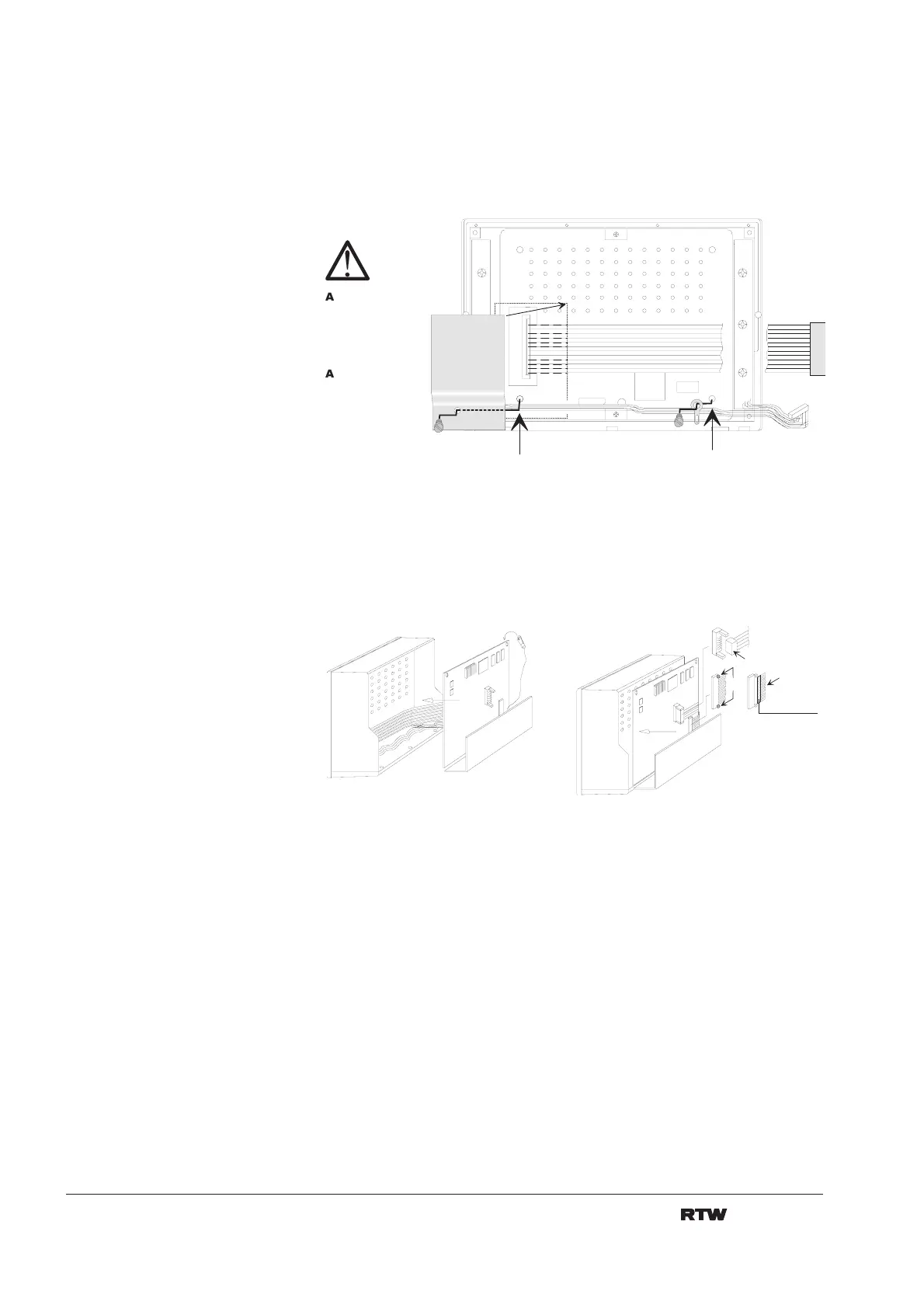
14. Carefully move the shield below the cables of the switch pcbs into the
position marked in fig 8-10, the data link cable and its connector must be
underneath. Then fasten the shield with a screw. Fasten the tab above the
cables of the switch pcbs with a screw. Avoid damage of the cables!
K o n t a k t s e i t e
c o n t a c t s i d e
1 .
2 .
3 .
Fig. 8-10: Fastening the shield and the tab
15. Place main pcb and connecting panel carefully inside the frame. Adjust
position of pcb and flat cables and reconnect flat cables (fig. 8-11).
Fig 8-11: Connecting main pcb
B e f e s t i g e n
F a s t e n
B e f e s t i g e n
F a s t e n
c h t u n g :
D a s A b s c h i r m b l e c h
m u s s
u n t e r
d i e
T a s t e n p r i n t k a b e l
g e s c h o b e n w e r d e n !
t t e n t i o n :
M a k e s u r e t o f i x t h e
s h i e l d
b e l o w
t h e
c a b l e s o f t h e s w i t c h
p c b ' s !


 To Next Page