Controls
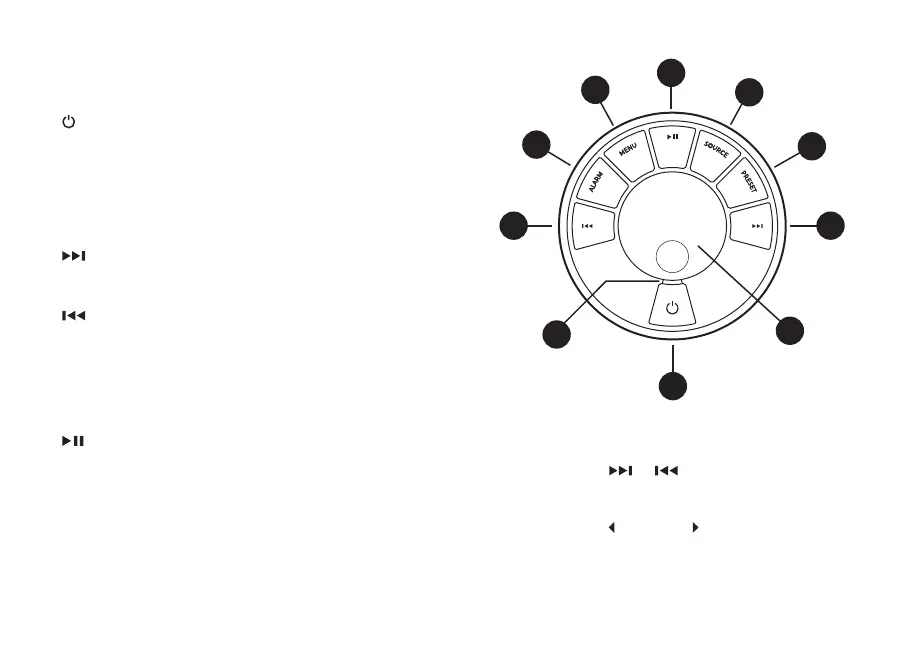
1. – STANDBY
2. CONTROL KNOB / SELECT
Rotate to adjust volume from a Now-playing screen.
Rotate to browse menus or station lists.
Press to SELECT.
Press to SNOOZE a sounding alarm. Press it again to
increase the snooze time, or press and hold to cancel.
3.
– press to skip to next station or track, press and
hold to fast forward a track or seek next FM station.
In standby, press to increase display brightness.
4.
– press to skip to previous station or track, press and
hold to rewind a track or seek the previous FM station.
In standby, press to decrease display brightness.
5. PRESET – press to recall a saved DAB/FM station or
press and hold for two seconds to save a radio station.
6. SOURCE – press to change audio source.
7.
– press to play/pause a track or mute audio.
8. MENU – press to view the options menu, press to go
back to previous screen when already in a menu.
9. ALARM / SLEEP – press to set an alarm or timer, press
and hold to set sleep timer.
10. LED – indicates radio is on and ashes when Bluetooth
is ready to connect or pair.
8
1
10
2
3
6
7
5
4
9
Tips
You can also press
or to browse menus,
sources or station lists.
Currently saved settings are highlighted with solid
angle brackets, eg
Radio text .
Press = tap or press and immediately release.
Press and hold = press and release after two seconds.


 To Next Page