Common functions
Switch on and to standby
Press STANDBY to turn your radio on. Press again to
switch to standby.
Now-playing screens
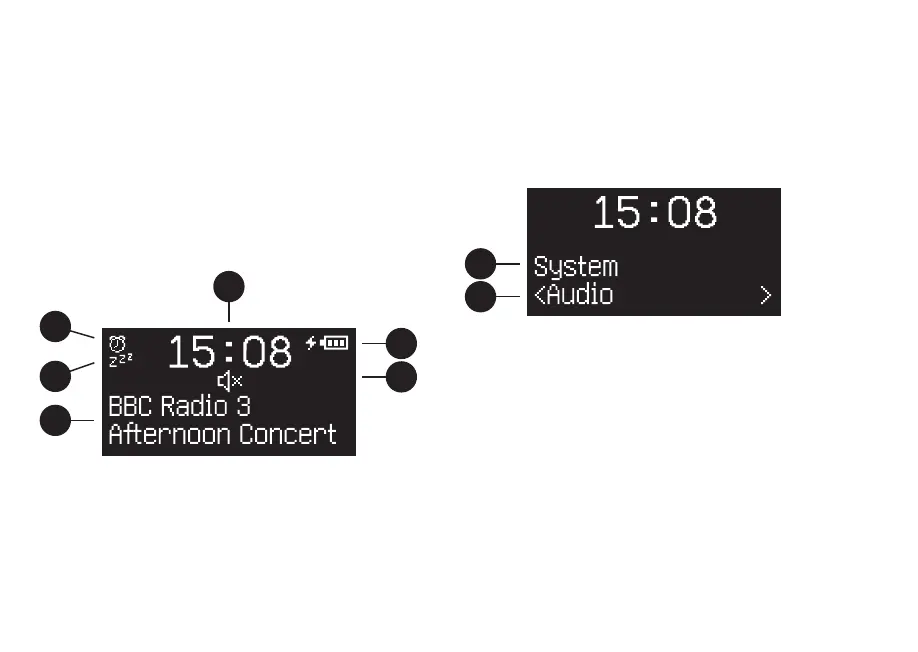
Unless you’re adjusting a setting, the screen will look
like the example below.
2
4
1
5
6
3
1. Clock
2. Alarm icon
3. Sleep timer icon
4. Station / track info
5. Battery status *
6. Mute icon
Menu screens
To change a setting, press MENU to display the list of
available options, rotate the CONTROL KNOB to scroll
through the list, and then press the knob to conrm
your selection.
7
8
7. Menu title
8. Menu option
To change settings – press MENU
To scroll through options – rotate CONTROL KNOB
To select option – press CONTROL KNOB
To exit menu – press MENU to go back to the
previous screen until you get back to the Now-playing
screen, or wait for a few seconds
*only shown when the optional BackPack
battery is tted



 To Next Page