20
How to Use Your Rumble Tu Serene Express
About Your Rumble Tu Serene Express
Depending on your preference and your
baby's sucking habit, you can choose
to express your milk in either the Swift
Expression or Natural Expression
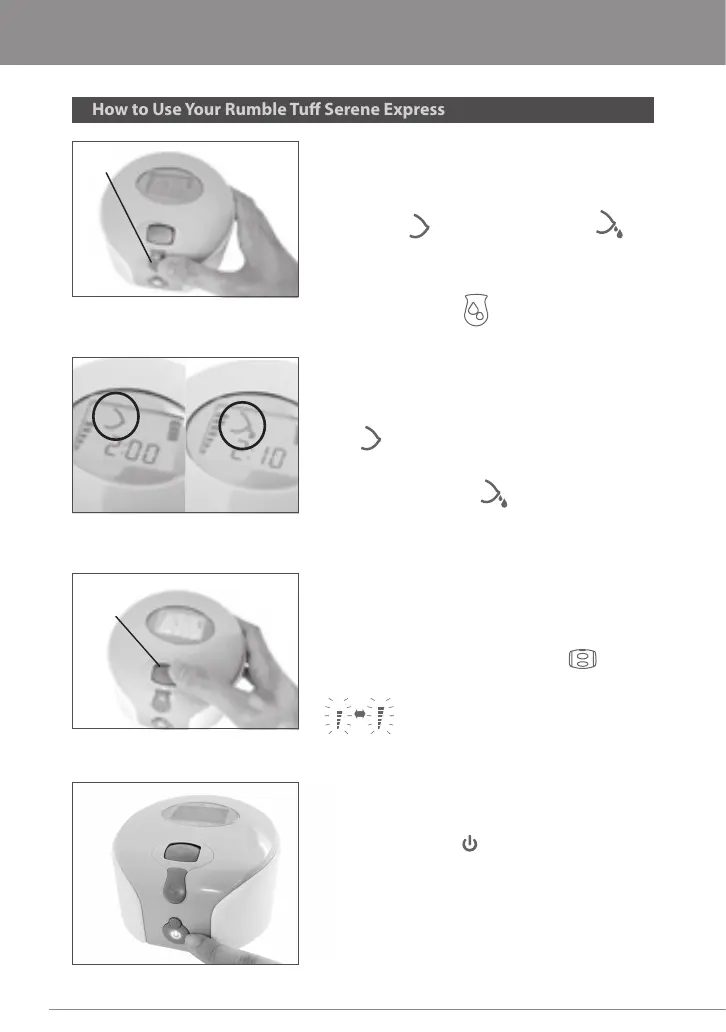
settings. To switch from Swift Expression
to Natural Expression, press the
Expression Button once.
Expression Button
Reex / Swift Natural
To check which expression setting that
you are on, check the LCD display for the
Expression Cycle Icon. The breast shape
icon indicates that you are at Reex /
Swift Expression setting. The breast shape
with milk drops icon indicates that
you are at Natural Expression setting.
Vacuum Adjusting
Wheel
Adjust the suction in the Natural
Expression to the most comfortable and
eective level while pumping by rolling
the Vacuum Adjusting Wheel up (+)
or down (-) .
When your pumping session is
nished, turn the pump o by pressing
the Power Button.



 To Next Page