23
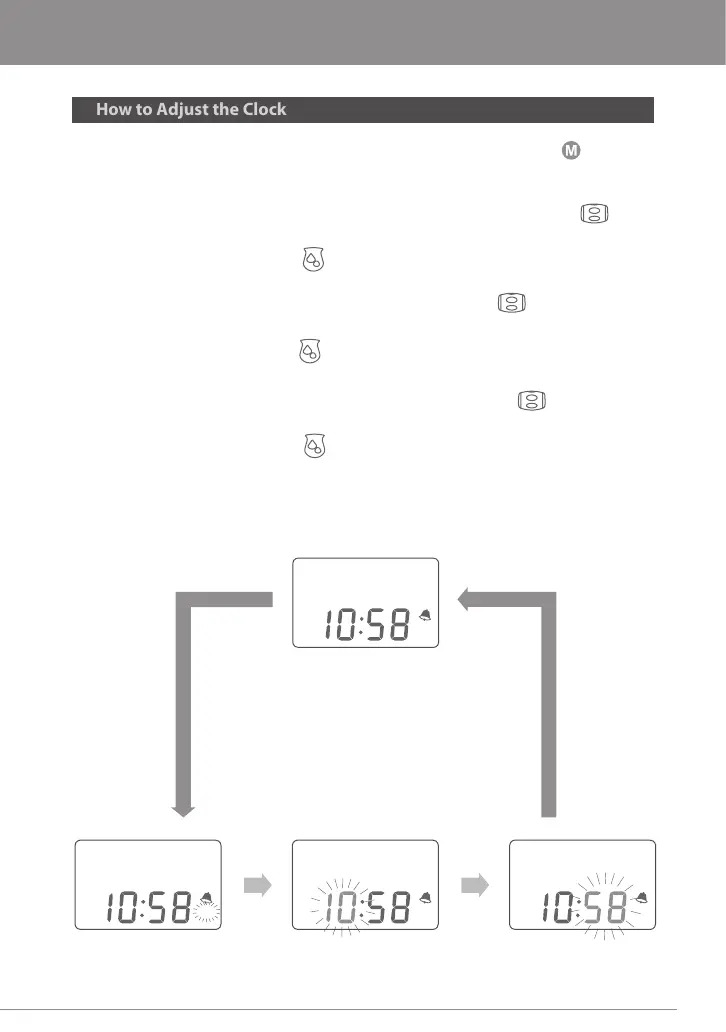
1. While in the Clock/Standby Mode, press and hold the M Button for 3
seconds to go into Clock Setting mode. A beep will sound and the AM/PM
icon will ash.
2. To change between AM/PM, turn the Vacuum Adjustment Wheel
up (+) or down (-).
3. Press the Expression Button once to change from AM/PM to the hour.
The hour number will ash.
4. To change the hour, turn the Vacuum Adjusting Wheel clockwise to
increase (+) or decrease (-) the hour.
5. Press the Expression Button again to change the minutes. The minute
number will ash.
6. To change the minutes, use the Vacuum Adjusting Wheel to
increase (+) or decrease (-) the minutes.
7. Press the Expression Button one last time to save your settings.
Press
the Expression
Button
Press
the Expression
Button
AM
Press M Button
for more
than 3 sec
Press
the Expression
Button
** Roll Adjusting Wheel to adjust
AM / PM Adjusting "Hour" Adjusting "Minute" Adjusting
Clock
AM
AM
AM
Note: While in any Clock Setting mode, if no adjustments are made within 10 seconds, the
setting will automatically save and the LCD Screen will return to Clock-Standby Mode.
Please install and keep batteries in place to preserve the Clock and Alarm function.
About Your Rumble Tu Serene Express



 To Next Page