
 Need help?
Do you have a question about the Russell Hobbs 14752 and is the answer not in the manual?
Key safety guidelines to follow when using the coffee maker to prevent accidents and damage.
Initial setup steps to prepare the coffee maker for its first use.
Guidance on coffee types, grinding, storage, and milk preferences for optimal taste.
Advice on using bottled water and factors affecting coffee taste, including reheating.
Steps for preparing the machine, filling the water reservoir, and adding coffee grounds or beans.
Explanation of how to adjust the water bypass valve for controlling coffee extraction.
Instructions for closing the coffee maker lid and correctly placing the carafe on the hotplate.
Initial steps to plug in and turn on the coffee maker, noting display and light indicators.
How to immediately brew coffee using the 'coffee now' function, including mill operation.
Instructions for setting the clock and programming the timer for automatic brewing.
How to select the grind duration for coffee beans, affecting the brewing process.
Guidance on letting the timer operate and how to cancel the brewing timer.
Information on the automatic shut-off and the 'keep warm' function for brewed coffee.
How to serve coffee mid-brew and activate the specific 4-cup brewing mode.
Detailed steps for adjusting the duration the coffee maker keeps coffee warm.
Instructions for descaling the coffee maker to maintain performance and longevity.
Routine cleaning advice for removable parts and external surfaces, and what to avoid.
Details on earthing, plug replacement, and fuse types for safe electrical operation.
Explanation of the wheelie bin symbol indicating proper disposal of electronic waste.
Information on obtaining technical support, warranty, and product registration.
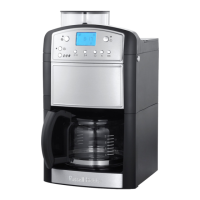
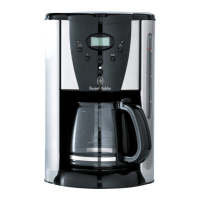
This document provides instructions for a Russell Hobbs coffee maker, a device designed for brewing coffee from either whole beans or pre-ground coffee. It features an integrated coffee mill for fresh grinding and a hotplate to keep coffee warm after brewing.
The coffee maker's primary function is to brew coffee. It can handle both whole roasted coffee beans and ready-ground coffee. When using whole beans, the integrated coffee mill grinds them automatically before brewing. The brewing process involves heating water, which then passes through the coffee grounds in a filter holder, extracting the coffee's flavor, and dripping into a carafe placed on a hotplate. The hotplate then keeps the brewed coffee warm for an extended period. The device includes a water bypass valve to adjust the amount of water bypassing the filter, allowing for control over the extraction process and preventing unwanted flavors. A non-drip valve in the filter holder prevents coffee from dripping onto the hotplate when the carafe is removed during brewing. The coffee maker also features a descaling function to maintain its performance and longevity.
The coffee maker offers several user-friendly features. To begin, the reservoir is filled with water, ensuring it's between the minimum of 2 cups and the maximum fill line. For ground coffee, two rounded teaspoons per cup are suggested, placed directly into the filter. For whole beans, one level tablespoon per cup is recommended, placed into the coffee mill. The water bypass valve can be adjusted to either increase or decrease the amount of water bypassing the filter, allowing users to fine-tune the coffee's strength and flavor.
The device can be set to brew coffee immediately or at a preset time. For immediate brewing, users simply press the brew button. If using whole beans, the mill will operate first. For delayed brewing, a timer function allows users to set a specific start time. The clock can be set to the correct hour and minute, and the timer can be activated to begin brewing automatically at the desired time. The display shows the current time and any active timer settings.
The coffee maker also includes a "1-4 function" for brewing smaller quantities. If only 4 cups are desired, activating this function before brewing will ensure the machine stops after brewing 4 cups, and the "keep warm" function will not be activated.
During brewing, users can remove the carafe for a quick cup without worrying about drips, thanks to the non-drip valve. However, it's advised to replace the carafe within about 20 seconds to prevent the filter holder from overflowing. The hotplate keeps the coffee warm for up to 3 hours and 59 minutes after brewing. The "keep warm" time can be adjusted from the default 2 hours to a maximum of 3 hours and 59 minutes, though the default is generally recommended. The brewing process or the "keep warm" period can be manually interrupted by pressing a dedicated button.
The device provides visual indicators for various states: a light glows when the coffee maker is on, during brewing, and when the timer is active. A dot on the display indicates selected grind times (20, 30, or 40 seconds) or an active timer. If the heating tube becomes blocked, a specific light will glow, indicating the need for descaling.
Regular maintenance is crucial for the coffee maker's performance and lifespan. After each use, the filter holder, filter, and carafe should be cleaned to prevent residue from spoiling future brews. These removable parts can be washed in warm soapy water or placed in the top tray of a dishwasher. The exterior surfaces of the coffee maker should be cleaned with a damp cloth. It's important never to immerse the coffee maker in water or any other liquid, and to avoid harsh or abrasive cleaning agents.
Descaling is a key maintenance task to prevent scale build-up, which can cause the heating element to overheat, reduce its working life, and lengthen brewing time. The instructions recommend descaling regularly, and more frequently in areas with very hard water (potentially once a month) or if filtered water is not used. A proprietary descaler suitable for plastic-bodied products should be used, following its specific instructions. After descaling, the coffee maker should be run through two complete cycles with clean, fresh water (without coffee) to remove any chemical residues. The device will indicate when descaling is needed by illuminating a specific light if the heating tube becomes blocked. However, it is advised not to wait for this indicator and to descale proactively. Products returned under guarantee with faults due to scale will incur a repair charge. Before any cleaning or storage, the coffee maker should be unplugged and allowed to cool down completely. When disposing of coffee grounds, they should be placed in a bin, not flushed down the sink, to prevent blockages.
 General
| Housing material | Plastic |
|---|---|
| Water level indicator | Yes |
| Keep warm function | Yes |
| Anti-drip function | Yes |
| Removable Filter Holder | Yes |
| Cord Storage | Yes |
| Water tank capacity | 1.25 liters |
| Product Type | Filter coffee machine |


 To Next Page