This document is a user guide for the 2850-000 remote control, model 850A, produced by ruwido austria gmbh. The document is dated 2020-08-19 and is version 1.
The remote control is designed for user operation with a Set-Top Box (STB) and other devices like a TV or Amplifier (AMP). It features both Bluetooth Low Energy (BLE) and Infrared (IR) communication capabilities.
Function Description:
The primary function of the 850A remote control is to provide a means of controlling a Set-Top Box (STB) and other entertainment devices. It supports manual pairing with an STB, transmits commands via both BLE and IR, and includes features for managing its own settings, such as deleting pairings and performing a factory reset.
Usage Features:
- Manual Pairing:
- To initiate pairing with an STB, the user must first power on the STB.
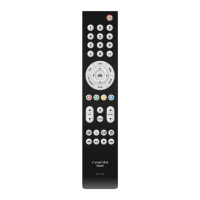
- Then, simultaneously press the "play/pause" and "vod" buttons on the remote control for 3 seconds. This action starts the pairing process, indicated by a continuous orange LED flashing on the remote.
- Successful pairing is confirmed when the orange LED stops flashing.
- Deleting Pairing:
- To delete an existing pairing from the remote control, the user needs to press the "4" and "6" buttons simultaneously for 3 seconds.
- Upon successful deletion, the LED on the remote will flash red 4 times.
- Factory Reset:
- To restore the remote control to its factory default settings, the user must press and hold the "7" and "9" buttons for a minimum of 3 seconds.
- Similar to pairing deletion, the LED will flash red 4 times to indicate a successful factory reset.
LED Behavior (Indicators):
The remote control incorporates two LEDs, a "top LED (stb)" and a "bottom LED (tv)", to provide visual feedback on its operational status and command transmission.
- Top LED (STB):
- Flashes green when a Set-Top Box (STB) BLE command is being transmitted. This indicates that the remote is communicating with the STB via Bluetooth.
- Flashes red when an STB IR command is being transmitted. This signifies that the remote is sending commands to the STB via infrared.
- Flashes orange during the BLE pairing process. This visual cue guides the user through the pairing procedure.
- Bottom LED (TV):
- Flashes red when a TV or AMP (Amplifier) IR command is being transmitted. This indicates that the remote is sending infrared commands to a television or amplifier.
Important Technical Specifications / Compliance:
The device adheres to several regulatory standards, ensuring its safe and compliant operation.
- User Information FCC 15.2:
- Emphasizes that any changes or modifications to the device not expressly approved by the party responsible for compliance could void the user's authority to operate the equipment. This is a standard warning for electronic devices to prevent unauthorized alterations that might affect performance or compliance.
- Part 15 Statement. FCC 15.19/RSS Gen Issue 3 Sect. 7.1.3:
- This device complies with Part 15 of the FCC Rules and with Industry Canada license-exempt RSS standard(s).
- Operation is subject to two specific conditions:
- The device must not cause harmful interference.
- The device must accept any interference received, including interference that may cause undesired operation.
- This ensures that the remote control operates without disrupting other electronic devices and is resilient to external interference.
- Le présent appareil est conforme aux CNR d'Industrie Canada applicables aux appareils radio exempts de licence. L'exploitation est autorisée aux deux conditions suivantes : (1) l'appareil ne doit pas produire de brouillage, et (2) l'utilisateur de l'appareil doit accepter tout brouillage radioélectrique subi, même si le brouillage est susceptible d'en compromettre le fonctionnement.
- This is the French equivalent of the FCC/RSS statement, reiterating compliance with Industry Canada's license-exempt radio standards and the two conditions regarding interference.
- Statement Class B Digital Device FCC 15.105:
- NOTE: This equipment has been tested and found to comply with the limits for a Class B digital device, pursuant to part 15 of the FCC Rules. These limits are designed to provide reasonable protection against harmful interference in a residential installation.
- The equipment generates, uses, and can radiate radio frequency energy. If not installed and used according to instructions, it may cause harmful interference to radio communications.
- However, there is no guarantee that interference will not occur in a particular installation.
- If the equipment does cause harmful interference to radio or television reception (which can be determined by turning the equipment off and on), the user is encouraged to try to correct the interference by one or more of the following measures:
- Reorient or relocate the receiving antenna.
- Increase the separation between the equipment and receiver.
- Connect the equipment into an outlet on a circuit different from that to which the receiver is connected.
- Consult the dealer or an experienced radio/TV technician for help.
- This section provides guidance on how to mitigate potential electromagnetic interference, a common issue with electronic devices, especially in residential settings.
Maintenance Features:
While the document does not explicitly detail "maintenance features" in terms of user-performed upkeep, the "factory reset" function can be considered a maintenance tool. It allows users to troubleshoot issues by reverting the remote to its initial state, which can resolve configuration problems or unexpected behavior without requiring professional intervention. The instructions for deleting pairings also fall under user-level configuration management, which can be seen as a form of maintenance.
The document is copyrighted by ruwido austria gmbh, and all information contained within is their intellectual property. Reproduction, modification, communication to third parties, and any other use are strictly prohibited without prior written accordance from ruwido.
- Address: Koestendorfer Str. 8, 5202 Neumarkt, Austria
- Telephone: +43 6216 4571-0
- Email: office@ruwido.com
- Website: www.ruwido.com

 Need help?
 General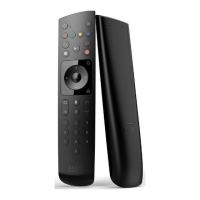

 To Next Page