2. While firmly holding the add-on, push
straight into the Click-Link® shaft (Fig. 13).
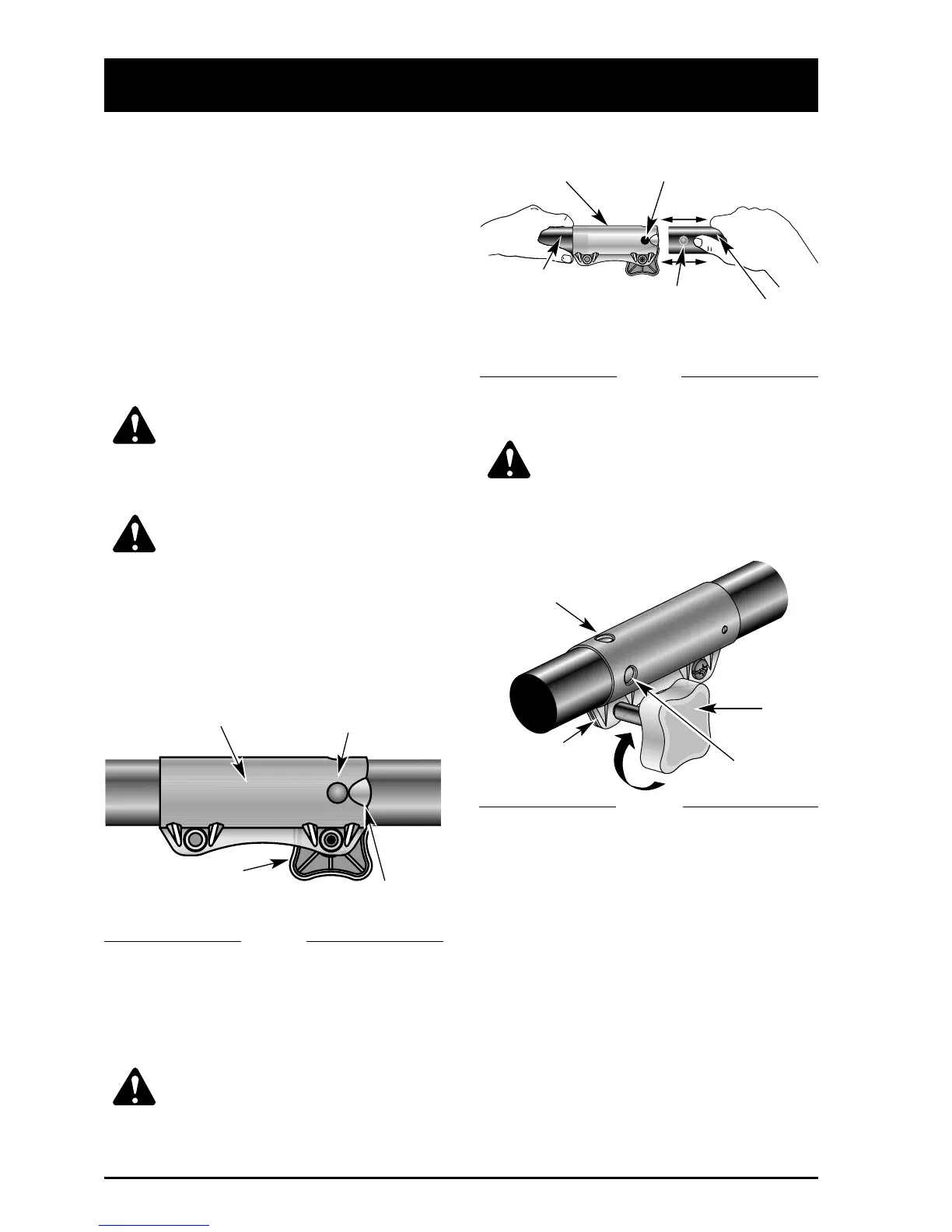
NOTE: Aligning the release button with the
guide recess will help installation
(Fig. 12)
.
CAUTION: Lock the release button
in the primary hole and securely
tighten the knob before operating
this unit.
3. Tighten the knob securely clockwise
(Fig. 14).
CAUTION: Add-ons, are to be used
in the primary hole unless stated
otherwise in the specific add-ons
operator’s manual. Using the wrong
hole could lead to personal injury, or
damage to the unit.
OPERATING THE CLICK-LINK
®
SYSTEM - MODEL 725r
The model 725r Click-Link® system enables the
use of these optional
add-ons
.
Blower/Vacuum . . . . . . . . . . . . . . . . . . BV720r
Cultivator . . . . . . . . . . . . . . . . . . . . . . . GC720r
Edger . . . . . . . . . . . . . . . . . . . . . . . . . . LE720r
Hedgetrimmer . . . . . . . . . . . . . . . . . . . HS720r
Snowthrower . . . . . . . . . . . . . . . . . . . . ST720r
Straight Shaft Trimmer . . . . . . . . . . . . . SS725r
Sweeper/Blower . . . . . . . . . . . . . . . . . . SB720r
Tree Pruner . . . . . . . . . . . . . . . . . . . . . . TP720r
Turbo Blower . . . . . . . . . . . . . . . . . . . . TB720r
WARNING: Read and understand
operator’s manual for add-on prior to
operation.
Installing an Add-On:
WARNING: To avoid serious
personal injury, shut unit off before
removing or installing add-ons.
To change from one add-on to another
NOTE: To make installing or removing the
add-on easier, place the unit on the
ground or on a work bench.
1. Loosen the knob counterclockwise (Fig. 12).
Removing an Add-On:
1. Loosen the knob counterclockwise (Fig. 12).
2. Press and hold the release button (Fig. 12).
3. While firmly holding the upper shaft housing,
pull the add-on straight out of the
Click-Link® (Fig. 13).
Basic Trimming or Using Other RYOBI
Add-Ons:
Lock the release button in the Primary Hole in
the Click-Link® (Fig. 13).
Edging with the Cutting Attachment
Lock the release button in the 90˚ Edging Hole
or the 180˚ Edging Hole in the
Click-Link® (Fig. 14).
OPERATING INSTRUCTIONS
13
Click-Link®
Click-Link®
Release Button
Guide Recess
Knob
Primary Hole
Upper Shaft
Housing
Lower Shaft
Housing
Release Button
90˚ Edging Hole
180˚ Edging Hole
Washer
Knob
Fig. 12
Fig. 13
Fig. 14


 To Next Page