5
English
battery life. Under some operating conditions, these
built-in features may cause the battery and the tool it is
powering to act differently from nickel-cadmium batteries.
During some applications, the battery electronics may
signal the battery to shut down, and cause the tool to
stop running. To reset the battery and tool, release the
trigger and resume normal operation.
NOTE: To prevent further shut down of the battery, avoid
forcing the tool. Switching to a lower speed will also
prevent shut down.
If releasing the trigger does not reset the battery and
tool, the battery pack is depleted. If depleted, the battery
pack will begin charging when placed on the lithium-ion
charger.
OPERATION
WARNING
Do not allow familiarity with products to make
you careless. Remember that a careless fraction
of a second is sufficient to inflict serious injury.
WARNING
Always wear safety goggles or safety glasses
with side shields when operating products.
Failure to do so could result in objects being
thrown into your eyes, resulting in possible
serious injury.
WARNING
Do not use any attachments or accessories
not recommended by the manufacturer of this
product. The use of attachments or accessories
not recommended can result in serious personal
injury.
APPLICATIONS
You may use this product for the purposes listed below:
Cutting all types of wood products (lumber, plywood,
paneling, composition board, and hard wood)
This product will accept Ryobi One+ 18 V lithium-ion
battery packs and Ryobi One+ 18 V nickel-cadmium
battery packs. Both types of battery packs are shown on
this page. Following pages will show the lithium-ion 18 V
battery pack.
For complete charging instructions, refer to the operator’s
manual for the BCL-1800 charger.
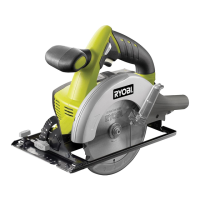
NOTE:Join dust port to a vacuum when using this
Cir. Saw.
INSTALLING THE BATTERY PACK(Not Included)
See Figure 4.
NOTE: The battery pack is shipped in a low charge
condition. Therefore, it must be charged prior to use.
Refer to CHARGING BATTERY PACK for charging
instructions.
Place the battery pack in the saw. Align the raised rib
on the battery pack with the groove inside the saw,
then slide the battery pack into the saw.
Make sure the latches on each side of your battery
pack snap into place and the battery pack is secured
in the saw before beginning operation.
CAUTION
When placing battery pack in the tool, be sure
raised rib on battery pack aligns with the bottom
of the tool and latches into place properly.
Improper installation of the battery pack can
cause damage to internal components.
REMOVING THE BATTERY PACK(Not Included)
See Figure 4.
Locate the latches on the side of the battery pack and
depress them to release the battery pack from the
saw.
Remove battery pack from the saw.
WARNING
Battery tools are always in operating condition.
Therefore, switch should always be locked when
not in use or carrying at your side.
KICKBACK
See Figures 5 - 8.
Kickback occurs when the blade stalls rapidly and the
saw is driven back towards you. Blade stalling is caused
by any action which pinches the blade in the wood.
DANGER
Release switch immediately if blade binds or saw
stalls. Kickback could cause you to lose control
of the saw. Loss of control can lead to serious
injury.
To guard against kickback, avoid dangerous practices
such as the following.
Setting blade depth incorrectly.
Sawing into knots or nails in workpiece.
Twisting the blade while making a cut.
Making a cut with a dull, gummed up, or improperly
set blade.
Supporting the workpiece incorrectly.
Forcing a cut.


 To Next Page
 Loading...