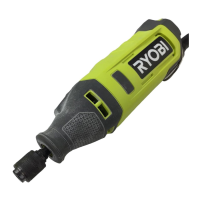
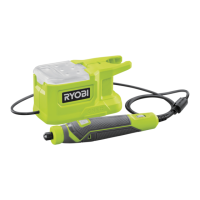
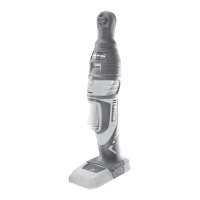
This document describes the RYOBI RRT4 Rotary Tool, a versatile cordless power tool designed for a variety of precision tasks.
Function Description
The RYOBI RRT4 Rotary Tool is intended for consumer use by adults who have read and understood its instructions and warnings. With appropriate accessories, it performs grinding, sanding, rust removal, sculpting, polishing, buffing, etching, and engraving. It is not designed for dental, human, or veterinary medical applications.
Important Technical Specifications
- Model: RRT4
- Voltage: 4 V Direct Current
- Collet: 3.2 mm (1/8")
- Maximum Allowable Overhang: 30 mm
- Maximum Mandrel Length: 65 mm
- Rated Speed: 5,000 - 25,000 min⁻¹ (Revolutions per minute)
- Weight (excluding battery pack): 0.225 kg
- Sound Pressure Level (LPA): 61.0 dB(A) with 3 dB(A) uncertainty
- Sound Power Level (LWA): 72.0 dB(A) with 3 dB(A) uncertainty
- Vibration Emission Value (Near Head): 2.855 m/s² with 1.5 m/s² uncertainty
- Vibration Emission Value (Body): 2.139 m/s² with 1.5 m/s² uncertainty
- Compatible Battery Pack: RB420
- Ambient Temperature Range (Operation): 0°C to 40°C
- Ambient Temperature Range (Storage): 0°C to 40°C
- Ambient Temperature Range (Charging System): 10°C to 38°C
Usage Features
The RRT4 features a variable speed dial with five settings, ranging from 5,000 RPM to 25,000 RPM, allowing users to select the appropriate speed for different materials and applications. The manual provides a speed dial settings chart with recommendations for various materials like soft wood, hard wood, laminates, plastics, steel, aluminum, brass, shell/stone, ceramic, and glass, across different accessory types such as cut-off discs, fiberglass cut-off wheels, sanding drums, felt polishing wheels, aluminum oxide grinding stones, silicon carbide grinding stones, drill bits, and drywall cutting bits.
Key components include:
- Battery port and cap
- LED indicator
- Variable speed dial
- On/off switch
- Spindle lock button
- Collar and quick-change collet
- USB-C port for charging
- Accessories kit and USB cable
- USB power adaptor
Operating instructions cover:
- Battery Insertion/Removal: The battery pack is inserted into the battery port and secured with the battery cap. Removal involves unlocking the cap and pulling out the battery.
- Accessory Installation/Removal: The spindle lock button is pressed to secure the shaft, allowing the collet nut to be loosened or tightened with the provided wrench. Accessories are inserted fully into the collet before tightening. The quick-change collet allows for faster accessory changes.
- Power On/Off and Speed Adjustment: The on/off switch activates or deactivates the tool. The variable speed dial adjusts the rotational speed from 1 (minimum) to 5 (maximum).
- LED Indicator: The LED provides visual feedback on battery status and tool conditions:
- Solid Green: Charged
- Solid Red: Low Battery (5-25%)
- Flashing Red (3 Flashes): Very Low Battery (0-5%)
- Flashing Red (6 Flashes): Overload Protection
- Flashing Red (9 Flashes): High Temperature Protection
- Charging: The battery pack is charged via the USB-C port using the provided USB cable and power adaptor. Charging time is approximately 0-5 hours.
- Safe Operation: Users are instructed to maintain a firm grip, position their body to resist kickback, avoid snagging the accessory, and use appropriate personal protective equipment (face shield, safety goggles, dust mask, hearing protectors, gloves, workshop apron). The manual emphasizes not forcing the tool, using the correct accessory for the application, and ensuring accessories are undamaged and properly installed.
Maintenance Features
- General Maintenance: The manual stresses the importance of keeping the work area clean and well-lit, and storing idle power tools out of reach of children.
- Cleaning: Plastic parts should be cleaned with a clean cloth to remove dirt and carbon dust. Solvents, brake fluids, gasoline, petroleum-based products, or penetrating oils should not come into contact with plastic parts as they can cause damage.
- Accessory Inspection: Before each use, accessories should be inspected for chips, cracks, tears, excess wear, or loose/cracked wires. Damaged accessories should not be used.
- Nail Removal: All nails should be removed from the workpiece before using the product to prevent serious injury.
- Servicing: All repairs should be performed by a qualified repair person using only identical replacement parts to ensure tool safety and reliability. Damaged battery packs should only be serviced by the manufacturer or authorized service providers.
- Troubleshooting Accessory Insertion/Release: Specific instructions are provided for situations where an accessory cannot be inserted into or released from the quick-change collet, including using the provided wrench to adjust the collet.
Safety Warnings
The document includes comprehensive safety warnings covering work area safety, electrical safety, personal safety, power tool use and care, battery tool use and care, and specific warnings for rotary tool operations such as grinding, sanding, wire brushing, polishing, carving, or abrasive cutting-off.
Key safety points include:
- Avoiding explosive atmospheres.
- Keeping children and bystanders away.
- Matching power tool plugs to outlets and avoiding adapter plugs with earthed tools.
- Avoiding body contact with earthed surfaces.
- Not exposing power tools to rain or wet conditions.
- Not abusing the cord.
- Using an RCD in damp locations.
- Staying alert and using common sense.
- Wearing eye protection, dust mask, hearing protectors, gloves, and workshop apron.
- Preventing unintentional starting.
- Removing adjusting keys/wrenches before turning on the tool.
- Maintaining proper footing and balance.
- Dressing properly (no loose clothing or jewelry).
- Using dust extraction facilities if provided.
- Not forcing the power tool.
- Disconnecting power before making adjustments or changing accessories.
- Recharging only with the specified charger.
- Using only specifically designated battery packs.
- Keeping battery packs away from metal objects when not in use.
- Avoiding contact with liquid ejected from the battery.
- Not using damaged or modified battery packs/tools.
- Not exposing battery packs/tools to fire or excessive temperature.
- Following all charging instructions.
- Not using accessories not specifically designed or recommended by the manufacturer.
- Ensuring rated speed of accessories is at least equal to the tool's maximum speed.
- Ensuring accessory diameter and thickness are within tool capacity.
- Ensuring arbor size fits the spindle or collet.
- Fully inserting mandrel-mounted accessories.
- Not using damaged accessories and inspecting them after dropping.
- Running the tool at maximum no-load speed for one minute after accessory installation.
- Keeping bystanders a safe distance away.
- Holding the tool by insulated gripping surfaces when cutting near hidden wiring.
- Holding the tool firmly during start-up.
- Using clamps to support the workpiece.
- Positioning the cord clear of the spinning accessory.
- Not laying the tool down until the accessory has stopped.
- Ensuring collet nut, chuck, or adjustment devices are securely tightened.
- Not running the tool while carrying it at your side.
- Regularly cleaning air vents.
- Not operating near flammable materials.
- Not using accessories requiring liquid coolants.
- Kickback Warnings: Emphasizing maintaining a firm grip, avoiding corners and sharp edges, not attaching toothed saw blades, feeding the bit in the correct direction, securely clamping the workpiece, and taking corrective action if the wheel pinches or snags.
- Specific Grinding/Cutting-off Warnings: Using only recommended wheel types, using undamaged wheel mandrels, not jamming or applying excessive pressure, not positioning hands in line with the rotating wheel, and supporting oversized workpieces.
- Wire Brushing Warnings: Being aware of thrown bristles, not overstressing wires, allowing brushes to run at operating speed for one minute before use, and directing discharge away from the user.
- Long Hair: Secure long hair above shoulder level to prevent entanglement.

 Need help?
 General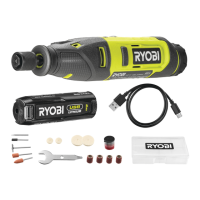

 To Next Page