25
• To change the displayed sport list, please refer to 10.3.18.
CHANGING SPORT MODES AVAILABLE ON YOUR WATCH
and choose from the 25 sport modes in the App.
• To return to the upper-level menu, tap the touch key.
11.7.1 STARTING AN EXERCISE SESSION
Once you have decided on a sport mode for the
exercise session, tap the selected sport icon.
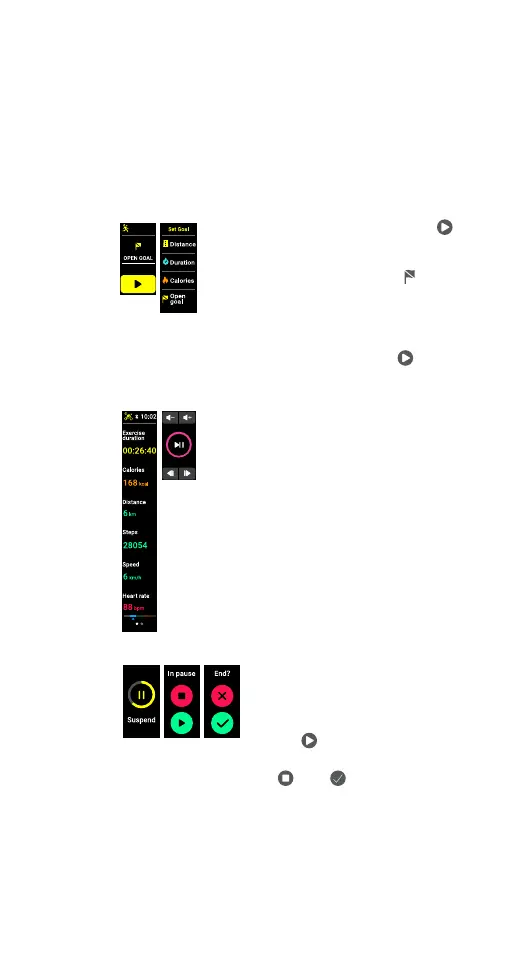
You will be requested to choose a goal for the exercise
session.
• If you don’t wish to set a goal, tap '
' to start the exercise when the screen
displays ‘OPEN GOAL.’
• If you wish to set a goal, tap '
'. Next
tap to choose a goal type, options
include Distance, Duration, Calories
or Open goal. In the sub menu, scroll
down the screen, tap to choose a
value for your goal and tap '
' to
start the exercise.
11.7.2 DURING AN EXERCISE SESSION
The screen displays real-time exercise
data when the exercise session is in
progress. Scroll down to view all data.
The types of data shown during an
exercise session is sport dependent.
When music control is enabled, swipe
the data screen left or right to switch
between the music control screen and
the real time data screen.
11.7.3
PAUSING, RESUMING & STOPPING AN EXERCISE SESSION
• Tap and hold the touch key
to suspend an exercise in
progress.
• To resume an exercise session,
tap '
'.
• To stop an exercise session, tap
'
' then ' '.
Only training sessions that last longer than a minute
will be recorded. Training data will be shown once the
session has finished.
• To return to the screen, tap the touch key.



 To Next Page