95Saab 9-3 Audio System
Quick guide to the Saab 9-3
Audio System
Radio, see page 98
On
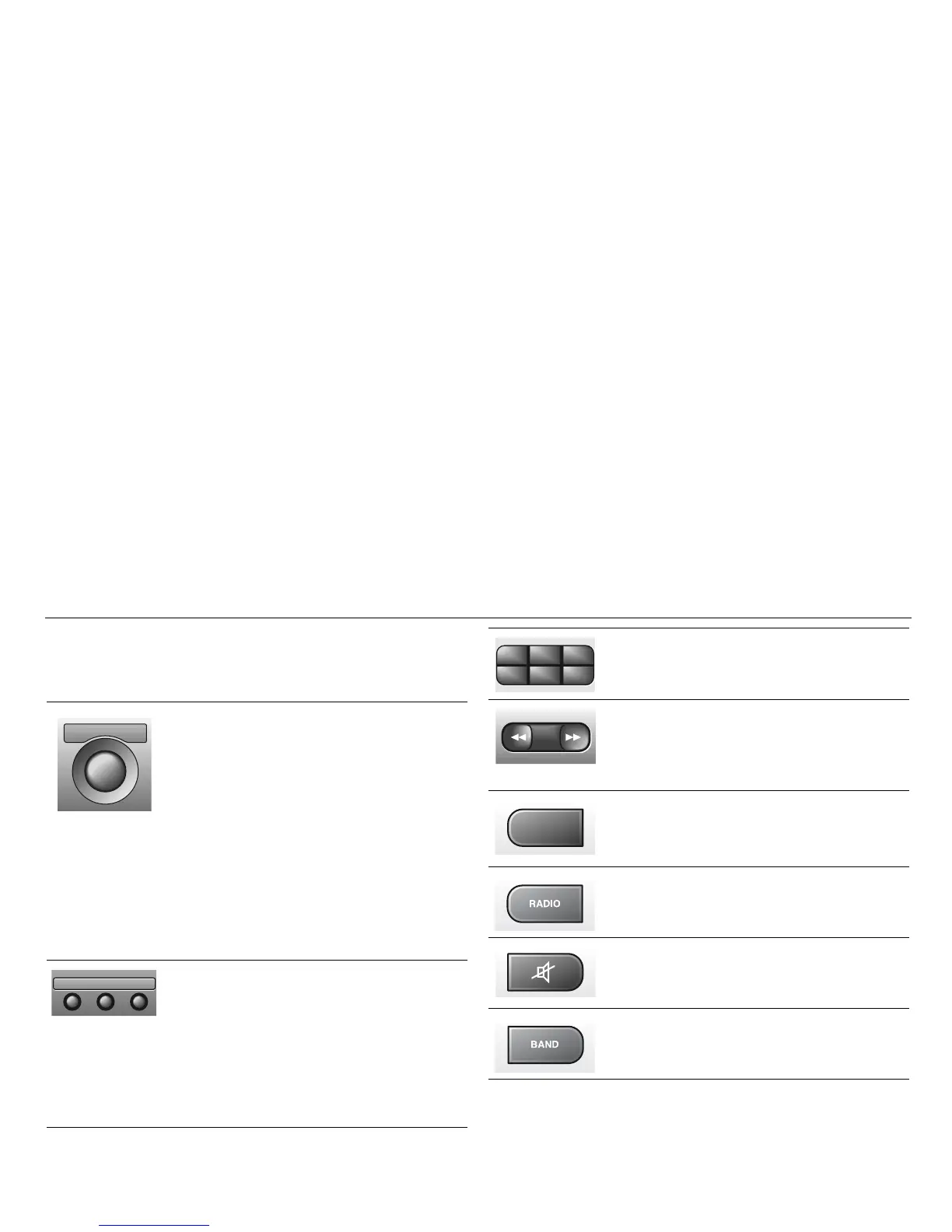
To switch the system ON, press the volume but-
ton. The last settings used will be activated.
If the Audio System is switched on when the igni-
tion key is not in the switch, the system will auto-
matically be switched off after one hour has
elapsed since a control button on the radio was
last pressed.
Off
To switch the system OFF, press the volume
button or remove the ignition key.
VOL
To adjust the volume, rotate the VOL control.
BAL
To adjust the balance between the left and right
channels, pull out and turn the VOL control.
BAS
Press to release the button, and adjust the bass
level. Lock the setting by pushing the button in.
TRE
Press to release the button, and adjust the tre-
ble. Lock the setting by pushing the button in.
FAD
Press to release the button, and adjust the bal-
ance between the front and rear sets of speak-
ers. Lock the setting by pushing the button in.
VOL
BALON
PULLPUSH
TRE
FADBAS
Preset station buttons
Press once: play the preset station.
Press and hold briefly: store a new station.
Auto tuning
Touch: SEEK.
Press and hold briefly (a chime will sound):
manual tuning.
Press SEEK once: frequency display
Touch: AS (AutoStore) ON/OFF.
Press and hold briefly: automatic tuning and
storing of the 6 strongest stations in the area in
which you are currently driving.
Touch: change to radio when CD active.
Press once: Mute ON/OFF.
Press once: change waveband.
213
546
SEEK
AS
SEARCH










 To Next Page