1. Open the door .Switch on the appliance;
2. Press the Program button for more than 5 seconds to start
the water softener set model within 60seconds after the
appliance was switched on( The Salt and Rinse aid warning
lights will be on periodically when it get in the set model);
3. Press the Program button to select the proper set accord-
ing to your local environment, the sets will change in the
follow¬ing sequence: H3->H4->H5->H6->H1->H2->H3;
4. Press the Power button to end the set up model.
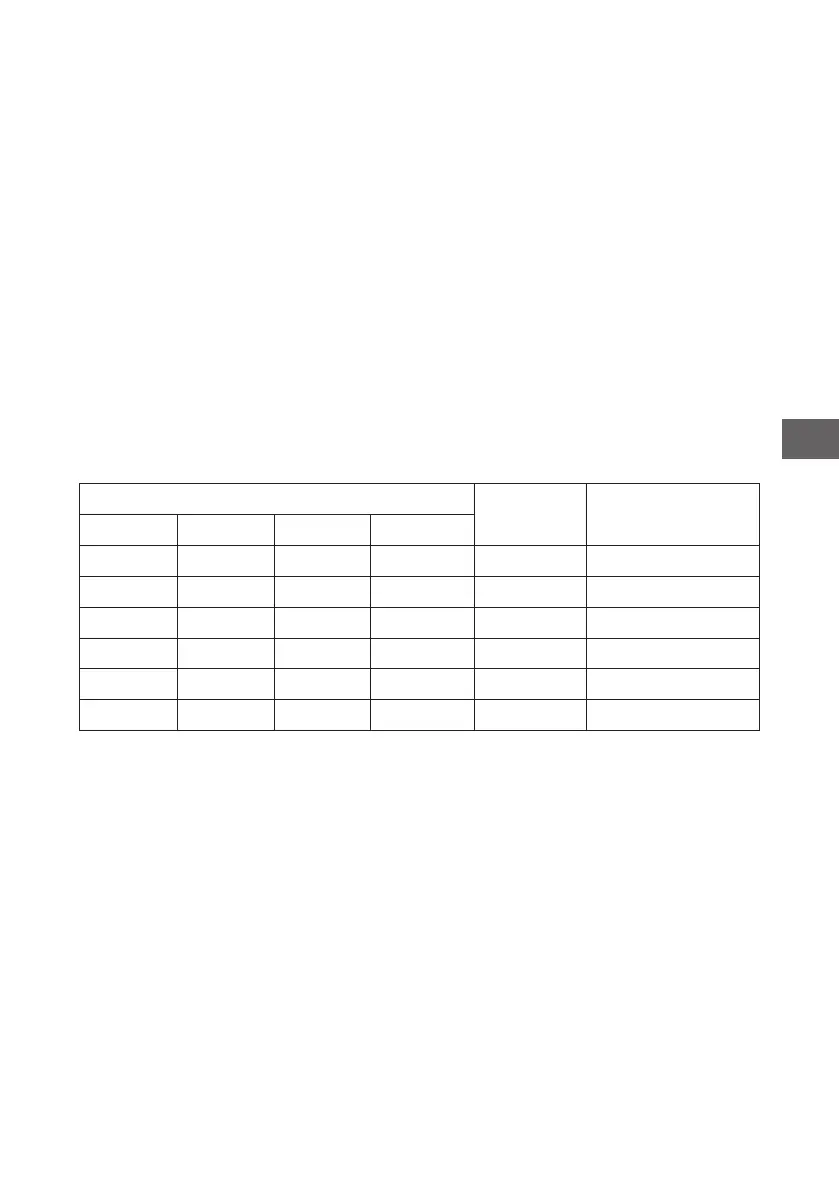
WATER HARDNESS
Selector
Position
Salt consumption
(gram/cycle)
°dH °fH °Clarke mmol/l
0-5 0-9 0-6 0-0.94 H1 0
6-11 10-20 7-14 1.0-2.0 H2 9
12-17 21-30 15-21 2.1-3.0 H3 12
18-22 31-40 22-28 3.1-4.0 H4 20
23-34 41-60 29-42 4.1-6.0 H5 30
35-55 61-98 43-69 6.1-9.8 H6 60
Note: 1
1 “dH=1,25°Clark=1.78 °fH=0.178mmol/l
°dH: German degree
°fH: French degree
°Clark: British degree
Note: 2
The manufactory setting: H3
Contact your local water board for information on the hardness of
your water supply.
15
GB


 To Next Page