GB GB
79
78
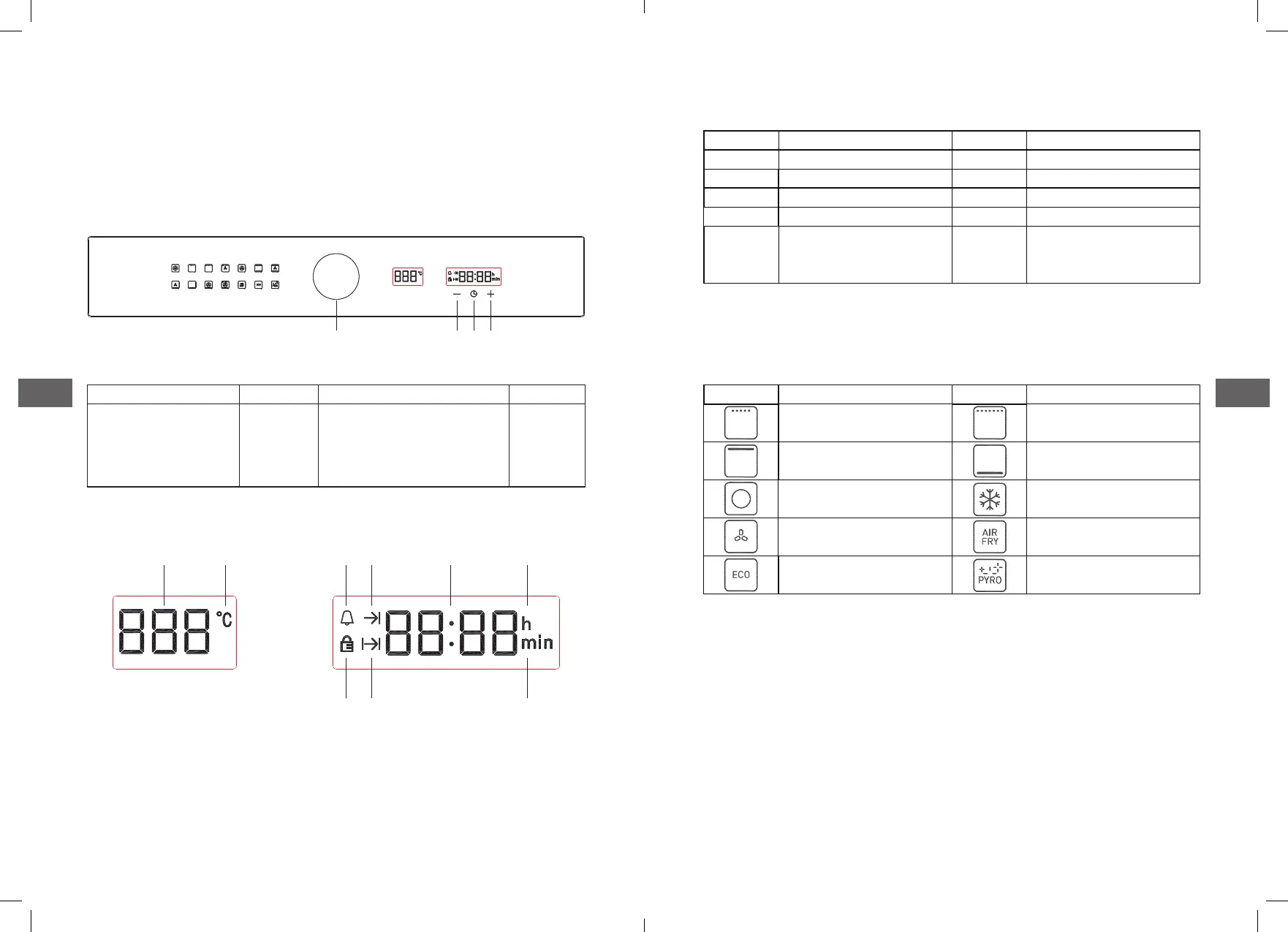
Switch knob K1 K2
Adjust the function /
temperature
minus
(timer)
System time / alarm / timer /
reservation function selection
(timer)
Plus
(timer)
D. Control panel
Here, you will see an overview of the control panel. Depending on
the appliance model, individual details may differ.
D.1 Button icon instruction
D.2 Display section
Switch knob
K1 K2 K3
Pic 1: Buttons diagram
Pic 2: Display screen icon
2 3
4 5
7 8
Display screen icon instruction
D.3 Function icon instruction
Icons Function Icons Function
1 Temperature value display 6 Hour unit icon
2 Unit of degree Celsius˚C 7 Door lock icon
3 Reminder time icon 8 Reservation function icon
4 Oven working icon 9 Minute unit icon
5
Time display(system time,
alarm clock, working hours,
appointment time)
Icon Function Icon Function
Top outer heating element
Bottom heating element
Top inner heating element
Top outer and inner
heatingelement
Back heating element
Heating fan(Defrost)
Rear fan Air frying
ECO energy-saving mode Pyrolytic self-cleaning mode
1
6
9



 To Next Page