Listen to music
Bluetooth mode
1. Turn on Bluetooth on your device
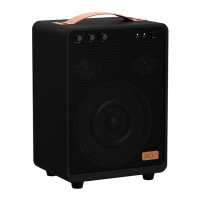
2. Press “Play/Pause Button” on WOOFit
JAM for 3 seconds
3. Choose WOOFit JAM in the
Bluetooth settings on your device
4. Start playing music from your device
Adjust volume
Short or long press “V+ ”/“V-” for volume
up & down.
Note: Volume can be adjusted separately
on all the modes including Bluetooth,
AUX and phone calls etc.
Navigate
Short press “PREV” or “NEXT Button” for
previous or next song.
Connect two WOOFit JAM
When you have two WOOFit JAM
speakers you can connect them
wirelessly for an amazing stereo
experience. When the two speakers are
connected, one speaker will play left side
sound and one speaker will play right
side sound.
1. When you have connected one
WOOFit JAM to your Bluetooth
device, it will play stereo.
2. Turn on another WOOFit JAM
3. Double press “M Button” at the same
time on both devices. You can connect
the speakers while listening to music.
The speakers are now in pairing
mode and the indicator light will be
UK
11



 To Next Page