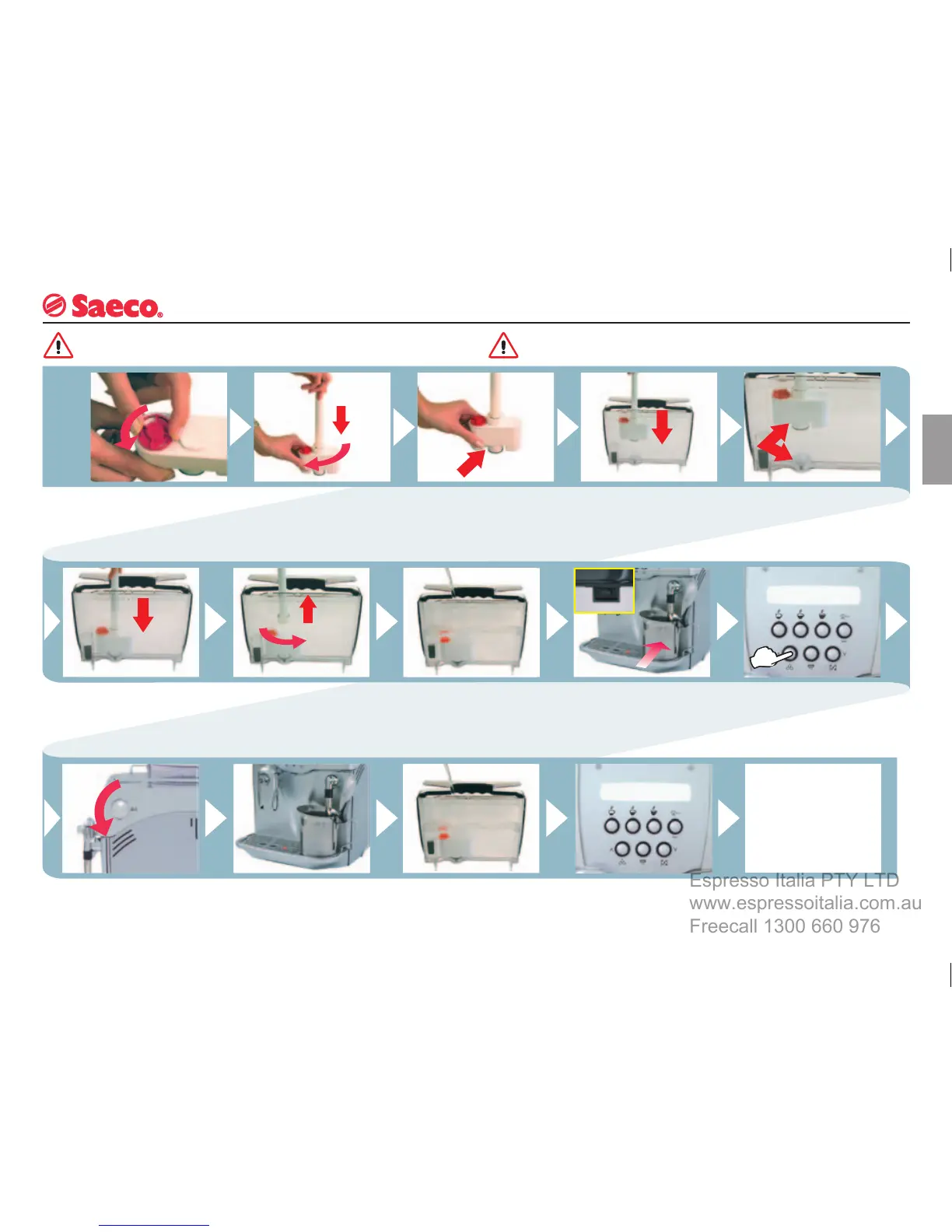
See “Programming”. Enable
the fi lter control function and
reset the water counter.
INSTALLATION
Remove the fi lter from the
packing container.
Adjust the dater to the
current month.
Put
the fi lter into the empty
tank.
Check
where the fi lter
positioning and reference
mark is.
Insert
the applicator and
turn it clockwise to secure
it to the fi lter.
The reference must be
positioned in correspon-
dence with the groove.
Press until the end limit. T
urn the applicator coun-
ter-clockwise and remove
it from the tank.
Fill
the tank with fresh
drinkable water.
Position a container
beneath the steam tube
and turn the machine on.
Press the button to
dispense water.
Open the knob and
dispense water.
Empty the water tank out at
intervals.
When
the tank is empty, fi ll
it again with fresh drinkable
water.
You can now use your
coffee machine.
It is possible to use the
machine without fi lter,
Saeco suggests its use.
If fi lter is not used, the
machine must be descaled
more frequently.
“AQUA PRIMA” CARTRIDGE FILTER
The fi lter must be replaced when signalled by the machine.
See “Programming”.
Before descaling, remove the fi
lter from the tank.







 To Next Page