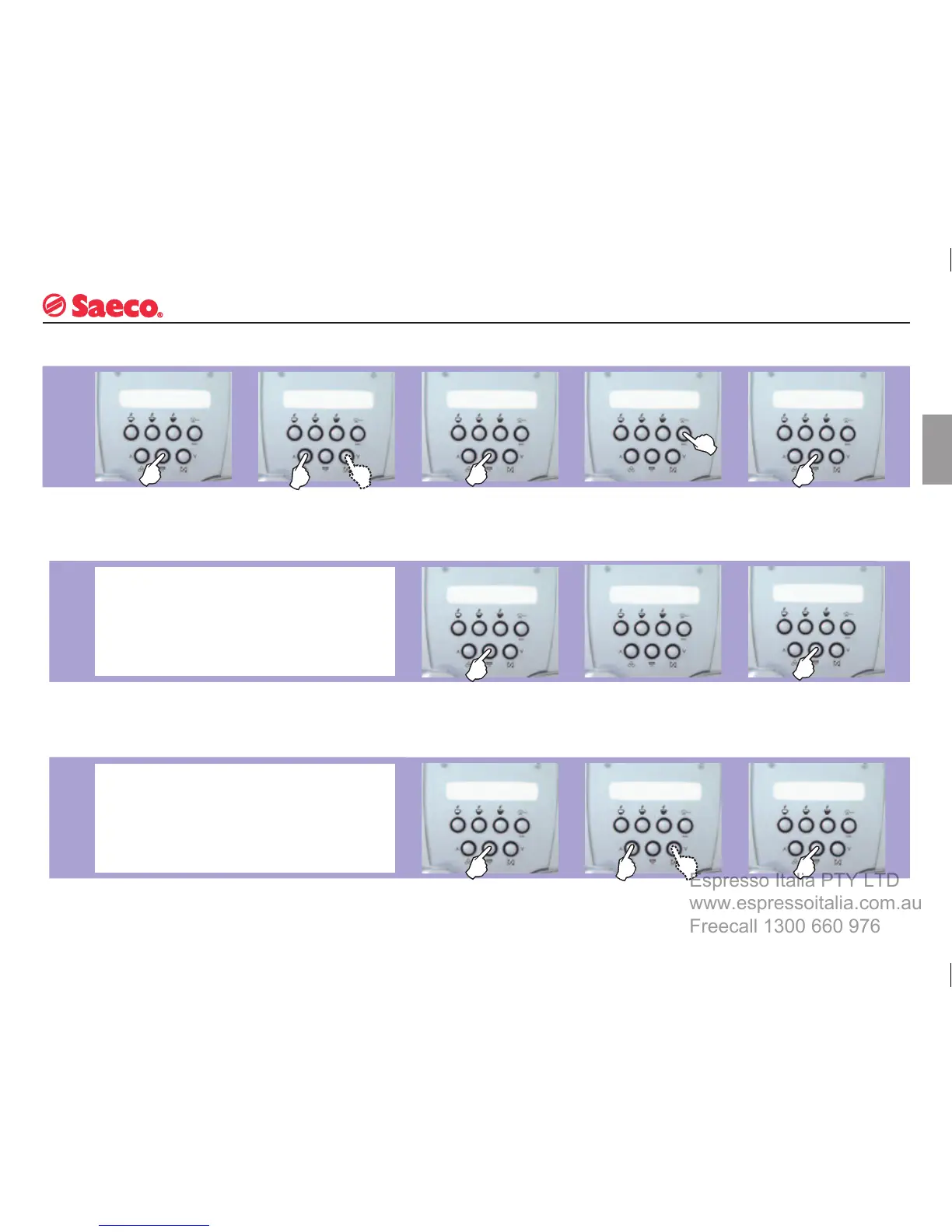
PROGRAMMING MACHINE FUNCTIONS
PROGRAMMING
START
ENERGY
SAVING
RINSING
The user can change some machine operating parameters to suit his/her personal needs.
Press the “MENU” button
to access the programming
mode.
Use
the “∧”
and “∨”
buttons to display/change
the menus.
Using
the “OK” button you can
select the menu item marked
with an -
*
-
Press ESC to exit without
making any changes.
Use
the “OK” button to
select a menu or confi rm
a change.
The
display will show
that the machine is in the
standby mode.
Press
the “OK” button to
restore the machine to
normal operation.
When this function is enabled, the internal machine circuits
will be rinsed immediately after the warming-up phase to
ensure that coffee is prepared with fresh water only.
From this menu you can
disable the function.
When
the appliance is used infrequently, it can be switched
to the STANDBY mode.
With this function you can cut energy costs.
When
the function ap-
pears, select it using the
“OK” button.
In
all new appliances this function has already been enabled
in the factory.
Press the “OK” button to
confi rm your choice.
When the function ap-
pears, select it using the
“OK” button.







 To Next Page