42
ENGLISH
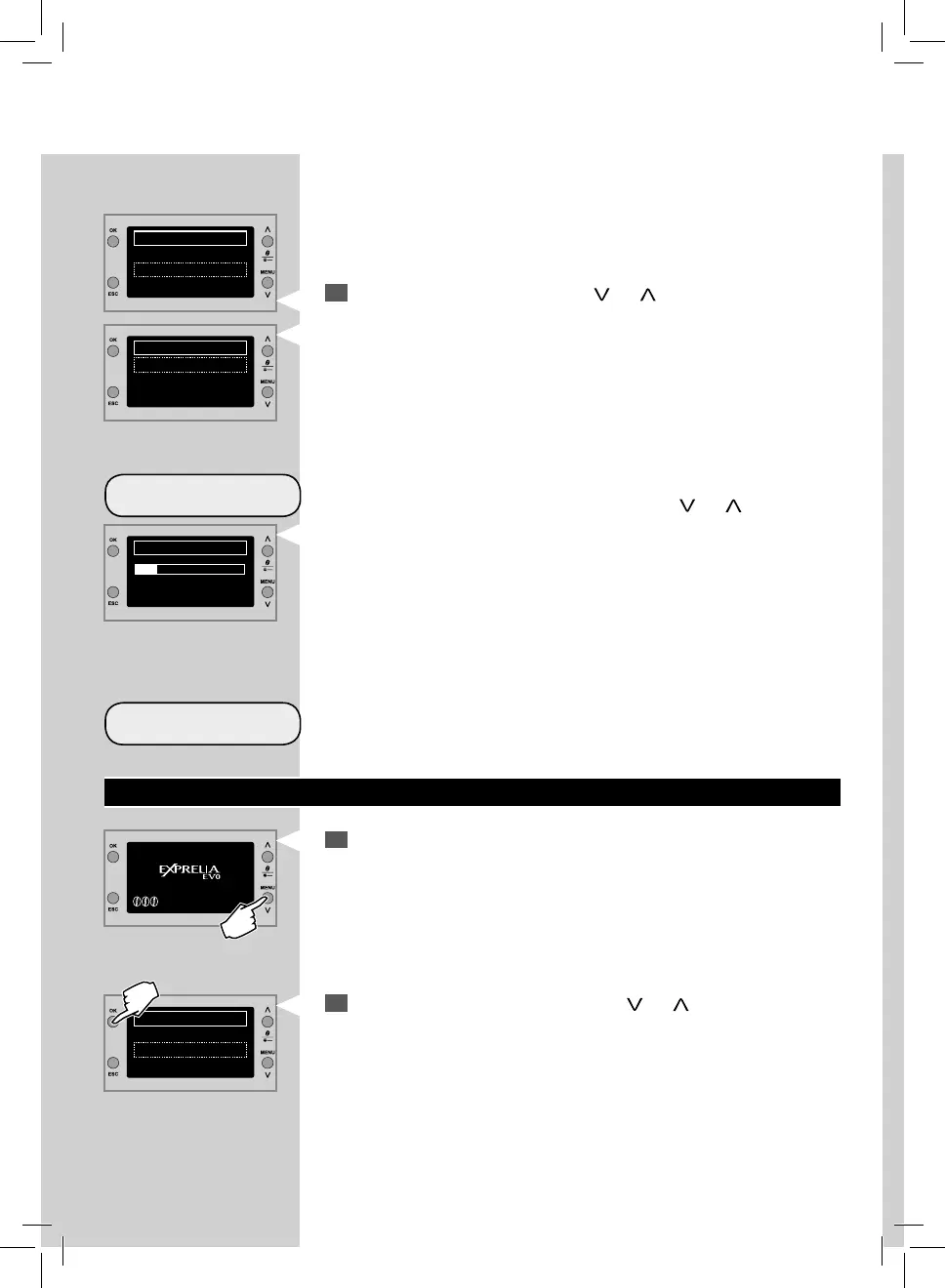
WATER QUANTITY
DEFAULT
2
Select HOT WATER by pressing the “ ” or “ ” scrolling button.
Press “OK” to con rm.
By adjusting the bar on the display by pressing the “
” or “ ” scrolling
button, you can choose the quantity of hot water to be dispensed.
Press “OK” to con rm the adjustment.
Reset the original factory settings. After selecting this function, the custo-
mized settings are deleted.
MACHINE PROGRAMMING
1
Press the“MENU” button to access the machine main menu.
2
Select MACHINE MENU by pressing the “ ” or “ ” scrolling button.
Press the “OK” to con rm.
HOT WATER
WATER QUANTITY
DEFAULT
WATER QUANTITY
SPECIAL BEVERAGES
HOT MILK
HOT WATER
STEAM
MENU
BEVERAGE MENU
MACHINE MENU



 To Next Page